Real phones and tablets, yours for a session
Rent genuine iPhones, iPads and Android devices running on real hardware, streamed live to your browser. Real taps, real GPS, real networks — and your own app installed.
Free device-minutes to start · no credit card required
An emulator can't feel like a real phone
On a simulator, the phone is really your laptop — its chips, its screen, its network. The lag, the throttling and the way a maker's own Android handles a permission never show up. The bug your users hit is on hardware you don't own.
Real, all the way down
Real touch
Tap, swipe, pinch and long-press on the actual glass.
Real GPS
Set a location and test maps, geofences and regional flows.
Real networks
The device's own radios and mobile networking, latency and all.
Real performance
Genuine CPU, GPU and thermal limits under real load.
Real sensors
Accelerometer, orientation and the exact OS build your users run.
Your own app
Install an .ipa or .apk for the session — nothing published to a store.
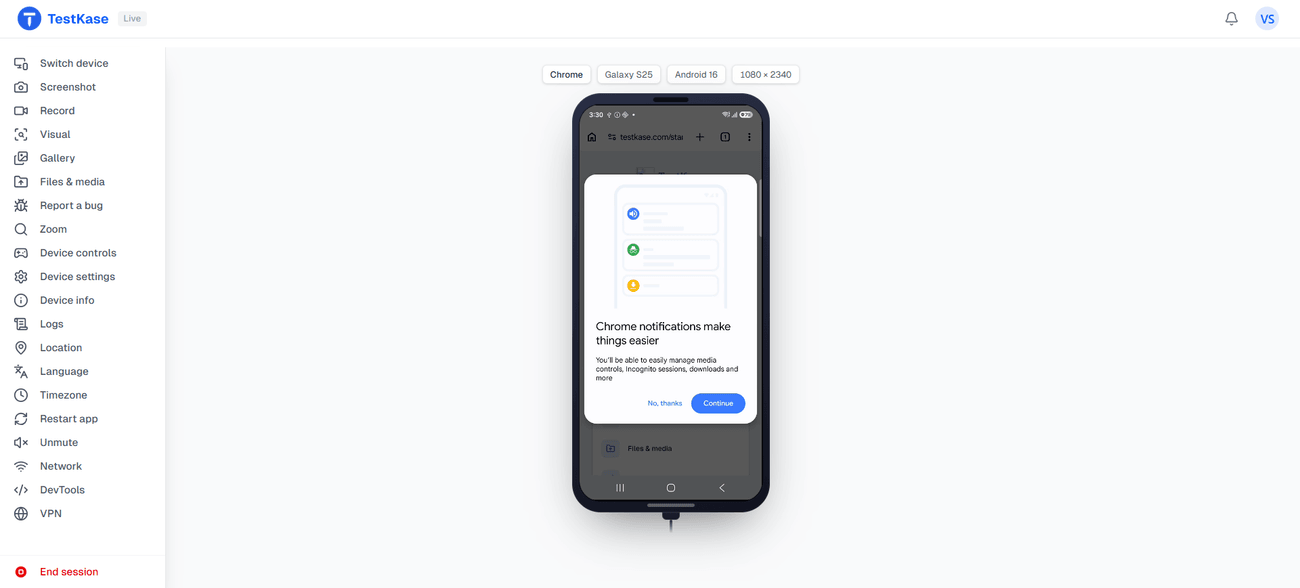
Drive the real device from your tab
Everything you'd reach for on a phone in your hand — without a phone in your hand. The rail is the same on Android and iOS.
Device controls
Home, back, volume and rotate, right where you'd reach for them.
Live logs
Read the device log as you drive, so a crash shows up when it happens.
Restart the app
Kill and relaunch what's on screen in a single tap.
Inspect elements
Read a native app's view hierarchy — ids, text and bounds.
Location, language & timezone
Change what the device reports and test regional behaviour.
Capture & report
Screenshot, record, and file a bug straight into your tracker.
Real hardware, ready when you are
One customer per device
Your session is yours alone — no shared screen, no queue behind you.
Cleaned between users
Signed out and wiped, fully erased when a light clean isn't enough.
iPhones, iPads & Android
Real iOS and Android hardware across a range of OS versions.
Virtual tier, clearly labelled
Emulators and simulators sit in the same picker — never swapped in for a phone you asked for.
Frequently asked questions
Real, physical hardware — genuine iPhones, iPads and Android phones and tablets, streamed live to your browser and cleaned between users. Android emulators and iOS simulators exist too, as their own clearly labelled tier in the same picker, for the screen sizes and OS versions we do not hold as hardware. You pick one on purpose; a virtual device is never substituted for a phone you asked for.
Yes. Upload an .ipa or an .apk and install it on the device for the session — no Apple ID of yours is needed on iOS, and nothing is published to a store. You can also install from the App Store or Play Store with your own account for a released build.
No. One customer has one device at a time, for the length of the session. It is not a shared screen and there is no queue running behind you. When you finish, the device is cleaned before anyone else can book it.
The device is cleared: accounts signed out, anything you installed removed, data wiped — and fully erased and re-provisioned when a light clean is not enough. Screenshots, recordings and logs you captured stay in your own organisation's gallery, scoped to your organisation, not to the device.
Yes. Set a real GPS location on the device during a session and test location-aware behaviour on genuine hardware, not a simulated coordinate. It applies at device level, so native apps and web pages both see it.
The real device cloud is fully manual and interactive — you drive the real device by hand, live in your browser. If you need scripted Selenium, Playwright or Appium runs, or Espresso and XCUITest suites, that is the Automate product.
On Android sessions, yes. iOS sessions carry no network item — on real devices or simulators alike — so network capture is not available there.
Exit-IP routing is available on real iPhones where the routing app is installed. It is not available on Android sessions or on simulators.
No — the element inspector works on installed apps, not web pages. It reads the view hierarchy of an installed app; for mobile web, use the browser's own developer tooling instead.
Yes. Change what the device reports and test regional behaviour. On Android the language control is per app, because that is how the platform exposes it, and where a platform genuinely cannot honour a control it stays visible and greyed with the reason rather than disappearing.
We keep a curated, working set of current devices rather than a catalogue of every handset ever sold. If you need a specific older model, check the picker before you plan around it.
Every account includes free device-minutes for its lifetime, and you can spend them across as many parallel sessions as they cover — the minutes are the only limit. No credit card required to start.
Open a real device in your tab
Pick an iPhone, iPad or Android device and start a live session in seconds. No credit card required.