We Gave Our Test Management Tool an AI Brain. Here's What Happened.

We Gave Our Test Management Tool an AI Brain. Here's What Happened.
Here's a scene that plays out every Monday morning in QA teams everywhere.
You sit down, coffee in hand, ready to set up this sprint's test cycles. You need to create three cycles — one per module. Link 47 test cases across them, filtered by priority and folder. Assign testers. Pull last sprint's coverage report because the PM wants numbers in standup. Check why two tests are still marked as blocked from last week.
The thinking takes two minutes. You already know what needs to happen. But the doing — navigating to the test cycle screen, filling in the form, saving, switching to test cases, applying filters, selecting rows, clicking "link," switching screens again, opening reports, exporting — takes eighteen.
Eighteen minutes of clicking through an interface that makes you prove, one dropdown at a time, that you know what you want to do. You already knew. The tool just couldn't keep up.
We watched this happen with our own users. And it kept nagging at us. The tools weren't broken — they had every feature teams asked for. The problem was something more fundamental.
Our users weren't slow. Our interface was.
The click tax nobody talks about
Every test management tool in the market — ours included, at the time — works the same way. You want something done, you fill out a form. You want information, you navigate to a report. You want to connect two things, you go to screen A, find the thing, go to screen B, link it.
We started counting. Creating a single test cycle with 20 linked test cases requires roughly 40 clicks. Navigate to cycles, click create, fill five fields, save. Switch to test cases. Apply filters. Select cases. Click link. Confirm. Go back. Repeat for the next module.
Sprint setup across three modules? Fifteen to twenty minutes of pure navigation. And that's for someone who knows the tool well. New team members take twice as long.
The World Quality Report has been saying for years that QA teams spend 30–40% of their time on administrative tasks. We always assumed that meant meetings, documentation, process overhead. But when we looked closer, a significant chunk of that admin time was just navigating the UI. Not thinking. Not testing. Not making quality decisions. Just clicking.
There's an irony here that's hard to ignore: QA teams exist to find friction in products. Their own tools are full of it.
The math is sobering
A typical QA engineer performs 200–400 administrative actions per day in their test management tool. Each action requires 3–8 clicks across multiple screens. That's 600–3,200 clicks per day spent on data entry — not on testing.
What if you could just... say it?
The question that changed our roadmap was embarrassingly simple: What if the tool could just understand what you want?
Not in a sci-fi way. In a practical way. The question in your head — "are we ready to release?" — should be the input. The answer should be the output. Everything in between is overhead that the machine should handle, not the human.
So we built an AI agent. Not a chatbot that answers questions about testing best practices. Not a copilot that suggests what you might want to do next. An agent — something that actually does things in your system.
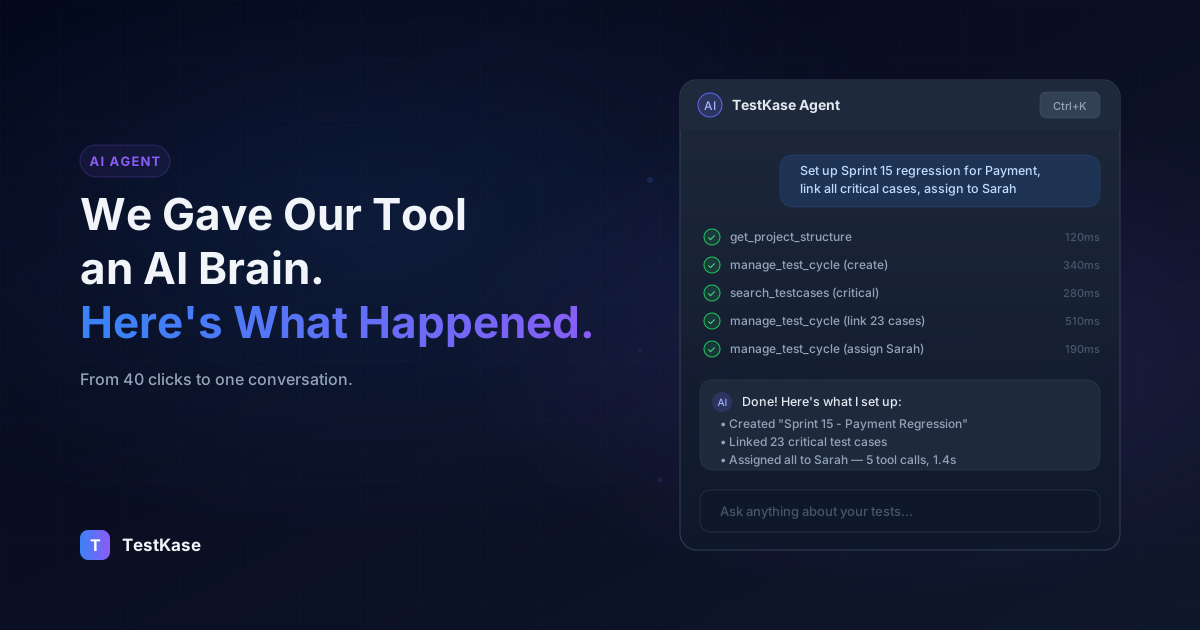
You open a sidebar with Ctrl+K. You type what you want in plain English. The agent figures out which APIs to call, in what order, observes the results, decides if it needs more information, and keeps going until the job is done.
"Create a regression cycle for the Payment module, link all high and critical priority test cases, and assign them to Sarah."
One sentence. The agent handles the rest.
It identifies the project. Looks up the folder structure to find the Payment module. Creates the cycle with the right metadata. Searches for test cases matching your priority criteria. Links all 23 of them. Assigns Sarah. Six API calls, executed in sequence, completed in about 30 seconds.
The equivalent workflow in any traditional test management UI — including ours, before this — takes 10 to 15 minutes.
We weren't the first to think about AI agents. But we might be the first to ship one inside a test management tool. As of today, no other TMT — not TestRail, not Zephyr, not Qase — offers anything like this. That's not a marketing claim; you can check their feature pages.
Under the hood
We want to be transparent about how this works, because "AI agent" has become one of those phrases that can mean anything.
Our agent has access to 11 tools — think of them as capabilities. It can list projects, explore project structure, search test cases, view test case details, create or update or delete test cases (individually or in bulk), manage folders, search and manage test cycles, execute tests, manage test plans, and pull from over 40 report types. Every action the agent takes is a real API call to your TestKase account, authenticated with your permissions.
When you send a message, the agent enters what's called an agentic loop. It reads your request, decides which tool to call first, makes the call, looks at the result, and decides what to do next. It can chain up to 10 tool calls in a single turn. Most requests need 2–6.
We didn't bet on a single AI provider. The agent can run on OpenAI's GPT-4.1 models, Anthropic's Claude Sonnet or Opus, or Google's Gemini 2.5 Flash. We exposed this as quality tiers — cheap, medium, and best — so teams can match the model to the task. A simple "how many test cases do I have?" doesn't need the same reasoning power as "compare Sprint 14 and Sprint 13 results across all modules and tell me what regressed."
One design decision we're particularly happy with: streaming with tool transparency. When the agent is working, you see each tool call as it happens — "Searching test cases... Found 23 results... Linking to cycle... Done." You're never staring at a blank screen wondering if something is happening. And you can see exactly what the agent did, which matters when an AI is taking real actions in your system.
Five things that actually changed
We could list features here, but that's not what changed. What changed was behavior.
Sprint setup went from a ritual to a sentence. The Monday morning cycle-creation ceremony — the one that takes 20 minutes and three screens — turned into a single conversation. QA leads started setting up entire sprints during their morning coffee instead of after standup. That's not a productivity metric. That's a vibes improvement. But vibes matter when your tool is the first thing you touch every morning.
New team members stopped asking "where do I find...?" This one surprised us. A new QA engineer used to spend their first day or two learning the UI — where the test cases live, how to filter by module, how to find their assignments. Now they open the agent and ask: "What's assigned to me?" Then: "Show me the project structure." Then: "What test cases are in the Payment folder?" Five minutes. Complete mental model of their workload. No training session required.
Reports became conversations, not destinations. Before, "How did this sprint compare to last sprint?" meant navigating to execution reports, pulling up two cycles, eyeballing the numbers, maybe exporting to a spreadsheet. Now it's a question. You ask it. You get a synthesized answer with the comparison, the deltas, and the modules that regressed. The person asking the question gets the answer, not a dashboard they have to interpret themselves.
Developers started checking test coverage. This was the most unexpected shift. We built MCP integration that lets you connect the same 11 agent tools to Claude, Cursor, or GitHub Copilot. Developers — people who never voluntarily opened a test management tool — started asking from their IDE: "What test cases cover the payment API?" Because when asking is as easy as typing a question in your code editor, the barrier drops to zero.
We stopped building dashboards for rare questions. Every few months, someone would request a new dashboard view. "Can we see test cases by label and priority?" Now the agent answers that question on demand. We realized that half the dashboard requests were really just query requests — questions someone asks occasionally but not often enough to justify a dedicated screen.
What doesn't work (yet)
We'd be lying if we said the agent handles everything perfectly. It doesn't.
Ambiguous requests cause real problems. "Delete the old test cases" is a dangerous sentence. Old how? Created before when? In which project? The agent will try to interpret it, and if your intent wasn't clear, the result won't be either. We've added confirmation steps for destructive actions, but the best defense is being specific. "Delete all test cases in the Archive folder of Project Alpha" is safe. "Clean up the old stuff" is not.
Be specific with AI agents
AI agents execute real actions in your system. Vague requests like "delete old tests" or "clean up the suite" can lead to unintended results. Always specify the project, folder, or filter criteria. The more specific your request, the more accurate the result.
Visual browsing is still faster in a table. If you want to scan 50 test cases and get a feel for coverage gaps, the list view wins. You can't "scan" a conversation. The agent is great for targeted queries ("show me all failed tests in Sprint 14") but poor for open-ended exploration where you don't know what you're looking for yet.
Long conversations lose context. The agent keeps 20 messages of history, which covers most workflows. But if you're deep into a complex session — setting up multiple cycles, linking cases, pulling reports — earlier context starts dropping off. Our advice: treat each distinct task as a fresh conversation rather than trying to do everything in one thread.
Similar names trip it up. If you have projects called "Payment API" and "Payment API v2," or folders called "Login" in three different modules, the agent sometimes picks the wrong one. We're working on better disambiguation, but for now, being explicit about which project or folder you mean saves trouble.
Our honest take: the agent is exceptional for workflows and queries. The UI is better for browsing and editing. The best experience is using both — the agent for "do this" and the UI for "show me everything."
Your IDE as a test management tool
The built-in sidebar is where most users start. But we also shipped an MCP server — the same protocol that Claude, Cursor, and GitHub Copilot use to connect to external tools.
Same 11 tools. Same capabilities. But accessible from wherever you already work.
The "aha moment" for MCP usually happens when a developer, mid-code-review in Cursor, wonders whether the function they're changing has test coverage. Instead of opening a browser, navigating to TestKase, finding the right project and folder, and searching — they type a question in their AI assistant. Ten seconds later, they have the answer and they never left their editor.
If you're interested in setting up MCP, we wrote a detailed walkthrough here. It takes about two minutes — generate a Personal Access Token, add a JSON config to your AI tool, and you're connected.
Where this goes next
We're not going to pretend we have a crystal ball, but the trajectory feels clear.
The next step is agents that don't wait for you to ask. An agent that watches your code repository and, when a PR touches the payment module, proactively suggests: "12 test cases may be affected by this change. Want me to create a regression cycle?" Not because we told it to — because it understands the relationship between code and tests.
Beyond that, cross-tool orchestration. A single conversation that spans Jira, GitHub, your CI/CD pipeline, and your test management system. "The payment refactoring PR just merged. Create test cases for the changed endpoints, set up an execution cycle, and notify the QA lead." One sentence, four tools, zero context switching.
The QA role isn't going away. But the work is shifting. Less time spent as a data entry operator navigating forms. More time spent as a quality strategist deciding what matters, where the risks are, and what to test next. The agent handles the mechanical work. The human handles the judgment.
Try it
If any of this resonated, the fastest way to see it is to try it. TestKase's free tier includes AI agent access for up to three users. Sign up, create a project, press Ctrl+K, and type your first question.
Start simple: "Show me the project structure." Then try something real: "Create 3 test cases for user login with high priority." See how it feels when your tool actually keeps up with you.
Start Free with TestKaseStay up to date with TestKase
Get the latest articles on test management, QA best practices, and product updates delivered to your inbox.
SubscribeShare this article
Related Articles
Accessibility Testing in CI/CD: Catching WCAG Issues Before They Ship
Three integration patterns, GitHub Actions / GitLab / CircleCI templates, and a 3-quarter rollout playbook to take an engineering team from zero accessibility in CI to block-on-fail.
Read more →Auditing Pages Behind a Login: A Practical Guide to Authenticated Accessibility Scanning
Most accessibility scanners stop at your login page. Here's how to audit the 70% of your app that lives behind authentication — cookie, login form, and header methods compared.
Read more →Test Case Examples: 30+ Real-World Examples for Web & API Testing
Browse 30+ real-world test case examples for login, registration, search, checkout, API, and form validation. Copy-ready format with steps and expected results.
Read more →