Let your AI assistant test on real devices
The Device Farm MCP lets Claude, Cursor or Copilot open real phones and browsers, read the screen and drive them. Pair it with the Test Management MCP, test case generation and a built-in agent — all built into the plan.
Real Android phones, iPhones and desktop browsers · your assistant, our devices
- 1Email field
- 2Password field
- 3Log in button
- 4Forgot password link
Give your AI assistant a real phone
The Device Farm MCP connects Claude, Cursor or Copilot to real Android phones, iPhones and desktop browsers. The assistant reads the screen as a numbered list, then taps, types and swipes by number — and it can read your Automate runs to explain a failure.
Open a device
A real Android phone or iPhone with your uploaded app or a web page, or Chrome, Edge, Firefox or Safari on Windows or macOS.
Drive it
Read the screen, tap, type, swipe, press keys, open URLs, take screenshots, and run several steps in one call.
Read the results
List Automate runs, read logs, video and screenshot links, ask why a run failed, and get Selenium, Appium or Playwright connection settings.
One device at a time per session; a session ends after about 3 minutes idle or 60 minutes total, and uses your Automate minutes. See AI Device Cloud
Four ways AI works here — pick what you need
Device Farm MCP
Let Claude, Cursor or Copilot open real phones and browsers, read the screen and drive them.
See AI Device CloudTest Management MCP
The same assistants read and update your test cases, cycles and plans where you already work.
Set up MCPTest case generation
Paste a requirement or point at a linked Jira, GitHub or GitLab issue, and get editable test cases back.
How generation worksThe AI agent
A built-in assistant that reads and changes test cases, cycles, plans and executions on request.
What the agent can do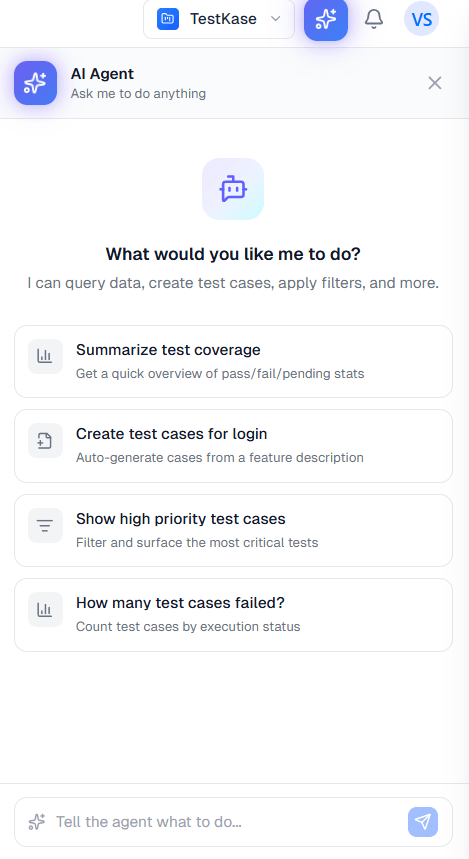
Reach your tests from where you already work
Your own AI tools read and update your test management directly, and the built-in agent handles the bulk edits that are tedious by hand — without copying things between windows.
- Everything is a draft. Generated cases land editable, so you keep the ones worth running and drop the rest.
- One workspace. The cases AI writes and the results it reads come from real devices in the same project.
- Included, not extra. AI is built into every plan, not sold as an add-on.
Credits on every plan
Generation spends AI credits. Paid plans include 100 per user each month — enough to draft the cases for a new feature.
Reporting stays free
The 11 Insight reports read your own history — no model, no credits — part of 37 reports on every plan.
Frequently asked questions
Yes. TestKase has two MCP servers for Claude, Cursor, Copilot or any MCP client. The Test Management MCP reads and updates your test cases where you already work. The Device Farm MCP opens real phones and desktop browsers in the device farm. One access key from your profile works for both.
Yes. Paste a requirement, or point at a linked Jira, GitHub or GitLab issue, and generation returns up to ten structured cases with steps, priority and expected results. They arrive as an editable draft you review and keep, not a finished suite that appears on its own.
No. The 11 Insight reports — flaky tests, risk heatmaps, release readiness and the rest — are calculated from your own execution history with queries and heuristics. No model is involved and they spend no AI credits. They are part of 37 reports included on every plan. We used to call them AI-powered; they are not, so we stopped.
Generation spends AI credits, because a model call has a real cost. Paid plans include 100 credits per user per month, reset at the start of the month and not rolled over. A free account gets 100 once, for the life of the account, so you can decide whether the output is worth it. Reporting spends no credits at all.
No. The agent reads and changes test cases, cycles, plans and executions, and records results — the bulk edits that are tedious by hand. Running things on real devices is what Live and Automate do. The value of having both in one product is that the cases the agent writes and the results it reads come from real devices in the same workspace.
That depends on what you hand it. Given a feature name, a model produces cases anyone could have guessed; given real acceptance criteria — token expiry, rate limits, what happens to an existing session — it produces the ones people forget to write. Because everything generated is an editable draft, you keep the cases worth running and drop the rest.
No. Generation runs only when you invoke it, on the specific requirement you choose. Nothing is generated in the background, and the reporting you would use daily involves no model at all.
Point your assistant at a real device
Install the Device Farm MCP, add your access key, and ask your assistant to open an app on a real phone.