Native Test Management Inside Jira
The TestKase Forge app brings full test management directly into every Jira issue. Create, link, execute, and AI-generate test cases — manage test cycles, track execution results, and organize with folders — all without leaving Jira.
Available on Atlassian Marketplace — Free
Runs on Forge infrastructure. No external servers required.
Everything You Need, Right Inside Jira
The Forge app packs the full power of TestKase into a native Jira panel — no tab switching, no context loss.
Native Issue Panel
Dedicated TestKase panel on every Jira issue — test cases, execution status, cycles, and defects at a glance.
Test Case Management
Create (simple & advanced), link, search, edit, and delete test cases directly from Jira.
Test Cycle Tracking
View and create test cycles, add or remove test cases, and track pass/fail/blocked metrics.
Test Execution
Update status, record actual results, and view execution history with timestamps.
AI Test Generation
Auto-generate test cases from Jira issue description with configurable fields and count.
Folder Organization
Organize test cases in folders and subfolders. Select target folder when creating test cases.
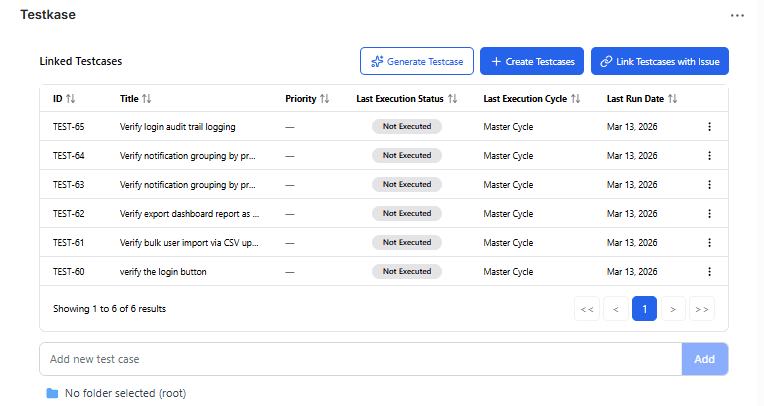
Manage Test Cases Without Switching Tabs
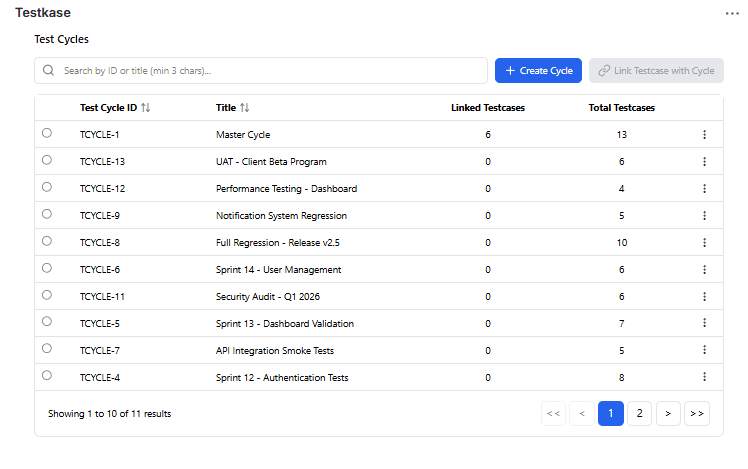
Run Tests and Track Execution in Real Time
AI-Powered Test Generation
Generate test cases from Jira issue context with a single click. The AI reads the issue description, summary, and metadata to produce relevant, high-quality test cases.
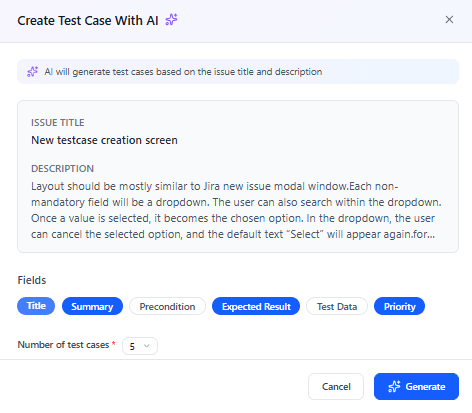
Configurable Generation
Choose how many test cases to generate and toggle which fields the AI should populate. The issue context is automatically loaded — just review and save.
Configurable Options
Get Started in Under 5 Minutes
Install, authenticate, map, and start testing — four simple steps to bring TestKase into your Jira workflow.
Install the App
Free from Atlassian Marketplace. Runs on Forge infrastructure — no external servers.
Authenticate with PAT
One-time Personal Access Token entry per user. Encrypted and stored securely on Forge.
Map Your Project
Admin links your Jira project to a TestKase project from the global configuration page.
Start Testing from Jira
Open any Jira issue, find the TestKase panel, and start creating, linking, and executing tests.
Enterprise-Grade Security
Built on Atlassian Forge with per-user authentication and encrypted credential storage.
Per-User Auth
Each user authenticates with their own Personal Access Token. No shared service accounts.
Forge Infrastructure
Runs entirely on Atlassian-managed Forge infrastructure. No external servers or data routing.
Encrypted Credentials
PATs are encrypted in Forge SQL storage. Credentials never leave Atlassian infrastructure.
Team Collaboration
Assign owners, manage labels, and control access with scoped permissions per project.
Start Testing for Free
Sign up instantly and begin using TestKase with all core features, completely free for up to 3 users.