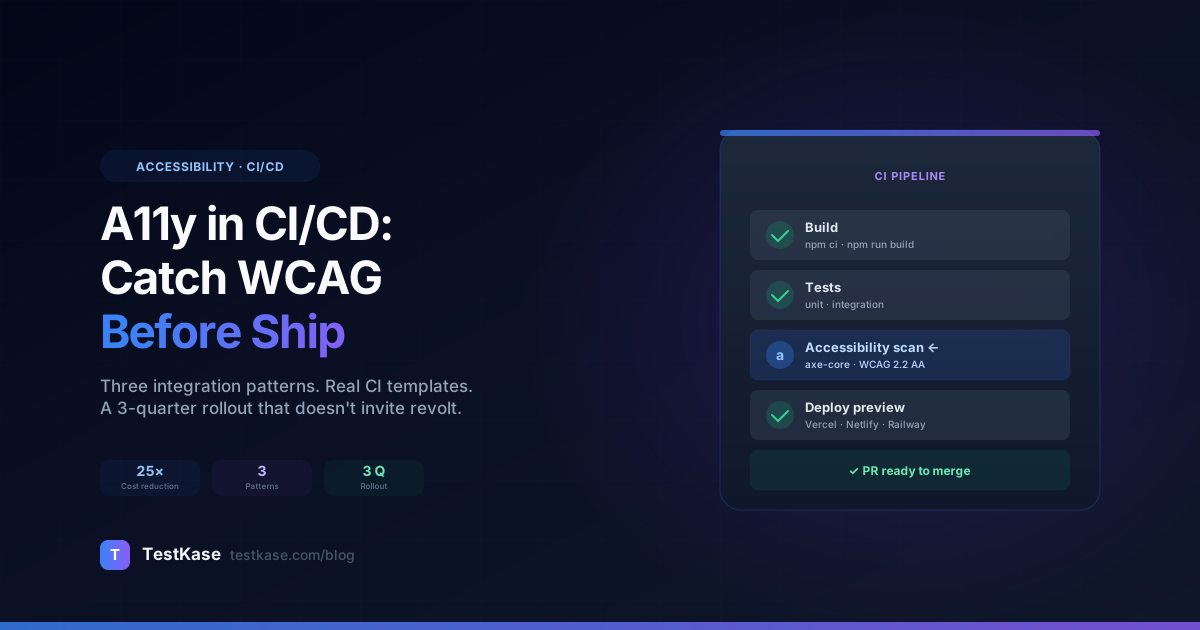
Accessibility Testing in CI/CD: Catching WCAG Issues Before They Ship

Accessibility Testing in CI/CD: Catching WCAG Issues Before They Ship
Most teams discover accessibility issues in one of three ways: a customer files a complaint, a sales prospect asks for a VPAT, or someone runs an audit and gets back a 200-finding spreadsheet. All three are reactive. The team scrambles, fixes critical findings, ships a hotfix, and then quietly returns to status quo until the next incident.
Reactive accessibility is expensive. The same violation costs ~5x more to fix in production than it does at PR review, and ~25x more if it ships and triggers a legal complaint.
This post is the playbook for moving accessibility into the CI pipeline so violations are caught at the moment of risk: when the engineer is still looking at their code. We'll cover three integration patterns, the cost-of-fix curve that justifies the investment, complete CI templates for GitHub Actions / GitLab CI / CircleCI, and the 3-quarter rollout that takes a team from zero accessibility in CI to block-on-fail without revolt.
Who this is for
Engineering leads, DevOps engineers, and QA leads at teams shipping a web app, who have already had at least one accessibility audit (so they know the shape of the problem) and want to stop discovering it in production. The strategies generalize across stacks — the templates are React/Next.js + axe-core but the patterns work for any framework.
The cost-of-fix curve
The single best argument for moving accessibility left is the cost-of-fix curve. Industry data is consistent across QA disciplines: catching an issue earlier in the SDLC is cheaper, not in proportion but exponentially.
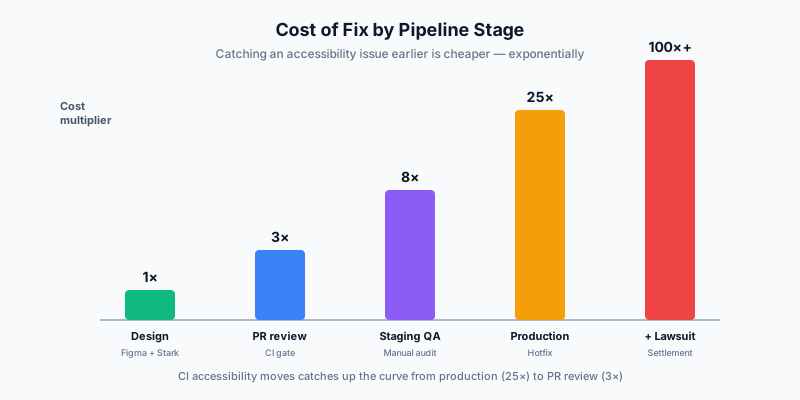
| Stage caught | Relative cost to fix | Why | |---|---|---| | At design (Figma + Stark plugin) | 1× | Designer adjusts a token. No code written yet. | | At PR review (axe-core on changed files) | 3× | Developer adjusts before merging. No QA time. No deploy. | | At staging QA (manual audit before release) | 8× | Bug ticket, dev re-context, re-test, re-deploy. | | In production (post-release report) | 25× | Hotfix, customer impact, possible support escalation. | | In production + legal complaint | 100×+ | Settlement costs, accessibility statement updates, board-level reporting. |
The cost multipliers are conservative — published industry research (CGI, NIST, IBM Systems Sciences Institute) puts the bug-fix multiplier between 30× and 100× for production-vs-design discovery, and the 5-10× factor between PR-review and staging-QA holds across studies.
CI accessibility moves the catch from "production + legal" or "staging QA" up to "PR review". That's a 5-25× cost reduction per finding. For a team with even modest accessibility debt, it pays for the integration effort within a quarter.
Three integration patterns
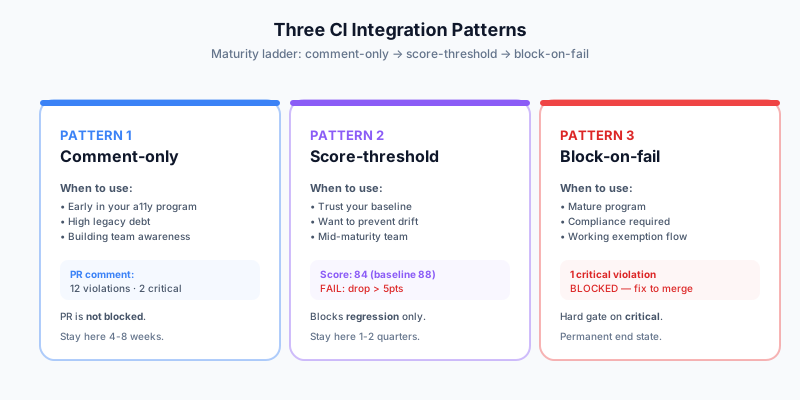
There's no one-size-fits-all CI accessibility integration. Three patterns dominate, and they map roughly to a maturity curve. Pick the one that fits your team's current state, ratchet up over time.
Pattern 1 — Comment-only
Every PR runs an accessibility scan. The result is posted as a PR comment showing the score, total violations, and a link to the full report. The PR is not blocked — even if the scan finds 200 critical violations, the merge button still works.
When to use it:
- You're early in your accessibility program.
- Your existing codebase has high accessibility debt and a hard block would block every PR.
- You want the team to see findings without triggering pushback.
Pros:
- Zero risk of false-positive PR blocks.
- Builds team awareness organically — engineers see the comment, internalize the patterns.
- Trivial to roll out (no exemption flow needed).
Cons:
- Easily ignored. Without a mechanism to enforce, the comment is information theater.
How long to stay here: 4-8 weeks. Enough time for the team to see patterns; not so long that the comment becomes background noise.
Pattern 2 — Score-threshold
The scan runs on PR; the PR is blocked if the accessibility score drops below a threshold. The threshold can be absolute ("must be 80+") or relative ("must not drop more than 5 points from main"). Most teams use the relative form — it's a "ratchet" that prevents regression without requiring perfection.
When to use it:
- You have a baseline you trust and want to prevent drift.
- The team has seen comment-only feedback for a few sprints and is ready for a soft gate.
- Legacy code has known accessibility debt that you'll address separately.
Pros:
- Prevents accessibility regression without requiring perfect new code.
- Composable with the existing maturity — works at any score level.
- Resists most false-positive concerns (one PR adding one violation usually doesn't drop the score below threshold).
Cons:
- Requires baseline maintenance. If you "bank" an improved score, you can't drop back below it.
- Some genuinely-correct PRs (refactors that touch many files) may dip the score temporarily.
How long to stay here: 1-2 quarters. Solid for most mid-maturity teams indefinitely.
Pattern 3 — Block-on-fail
The strict version: any critical or serious finding blocks the PR. The team must either fix the violation or document an exemption to merge.
When to use it:
- Mature accessibility program; baseline is clean.
- Compliance or legal requirements demand it.
- The team is comfortable with the muscle of writing exemptions for genuine edge cases.
Pros:
- The strongest possible gate against accessibility regression.
- Forces the conversation about whether a finding is real or a false positive at the moment it matters.
- Visible in the PR review — reviewers see the green check and know accessibility passed.
Cons:
- Requires a working exemption flow (an
.axe-ignorefile, a "skip-a11y-check" label, or similar). - If the underlying scanner has high false-positive rate, frustration builds quickly.
How long to stay here: Forever, once you're there. The dividend is permanent.
Tool comparison: axe-core CLI vs Lighthouse CI vs TestKase
Three tools cover essentially every web-app CI accessibility need. Here's the objective comparison.
The honest take:
- axe-core CLI is the right starter for teams comfortable wiring their own integration. Maximum control, zero ceiling.
- Lighthouse CI is right when you want the broader Lighthouse perf+SEO+a11y signal in one tool. Accessibility is one of four scores it reports.
- TestKase is right when you need authenticated scanning, multi-page workflow audits, and centralized history across teams without building infrastructure. The free tier covers most teams' early-stage CI needs.
Most teams end up using two of the three: axe-core CLI for blazing-fast unit-level checks in component test runners (Storybook, Jest) plus TestKase or Lighthouse CI for the integration-level scan against the deployed preview URL.
CI templates
Working examples for the three most common platforms. Each runs an accessibility scan, posts results back to the PR, and (optionally) blocks the merge.
GitHub Actions — comment-only
# .github/workflows/accessibility.yml
name: Accessibility scan

on:
  pull_request:
    branches: [main]

jobs:
  a11y:
    runs-on: ubuntu-latest
    steps:
      - uses: actions/checkout@v4

      - uses: actions/setup-node@v4
        with: { node-version: 20, cache: npm }

      - run: npm ci
      - run: npm run build

      - name: Start preview server
        run: |
          npm run start &
          npx wait-on http://localhost:3000

      - name: Run axe-core scan
        id: scan
        run: |
          npx axe http://localhost:3000 \
            --tags wcag2a,wcag2aa,wcag21a,wcag21aa,wcag22aa \
            --save axe-results.json || true

      - name: Comment on PR
        uses: actions/github-script@v7
        with:
          script: |
            const fs = require('fs');
            const results = JSON.parse(fs.readFileSync('axe-results.json'));
            const violations = results[0]?.violations ?? [];
            const critical = violations.filter(v => v.impact === 'critical').length;
            const serious  = violations.filter(v => v.impact === 'serious').length;
            const body = `### Accessibility scan results

**${violations.length}** violations found
- ${critical} critical
- ${serious} serious

[Full report](${context.payload.pull_request.html_url}/files)`;
            await github.rest.issues.createComment({
              ...context.repo,
              issue_number: context.issue.number,
              body
            });
GitHub Actions — score-threshold (block on regression)
- name: Compute current vs baseline score
  id: gate
  run: |
    CURRENT_SCORE=$(jq '.[0].score // 0' axe-results.json)
    BASELINE=$(curl -s https://your-baseline-store.example.com/main-score)
    DROP=$(echo "$BASELINE - $CURRENT_SCORE" | bc)

    echo "current=$CURRENT_SCORE" >> $GITHUB_OUTPUT
    echo "baseline=$BASELINE"   >> $GITHUB_OUTPUT
    echo "drop=$DROP"           >> $GITHUB_OUTPUT

    # Block if score dropped more than 5 points
    if (( $(echo "$DROP > 5" | bc -l) )); then
      echo "::error::Accessibility score dropped $DROP points (current: $CURRENT_SCORE, baseline: $BASELINE)"
      exit 1
    fi
GitLab CI
# .gitlab-ci.yml
accessibility:
  stage: test
  image: node:20
  script:
    - npm ci
    - npm run build
    - npm run start &
    - npx wait-on http://localhost:3000
    - npx axe http://localhost:3000 --save axe-results.json --tags wcag22aa
    - |
      VIOLATIONS=$(jq '[.[].violations[]] | length' axe-results.json)
      CRITICAL=$(jq '[.[].violations[] | select(.impact=="critical")] | length' axe-results.json)
      echo "Total: $VIOLATIONS, Critical: $CRITICAL"

      if [ "$CRITICAL" -gt 0 ]; then
        echo "Critical accessibility issues — blocking merge"
        exit 1
      fi
  artifacts:
    when: always
    paths:
      - axe-results.json
    expose_as: 'Accessibility report'
  only:
    - merge_requests
CircleCI
# .circleci/config.yml
version: 2.1

jobs:
  accessibility:
    docker:
      - image: cimg/node:20.0
    steps:
      - checkout
      - run: npm ci
      - run: npm run build
      - run:
          name: Run accessibility scan
          command: |
            npm run start &
            npx wait-on http://localhost:3000
            npx axe http://localhost:3000 \
              --tags wcag22aa \
              --save axe-results.json
      - run:
          name: Block on critical findings
          command: |
            CRITICAL=$(jq '[.[].violations[] | select(.impact=="critical")] | length' axe-results.json)
            [ "$CRITICAL" -eq 0 ] || (echo "Critical findings present" && exit 1)
      - store_artifacts:
          path: axe-results.json

workflows:
  pr-checks:
    jobs:
      - accessibility:
          filters:
            branches:
              ignore: main
TestKase via webhook
For teams using the TestKase scanner, the integration is even shorter — the scanner handles the headless-browser setup, auth, and results storage:
- name: TestKase scan
  uses: testkase/accessibility-action@v1
  with:
    api_token: ${{ secrets.TESTKASE_API_TOKEN }}
    urls: |
      ${{ env.PREVIEW_URL }}
      ${{ env.PREVIEW_URL }}/dashboard
      ${{ env.PREVIEW_URL }}/settings
    auth_method: cookie
    auth_cookies: ${{ secrets.PREVIEW_AUTH_COOKIES }}
    fail_on: critical
The scan runs in TestKase's infrastructure (no local headless Chromium), authenticates with the configured method, and reports back as a PR check + comment.
The 3-quarter rollout
Most teams that try to go straight from "no accessibility in CI" to "block-on-fail" fail. The transition is too abrupt; engineers feel ambushed; the team backs out and accessibility quality degrades. The proven pattern is a 3-quarter ladder.
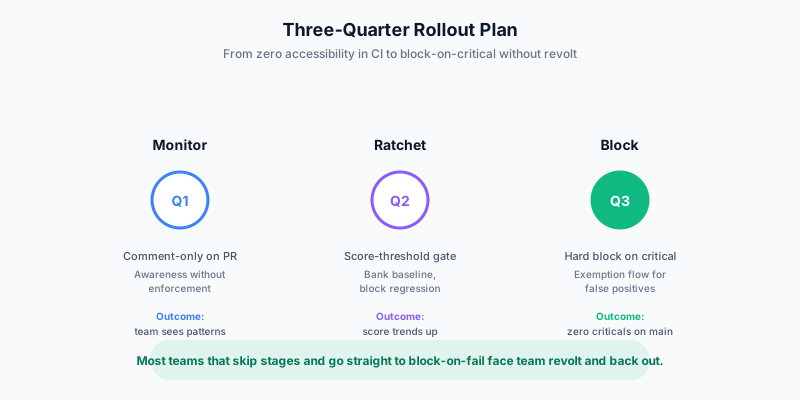
Quarter 1 — Monitor
Goal: team awareness without enforcement.
- Week 1-2: pick the tool. Run a one-off scan to establish today's score.
- Week 3-4: integrate as comment-only on PR. Every PR shows the scan output as a comment.
- Week 5-12: track team patterns. Most engineers will ignore the comment for the first 2-3 weeks. By week 6-8, you'll see PRs that voluntarily fix violations spotted in the comment. By end of quarter, the comment is part of the team's normal review surface.
What success looks like: team can articulate "what's a serious vs critical violation" without help, and at least 30% of new violations introduced are caught & fixed during PR review.
Quarter 2 — Ratchet
Goal: prevent regression without requiring perfection.
- Start of quarter: bank today's score as the baseline. Add the score-threshold gate (no PR can drop the score by more than 5 points without explicit approval).
- Middle of quarter: review what new violations are getting through. Most are in legacy code being touched for unrelated reasons. Decide team-by-team: fix-as-you-go, dedicated tech-debt sprints, or accept and document.
- End of quarter: measure outcomes. The score should be slowly trending up — even without a dedicated cleanup, the ratchet means new code must be at-or-above the existing standard.
What success looks like: baseline score is up 5-10 points from start of quarter. No PR has been "stuck" for more than 24 hours due to the gate. Team isn't requesting widespread exemptions.
Quarter 3 — Block on critical
Goal: zero critical violations in production.
- Start of quarter: add a hard block on critical-severity findings only. (Not all violations — only the worst.)
- Middle of quarter: most PRs pass cleanly. The 5-15% that get blocked are usually genuine issues; a small number are false positives that need ignore-list entries with documented reasons.
- End of quarter: the team has a "zero criticals" muscle. Critical violations don't reach main; serious violations are tracked but not blocking.
What success looks like: zero critical-severity findings on main branch for any 30-day window. Block-on-fail rate under 10% of PRs. Team treats the block as quality signal, not friction.
Beyond Q3
The next mile — block on serious-severity, automate the exemption flow, integrate with design system component tests — is a long tail. By Q4, the program is operating; further investment is incremental.
Handling false positives without disabling the check
The single most common failure mode of CI accessibility: a false positive blocks a PR, an engineer (under deadline pressure) disables the entire check, and the program quietly dies. Three defenses.
1. Configure ignore-lists with documented reasons. Every accessibility scanner supports per-rule, per-element, or per-page ignore configurations. Use them, but require a comment explaining why. Example for axe-core:
// axe-config.json
{
  "rules": {
    "color-contrast": { "enabled": true }
  },
  "ignore": [
    {
      "selector": ".disabled-button",
      "rule": "color-contrast",
      "reason": "WCAG 1.4.3 explicitly exempts inactive UI components. Re-confirmed by accessibility lead 2026-04-15."
    },
    {
      "selector": "[data-third-party=intercom]",
      "rule": "all",
      "reason": "Third-party widget. Vendor's VPAT confirms WCAG 2.2 AA. We don't control internals."
    }
  ]
}
2. Quarterly review of the ignore-list. Don't let it grow forever. Each quarter, sweep through the ignore-list, verify each entry's reason is still valid, remove stale ones. Most ignore-list entries become outdated as the codebase evolves.
3. Provide a clear escape hatch for genuine emergencies. Some bug fixes are time-critical (security patches, broken-flow incidents). For those, a "skip-a11y-check" PR label that bypasses the gate plus an automatic follow-up issue tagging the accessibility team to remediate within 5 days is a workable compromise. Used sparingly, it's a release valve. Used routinely, it's a sign your gate is too tight.
Per-team rollout in larger orgs
For organizations with multiple product teams, rolling out CI accessibility centrally rarely works. Different teams have different code maturity, different accessibility debt, different deadlines. The pattern that works:
- Central tooling, per-team gating. The accessibility tool and its CI integration are centrally maintained (one team owns the action / template). The enforcement level is per-team configurable.
- Per-team baselines. Each team's CI gate compares against that team's baseline, not a global one. New teams aren't punished for existing debt.
- Per-team rollout pace. A mature team may go straight to block-on-fail in Q1; a legacy team may stay in monitor mode for two quarters before ratcheting. Don't force everyone to the same milestone.
This decentralized model lets the program scale without becoming a bureaucratic blocker.
Pre-merge vs branch-deploy preview
A subtle question: should the accessibility scan run against your CI build artifact, or against the live preview deploy?
| Option | Pros | Cons | |---|---|---| | Scan the CI build (npm run start) | Self-contained; no preview-deploy dependency. | Misses CDN-injected fonts, env-specific styles, third-party scripts (analytics, support widgets). | | Scan the preview deploy URL | Realistic — exact same artifact users will see. | Needs the deploy to complete first; adds 30-60s to PR cycle. |
For most teams, scan the preview deploy is the right answer. The latency cost is worth the realism — accessibility issues caused by environment-specific scripts (a chat widget injecting an unlabeled iframe, an analytics script pushing focus on load) only show up against the real deploy.
For teams without preview deploys (legacy infra, internal-only apps), scanning the CI build is fine — just be aware of the gap.
What to track over time
If accessibility CI is a program rather than a setting, track these metrics:
- Accessibility score on main — trend over weeks/quarters. Should be flat or trending up.
- PR block rate — % of PRs that hit an accessibility gate. Under 10% is healthy; over 20% suggests the gate is too tight or the codebase has unaddressed debt.
- Time-to-fix on critical findings — from scan-detected to merged. Under 24 hours is great; over 7 days suggests a process problem.
- Ignore-list size — should be stable or shrinking. Growth without justification is the canary for a degrading program.
- Net new violations per sprint — should be near zero. Spikes correlate with hiring, framework upgrades, or new feature launches.
Most teams roll these into a quarterly accessibility report alongside other engineering health metrics. See TestKase's super-admin TMT dashboard pattern for an inspiration on how to present cross-team metrics.
Closing
Moving accessibility into CI is the single highest-leverage investment most teams can make in their accessibility program. The cost of fix at PR is 5-25× cheaper than catching the same issue in staging or production, and the integration effort — once you pick a tool — is measured in hours, not weeks.
The 3-quarter rollout (monitor → ratchet → block-on-critical) is the proven path. It takes the team from zero to mature gate without inviting revolt or letting the program decay into ignored CI noise. The CI templates above plug into the most common pipelines.
For teams that want a turnkey path: TestKase's web scanner and the matching Chrome toolkit cover both PR-time scanning and developer-loop inspection. The scanner's auth-aware mode handles the parts of your app the public scanners can't see — see Authenticated Accessibility Scanning for the full setup.
For broader context on what to scan for, see our WCAG 2.2 AA checklist.
Add accessibility scanning to your CI free →Stay up to date with TestKase
Get the latest articles on test management, QA best practices, and product updates delivered to your inbox.
SubscribeShare this article
Related Articles
Critical, Serious, Moderate, Minor: How to Triage Accessibility Issues by Severity
A practical triage policy template — SLAs per severity, ownership across design / engineering / content / QA, and how to share findings cross-team without forwarding PDFs.
Read more →Why Single-Page Accessibility Scans Miss Real Bugs (and What Multi-Page Audits Catch)
Single-URL accessibility scanners miss six entire categories of WCAG violations. Here's what falls through the gap, and how flow-aware audits catch the issues your users actually hit.
Read more →Color Contrast: The #1 Accessibility Violation (and How to Fix It in 30 Minutes)
Color contrast is roughly 38% of every accessibility scan report. Here's the math, the 8 patterns that fail in 90% of apps, and a designer-developer playbook for fixing them without breaking your brand.
Read more →