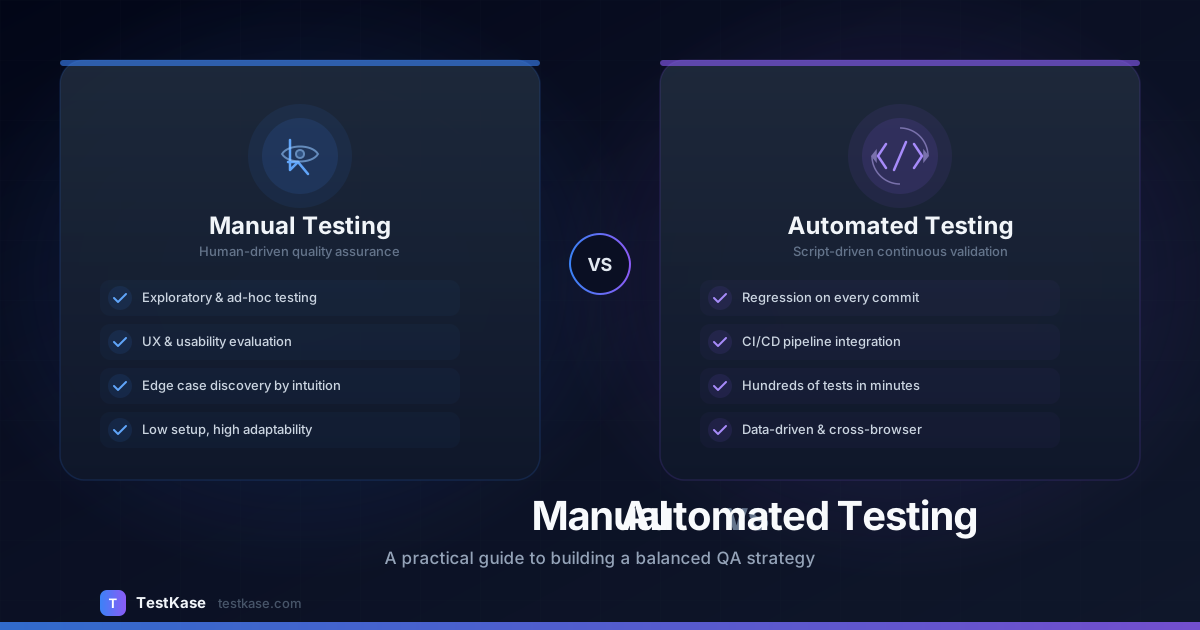
Manual vs Automated Testing: When to Use Each

Manual vs Automated Testing: When to Use Each
One of the most common debates in QA is whether to invest in manual testing or automated testing. The truth? You need both. The question isn't which one to choose — it's when to use each approach, and how to find the right balance for your team, product, and release cadence.
Teams that go all-in on automation miss critical usability issues. Teams that rely entirely on manual testing can't keep up with modern release cycles. The most effective QA organizations combine both approaches strategically, applying each where it delivers the highest return on investment.
In this article, we'll break down the strengths and weaknesses of each, provide clear guidelines for when to use manual vs automated testing, and show how modern test case management tools help you manage both effectively in a single reporting dashboard.
What Is Manual Testing?
Manual testing is when a human tester executes test cases step by step, without the aid of automation scripts. The tester interacts with the application just as an end user would, verifying that features work as expected, evaluating the user experience, and using their judgment to assess quality beyond what a script could detect.
Manual testing has been the foundation of QA since the inception of software development. Despite advances in automation, it remains indispensable for scenarios that require human intuition, creativity, and subjective evaluation.
Strengths of Manual Testing
- Exploratory testing — Humans can explore unexpected paths and find bugs that scripted tests miss. A skilled tester follows their instinct, tests edge cases, and tries combinations that no one thought to script.
- Usability evaluation — Only a human can judge whether a UI "feels right," whether the flow is intuitive, or whether an error message is confusing. Automation can verify that a button exists; it cannot tell you whether a user will find it.
- Low setup cost — No framework to build or maintain. A tester can start testing a new feature within minutes of it being deployed.
- Adaptability — Testers can adjust on the fly when requirements change, when they discover unexpected behavior, or when a bug leads them down an unplanned investigation path.
- Edge case discovery — Experienced testers develop intuition about where bugs hide. They know to test with special characters, empty fields, extreme values, and unusual user flows.
- Context-aware judgment — A manual tester can assess whether a 2-second delay is acceptable for a complex report but unacceptable for a button click. Automation treats both the same.
Weaknesses of Manual Testing
- Slow and repetitive — Running the same regression suite manually every sprint is time-consuming and demotivating. A 200-test regression suite might take 2-3 days manually but 30 minutes automated.
- Error-prone — Humans make mistakes, especially during repetitive tasks. A tester on their third day of regression testing may skip steps or miss subtle failures.
- Doesn't scale — As your test suite grows, manual execution becomes a bottleneck. Doubling your test cases means doubling your testing time.
- No overnight runs — Manual tests only run when people are working. You can't run manual regression at 2 AM before a morning release.
- Inconsistent reporting — Different testers may describe the same bug differently, skip documentation, or apply pass/fail criteria inconsistently.
What Is Automated Testing?
Automated testing uses scripts and tools to execute test cases programmatically. Once written, automated tests can run repeatedly without human intervention — on every commit, nightly, or on demand.
Modern test automation spans the entire testing pyramid: unit tests, integration tests, API tests, and end-to-end UI tests. The best teams use automation not just to catch regressions but to provide fast, continuous feedback on code quality.
Strengths of Automated Testing
- Speed — Execute hundreds of tests in minutes. A suite that takes days manually can run in under an hour.
- Consistency — Same steps, same order, same data, every time. No human variability.
- CI/CD integration — Run tests automatically on every build, pull request, or deployment. Catch regressions before they reach production.
- Scalability — Add more tests without adding more people. Run them in parallel across multiple browsers and environments.
- Regression confidence — Catch regressions instantly. Know within minutes whether a code change broke existing functionality.
- Cost efficiency over time — While the upfront investment is higher, automated tests pay for themselves after a few dozen runs. A test that takes 10 minutes to run manually costs nothing once automated.
Weaknesses of Automated Testing
- High initial investment — Writing and maintaining test scripts takes time and expertise. Setting up frameworks, configuring environments, and training team members all have costs.
- Brittle tests — UI changes can break automated tests. A simple CSS class rename or layout change can cause dozens of test failures that have nothing to do with actual bugs.
- Can't assess UX — Automation can verify that elements exist and respond correctly, but it can't tell you if a design looks wrong, a flow is confusing, or an animation feels jarring.
- Maintenance burden — Test scripts need updates as the application evolves. Without proper maintenance, your test suite becomes a collection of skipped and ignored failures.
- False confidence — Passing automated tests don't guarantee quality. Tests can only verify what they're written to check. If you didn't write a test for a scenario, automation won't catch it.
When to Use Manual Testing
Use manual testing when...
The value comes from human judgment, exploration, or the test is only run occasionally.
Manual testing is the right choice for:
- Exploratory testing sessions — When you need to find unknown unknowns. Set a charter like "explore the checkout flow for edge cases" and let experienced testers investigate.
- Usability and UX testing — Evaluating look, feel, accessibility, and user experience. Does the error message make sense? Is the button in the right place? Is the flow intuitive for first-time users?
- Ad-hoc testing — Quick sanity checks on new features before formal test cases are written.
- One-time tests — Scenarios you'll only verify once (e.g., data migration validation, one-off configuration changes).
- Complex setup scenarios — Tests that require physical devices, specific hardware configurations, or environment-specific conditions that are impractical to replicate in CI.
- Early-stage features — When the UI is still changing rapidly and automation would break constantly. Wait until the feature stabilizes before investing in automation.
- Accessibility testing — While some accessibility checks can be automated, comprehensive evaluation requires a human tester navigating with screen readers and keyboard-only input.
- Edge case investigation — When a bug report comes in and you need to explore related scenarios that weren't covered by existing tests.
When to Use Automated Testing
Use automated testing when...
The test is repetitive, data-driven, or needs to run on every build.
Automated testing is the right choice for:
- Regression testing — Verifying existing features still work after changes. This is the highest-ROI automation target.
- Smoke tests — Quick checks that critical paths (login, checkout, core workflows) are functional after deployment.
- Data-driven tests — Same logic with many input combinations. Testing a form with 50 different valid and invalid inputs is tedious manually but trivial with automation.
- API testing — Validating endpoints, status codes, response schemas, and error handling. API tests are fast, stable, and easy to maintain.
- Performance testing — Load and stress tests that require simulated traffic from hundreds or thousands of virtual users.
- Cross-browser/cross-device testing — Running the same tests across Chrome, Firefox, Safari, and different screen sizes.
- Security scanning — Automated vulnerability scans, dependency checks, and security regression tests.
- Database validation — Verifying data integrity, migration correctness, and query performance across environments.
Decision Matrix: Manual or Automated?
The Testing Pyramid: Finding the Right Balance
Most successful QA teams follow a testing pyramid that balances speed, cost, and coverage:
The key insight: automate the base, keep humans at the top. Unit and integration tests should be fully automated. End-to-end and exploratory testing benefit from human involvement.
Anti-Pattern: The Ice Cream Cone
Some teams invert the pyramid — lots of E2E UI tests, few unit tests. This creates a slow, brittle, expensive test suite. If your full test run takes 4 hours and breaks on every UI change, you have an ice cream cone problem. Fix it by pushing test coverage down the pyramid toward faster, more stable unit and integration tests.
Building Your Automation Strategy: A Practical Approach
Step 1: Identify Your Automation Candidates
Start by listing your existing manual test cases and scoring each on three criteria:
- Frequency — How often is this test run? (Daily = high priority for automation)
- Stability — How stable is the feature? (Stable = good candidate)
- Complexity — How many steps and data variations? (High data variation = great candidate)
Step 2: Start with High-ROI Tests
Don't try to automate everything at once. Start with:
- Smoke tests — The 10-15 tests that verify your critical paths work
- API tests — Stable, fast, and easy to maintain
- High-frequency regression tests — Tests you run every sprint
Step 3: Build Incrementally
Add 5-10 automated tests per sprint. This is sustainable and doesn't overwhelm the team. Within a few months, you'll have meaningful automation coverage without the burnout of a "big bang" automation project.
Step 4: Measure and Adjust
Track these metrics to evaluate your automation program:
- Automation coverage — Percentage of test cases that are automated
- Test execution time — How long your automated suite takes
- Flakiness rate — Percentage of tests that fail intermittently
- Bug escape rate — Bugs found in production that should have been caught by tests
- Time saved — Hours of manual testing replaced by automation each sprint
Common Mistakes
Trying to Automate Everything
Not every test should be automated. If a test is run once, changes frequently, or requires subjective judgment, automation adds cost without value. A good rule of thumb: if you'll run the test fewer than 5 times, keep it manual.
Neglecting Manual Testing
Teams that go "all-in" on automation often miss usability issues, edge cases, and the kind of bugs that only exploratory testing uncovers. Budget at least 20% of your QA effort for manual exploratory testing, even if everything else is automated.
Not Tracking Both in One Place
When manual and automated test results live in different tools, you lose the big picture. You need a unified view of quality across all testing types. Stakeholders asking "are we ready to release?" shouldn't have to check three different dashboards.
Unified test management
TestKase lets you manage both manual and automated test cases in one platform. Track manual execution alongside CI/CD-triggered automated results, all in a single dashboard. Get a complete picture of your quality without switching between tools.
Ignoring Test Maintenance
Automated tests are not "write once and forget." Every UI change, API update, or feature modification can break existing tests. Budget 20-30% of your automation effort for maintenance. Teams that skip this end up with hundreds of skipped or ignored tests that provide zero value.
Automating Too Early
Writing automation for a feature that's still being designed is wasteful. Wait until the feature is stable and the team has agreed on the final implementation before investing in automated tests.
How TestKase Helps You Manage Both
TestKase is built for teams that use a mix of manual and automated testing:
- Manual test execution — Step-by-step execution with pass/fail/block status, attachments, and comments
- Automated test integration — Import results from your CI/CD pipeline via the TestKase Reporter
- Unified dashboard — See manual and automated results side by side in a single view
- AI-assisted test generation — Generate test cases from requirements, then decide which to automate
- Test cycle management — Group manual and automated tests into release-specific cycles
- Coverage tracking — Understand which requirements have manual coverage, automated coverage, or both
- Trend analysis — Track pass rates, execution times, and flakiness across releases
Conclusion
Manual and automated testing aren't competitors — they're complementary strategies. The best QA teams use both, applying each where it delivers the highest return on investment.
Start by automating your repetitive regression tests and critical path smoke tests. Keep manual testing for exploration, usability, and edge cases. Build incrementally — 5-10 new automated tests per sprint — rather than attempting a massive automation overhaul.
Most importantly, track both manual and automated results in a single place. Quality is not "manual OR automated." It's the combination of both, applied strategically, that lets you ship confident releases on a predictable schedule.
Stay up to date with TestKase
Get the latest articles on test management, QA best practices, and product updates delivered to your inbox.
SubscribeShare this article
Related Articles
Critical, Serious, Moderate, Minor: How to Triage Accessibility Issues by Severity
A practical triage policy template — SLAs per severity, ownership across design / engineering / content / QA, and how to share findings cross-team without forwarding PDFs.
Read more →Why Single-Page Accessibility Scans Miss Real Bugs (and What Multi-Page Audits Catch)
Single-URL accessibility scanners miss six entire categories of WCAG violations. Here's what falls through the gap, and how flow-aware audits catch the issues your users actually hit.
Read more →Accessibility Testing in CI/CD: Catching WCAG Issues Before They Ship
Three integration patterns, GitHub Actions / GitLab / CircleCI templates, and a 3-quarter rollout playbook to take an engineering team from zero accessibility in CI to block-on-fail.
Read more →