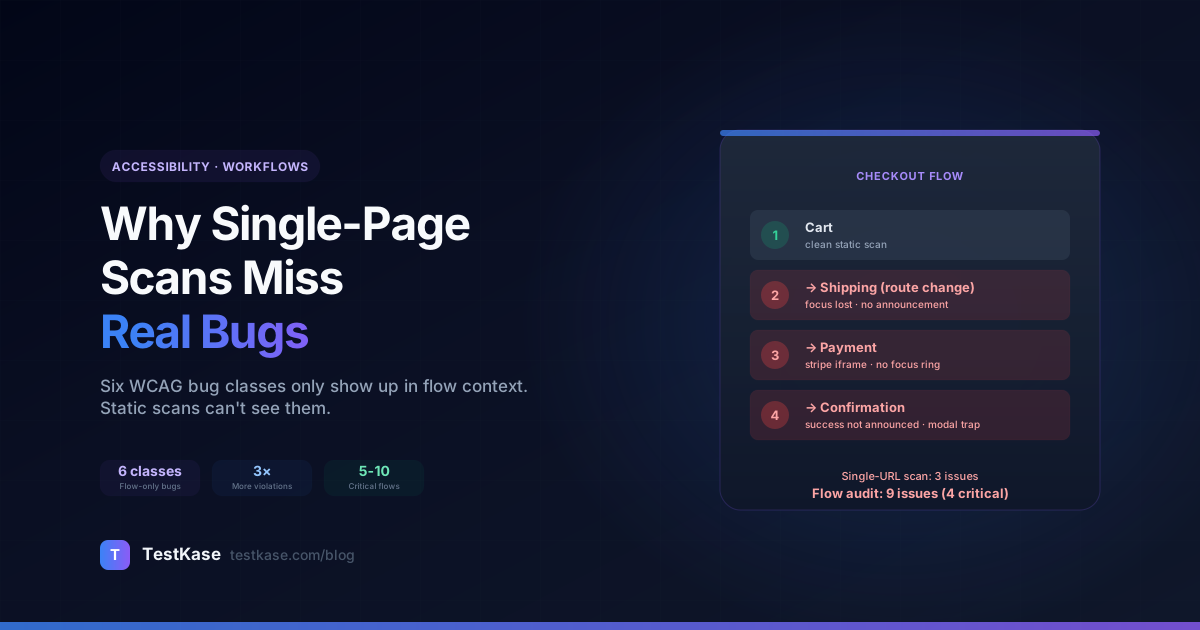
Why Single-Page Accessibility Scans Miss Real Bugs (and What Multi-Page Audits Catch)

Why Single-Page Accessibility Scans Miss Real Bugs (and What Multi-Page Audits Catch)
Run an accessibility scanner against your app's home page. Get a clean WCAG 2.2 AA report. Ship an accessibility statement. Get a customer complaint two weeks later about a screen-reader trap in your checkout flow that the scanner never saw.
This is the fundamental limit of single-page accessibility scanning: it audits a snapshot, not the flow. The home page might be perfectly accessible. The login flow that follows might be perfect. But the transition between them — the focus management, the ARIA state changes, the dynamic content — is where the violations actually live, and that's the part single-URL scans completely miss.
This post walks through the six categories of accessibility bugs that single-page scans miss, the multi-page workflow audit pattern that catches them, a worked example of a checkout flow audit, and how to translate flow findings into engineering tickets your team will actually fix.
What you'll learn
The six classes of WCAG bugs that only show up in flow context, when single-page scans are still appropriate (spoiler: they are, sometimes), how to set up a workflow audit, and a real example of auditing a 4-step e-commerce checkout from cart to confirmation.
What single-page scans actually catch
To understand the gap, first understand what a static, single-URL scan can do well:
- Read the rendered DOM
- Check
<img>tags for alt attributes - Compute color contrast for every text element
- Verify
<html>has alangattribute - Check that semantic landmarks (
<main>,<nav>,<header>) are present - Validate ARIA roles match the element they're on
- Check tab order as the page is currently rendered
That's a lot — easily 60-70% of WCAG criteria can be evaluated against a static DOM snapshot. For pages that are truly static (a blog post, a marketing landing page, an "About Us" page), single-URL scanning is enough.
The problems start when the page isn't really static. When a "page" is actually a multi-state SPA, when a button click reveals a modal, when a route change focuses a new region, when an API response inserts an ARIA live announcement — all of those scenarios fall outside the static snapshot. And modern web apps are nearly all of those scenarios.
The six classes single-page scans miss
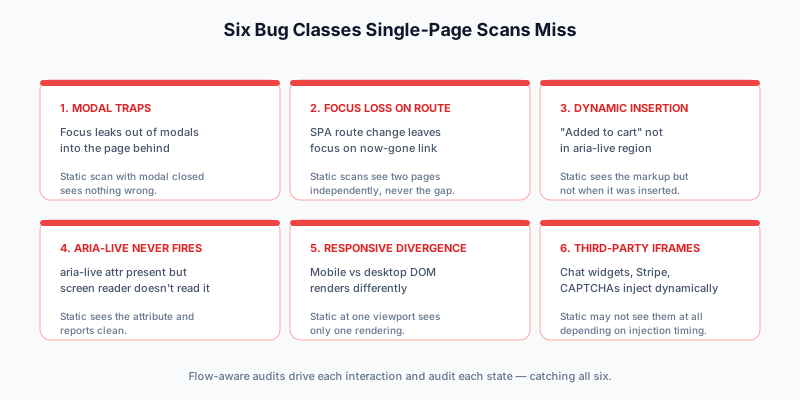
After auditing customer apps with both single-URL and flow-aware scanners side by side, the gap clusters into six specific bug categories. None of them show up in a static scan. All of them show up in real customer reports.
1. Modal traps
The classic. A modal opens; the user tabs away expecting to navigate within the modal; the focus leaks out to the page behind the modal — which is now hidden behind the modal overlay. The user is interacting with elements they can't see. Screen-reader users sometimes don't even realize the modal opened.
A static scan of the page (with the modal closed) sees nothing wrong. Even a static scan of the page (with the modal open via URL parameter) sees the modal HTML but can't observe that focus leaks.
A flow audit that opens the modal and presses Tab repeatedly catches the leak immediately.
2. Focus loss after route change
In a SPA, clicking a link can swap content client-side without a full page reload. By default, browser focus stays where it was — usually on the link the user just clicked. After the route swap, that link no longer exists. Focus falls back to <body>, and the user's "next Tab" lands on whatever is first in the new page's tab order. Screen-reader users get no announcement that the page changed.
A static scan of either page sees both pages independently; it doesn't see what happens between them.
A flow audit that records a route change and inspects post-change focus catches this every time.
3. Dynamic content insertion without ARIA
A common pattern: user clicks "Add to cart"; an API call returns; a confirmation message renders. If that message isn't wrapped in aria-live="polite" or role="status", screen readers never announce it. The user has no idea their action succeeded.
A static scan sees the message HTML but can't tell whether it was just inserted dynamically (which is when the announcement matters).
A flow audit that records the click and then checks for ARIA-live announcement coverage catches the missing semantic.
4. ARIA live regions never actually announced
The mirror of #3 — sometimes the aria-live is present, but the element is rendered in a way that screen readers ignore. Common causes: aria-live="polite" on an element that's already in the DOM with display: none, then revealed (most screen readers don't re-announce). Or the live region is in a portal that's outside the page's accessibility tree.
A static scan sees the aria-live attribute and reports clean. A flow audit can verify whether the announcement actually fires by querying the screen-reader-relevant DOM after the event.
5. Hidden-on-mobile-shown-on-desktop divergences
Different breakpoints render different DOM. A mobile menu might be a slide-out drawer; the desktop equivalent might be a horizontal nav. Both could be accessible individually, but the transition — when a user resizes their viewport mid-session — can drop focus, leak ARIA state, or surface elements that were previously hidden.
A static scan at a single viewport sees only one rendering. A flow audit that resizes the viewport and re-checks state catches the divergence.
6. Third-party iframes and widgets
Live chat widgets, payment forms, analytics overlays, captchas — all third-party iframes that get injected client-side. They typically don't appear in the static DOM at all (only after JavaScript runs and posts a message back). Worse, even when they do appear, the iframe boundary often blocks accessibility tree traversal.
A static scan running against the rendered page may or may not catch them, depending on timing. A flow audit that interacts with the third-party widget catches both whether the widget is accessible and whether the surrounding context handles iframe focus correctly.
When single-page scans are still right
To be balanced: single-page scans aren't bad. They're cheap, fast, and they catch a real majority of WCAG violations. They're absolutely the right tool for:
- Marketing sites where every page is a static-rendered template (Next.js with no client-side routing, or a CMS-generated site).
- Documentation sites that don't have stateful interactions beyond navigation.
- Blog posts and content where "the experience" is essentially "render the page".
- Internal admin pages where each route is a self-contained CRUD form.
For these, a single-URL scan in CI is enough, and adding flow audits would mostly add overhead without finding anything.
The shift point: once your app has interactive state — modals, multi-step forms, route-change focus, async data loading, dynamic content — single-page scans miss the issue surface that actually matters to users. That's the moment to layer in flow-aware auditing.
The workflow-audit pattern
The pattern is simple in concept: instead of scanning a single URL, the scanner records a sequence of user interactions and audits each state along the way. Each "step" in the workflow is a separate audit pass.
A flow definition looks roughly like:
flow:
  name: "Checkout — guest user"
  steps:
    - name: "Cart with item"
      url: "/cart"
      audit: true
    - name: "Shipping form"
      action: click
      selector: "[data-test=continue-to-shipping]"
      wait_for: "[data-test=shipping-form]"
      audit: true
    - name: "Payment form"
      action: fill
      selector: "[name=address]"
      value: "123 Test St"
    - action: click
      selector: "[data-test=continue-to-payment]"
      wait_for: "[data-test=payment-form]"
      audit: true
    - name: "Confirmation"
      action: click
      selector: "[data-test=submit-payment]"
      wait_for: "[data-test=order-confirmed]"
      audit: true
The scanner steps through each entry, performs the action, waits for the success signal, runs the audit, and accumulates findings.
What you get back: a per-step accessibility score plus a flow-level summary. Which steps regressed? Which steps have new violations? Which steps lost focus management? All of these are visible in the flow-level diff.
A real worked example: e-commerce checkout audit
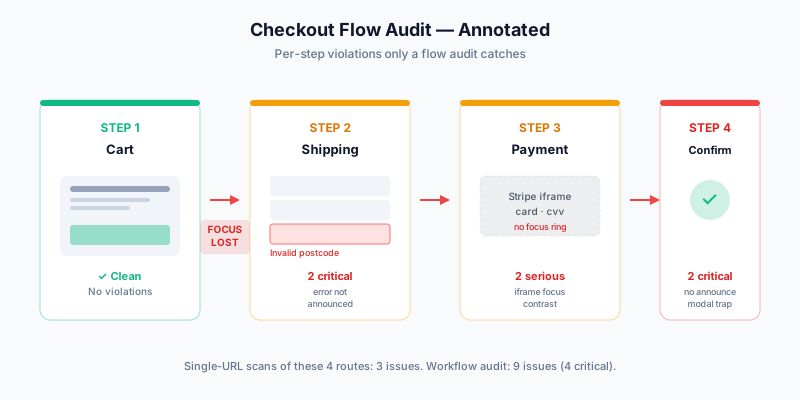
Let's audit a real flow. The setup: an e-commerce app with a 4-step checkout — cart → shipping → payment → confirmation. Each step is a route in a React SPA. A single-URL scan against /cart returns clean. So does each of the other three URLs scanned individually. But the flow has six violations the static scans never see.
Step 1 — Cart page
Static scan finds: zero violations. Clean WCAG 2.2 AA.
Flow audit finds: zero additional violations on this step. The cart page is genuinely accessible at rest.
Step 2 — Click "Continue to Shipping"
Static scan finds: N/A — there is no static scan of the transition.
Flow audit finds:
- Focus loss after route change. The "Continue to Shipping" button was at the bottom of the cart page. After the route change, focus falls back to
<body>. A keyboard user pressing Tab next lands on the site nav, not the shipping form. Critical violation.
The fix: in the new route's useEffect, programmatically focus the form's first input or a <h1> with tabindex="-1".
Step 3 — Shipping form rendered
Static scan finds: zero violations on the shipping page in isolation. All form fields have labels, error messages have aria-live.
Flow audit finds: zero new violations for this state. The shipping form is fine on first render.
Step 4 — Fill address, submit invalid postal code
Flow audit finds:
- Inline validation error not announced. When the submit reveals an inline "Invalid postal code" error next to the field, the error message is rendered into a
<span>withoutaria-live="polite". Screen-reader users don't hear the error. The static scan saw the<span>empty (no error rendered yet) and didn't flag it. Critical violation.
The fix: wrap the error span in <div role="status" aria-live="polite"> or set aria-describedby on the input pointing to the error span when present.
Step 5 — Fix postal, click "Continue to Payment"
Flow audit finds:
- Focus loss after route change. Same as step 2. Critical violation, second instance.
- Hidden-on-mobile-shown-on-desktop divergence. At desktop width, a "Order Summary" sidebar is visible on the right. At mobile, it collapses behind a "Show summary" disclosure. The desktop sidebar is the same DOM tree but with
display: noneat mobile breakpoints — and the disclosure button gives no focus indicator. Serious violation.
Step 6 — Payment form
Static scan finds: color contrast violations on disabled placeholder text in the credit card form. Three serious findings.
Flow audit finds: all three contrast violations from the static scan, plus:
- Third-party iframe (Stripe Elements) without focus indicator. The Stripe credit-card iframe handles its own focus management, but the parent page's CSS reset zeroes out the focus ring. When focus enters the iframe, there's no visible indicator that focus is now inside it. Serious violation.
Step 7 — Submit payment, confirmation page
Flow audit finds:
- Confirmation message not announced. The "Order placed successfully — check your email for confirmation" message is rendered into a
<div>after the API responds. Noaria-live, norole="status". Screen-reader users get no audible cue that the order succeeded. Critical violation. - Modal-trap-style behavior. A "Thanks!" celebration modal opens on confirmation. The modal has no focus trap — Tab leaves the modal and lands on hidden cart icons in the now-occluded background page. Critical violation.
Aggregate for the flow
| Source | Violations found | Critical | Serious | Moderate | Minor | |---|---|---|---|---|---| | 4× single-page scans (cart, shipping, payment, confirm) | 3 | 0 | 3 | 0 | 0 | | 1× workflow audit | 9 | 4 | 4 | 1 | 0 |
The static scans found 3 violations. The flow audit found 9 — including 4 critical issues a screen-reader user would hit on every checkout.
This is the gap.
From flow finding to engineering ticket
The findings are only useful if they translate into shippable fixes. The pattern that works:
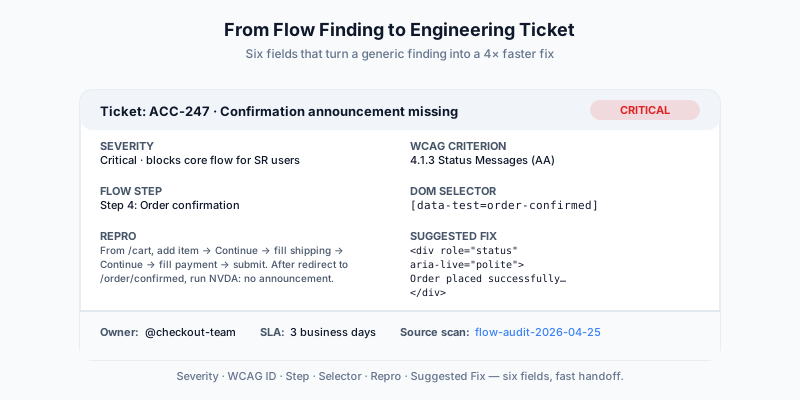
Each ticket should include:
- Severity — critical / serious / moderate / minor (per our triage guide).
- WCAG criterion — e.g.
1.3.1 Info and Relationships,4.1.3 Status Messages. Lets the dev verify the fix against the spec. - Step where it appeared — "Step 5: Continue to Payment". Repro-targeted, not vague.
- Reproducible steps — exact path: "From
/cart, click[data-test=continue-to-shipping], fill[name=postal]with 'XYZ', click submit". The reviewer can re-run. - The exact element — DOM selector, screenshot, axe-core rule ID.
- Suggested fix — "Add
role='alert'to the error span" or "UseuseEffectto focus the page heading after route change". Don't make the engineer figure out the fix from scratch.
A flow audit report that includes all six fields per finding is a 4× faster fix cycle than a "here's a generic axe report; figure it out" handoff.
Operational cadence
How often should flow audits run?
| Cadence | Use case | |---|---| | Per-PR | Too expensive for most apps (60-180s per scan). Skip. | | Nightly on main | Sweet spot. New violations caught within 24 hours of merge. | | Pre-release (every staging deploy) | Critical for compliance-sensitive apps. Pair with single-URL CI scans for fast feedback. | | Quarterly external audit | Manual + flow-audit hybrid. Confirms the program is working without depending on internal data alone. |
Most teams settle on:
- Per-PR: single-URL scan against changed-route's URL (fast).
- Nightly: workflow audit of the 5-10 critical user flows (signup, checkout, primary CRUD).
- Pre-release: workflow audit + manual screen-reader spot check of the riskiest changed flow.
When flow audits aren't worth it
To be balanced again: flow audits aren't free. They take 5-10× longer than single-URL scans, they're more flaky (any UI change can break a flow recording), and they require maintenance (when the flow's DOM changes, the recording needs an update).
Don't run flow audits when:
- The flow has 1 step (it's just a page; use single-URL scanning).
- The flow involves payment processing or PII you can't expose to the scanner.
- The flow takes >10 minutes to complete (audit overhead becomes prohibitive; consider sampling).
- The team doesn't have a stable e2e test suite already (a flow audit needs the same kind of stable selectors and waits as Playwright/Cypress; without them, both will be flaky).
For most teams the calculus is: single-URL scans for daily / per-PR, flow audits for the 5-10 most important user journeys nightly. That balance gives you fast feedback for the per-PR loop and deep coverage for the user-facing flows that actually matter.
Closing
Single-page accessibility scans solve the easy part of the problem: static-DOM violations on individual pages. They catch contrast issues, missing alt text, and ARIA-on-element bugs efficiently. But the violations users actually hit — focus loss, missing announcements, modal traps, route-change semantics — only manifest in flow context, and a static scan can't see them.
The fix isn't to abandon static scans; it's to layer flow-aware audits on top. Reserve flow audits for the 5-10 most-trafficked user journeys, run them on a daily/nightly cadence, and feed the findings into structured engineering tickets the team can actually act on.
For teams using TestKase, the Workflow Analyzer records and audits flows directly — same auth model as the single-URL scanner, with per-step findings. The free tier supports the basic flow audits; paid tiers add scan history, comparison reports, and longer flow definitions.
For the broader rollout strategy, see Accessibility Testing in CI/CD. For the auth setup that makes flow audits work against real authenticated apps, see Authenticated Accessibility Scanning. For triaging the multi-issue reports that flow audits generate, see Triaging Accessibility Issues by Severity.
Run a free workflow audit on your app →Stay up to date with TestKase
Get the latest articles on test management, QA best practices, and product updates delivered to your inbox.
SubscribeShare this article
Related Articles
Critical, Serious, Moderate, Minor: How to Triage Accessibility Issues by Severity
A practical triage policy template — SLAs per severity, ownership across design / engineering / content / QA, and how to share findings cross-team without forwarding PDFs.
Read more →Accessibility Testing in CI/CD: Catching WCAG Issues Before They Ship
Three integration patterns, GitHub Actions / GitLab / CircleCI templates, and a 3-quarter rollout playbook to take an engineering team from zero accessibility in CI to block-on-fail.
Read more →Color Contrast: The #1 Accessibility Violation (and How to Fix It in 30 Minutes)
Color contrast is roughly 38% of every accessibility scan report. Here's the math, the 8 patterns that fail in 90% of apps, and a designer-developer playbook for fixing them without breaking your brand.
Read more →