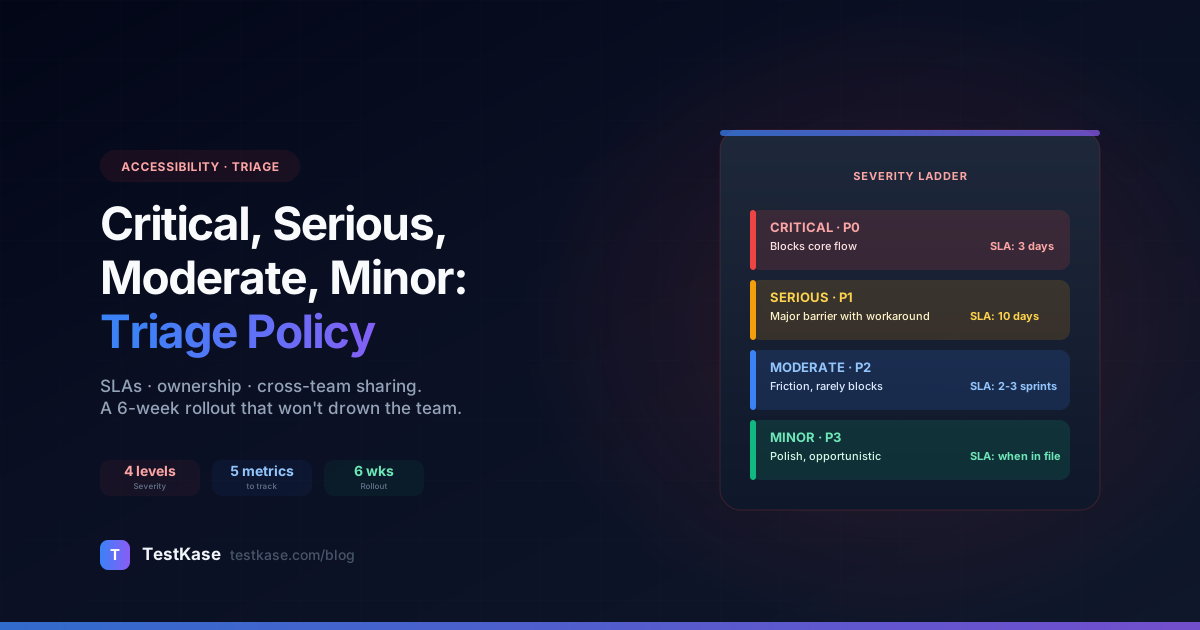
Critical, Serious, Moderate, Minor: How to Triage Accessibility Issues by Severity

Critical, Serious, Moderate, Minor: How to Triage Accessibility Issues by Severity
You ran your first comprehensive accessibility audit. The scan returned 247 findings. Your team has shipping pressure, limited bandwidth, and now a 247-row spreadsheet of "things that are wrong with the app".
What do you fix first?
This is the triage problem. Without a clear severity-to-ownership-to-SLA mapping, accessibility programs stall — every finding feels equally urgent and equally not-urgent at the same time. The team picks the easy ones, the hard ones rot, and six months later you're back where you started.
This post is the practical triage playbook: how the four severity levels actually map to user impact, how to assign ownership across design / engineering / content / QA, a 6-week rollout for a triage policy that won't drown the team, and how to share findings without forwarding PDFs.
What you'll get from this post
A working severity model that doesn't conflate "critical" with "annoying", a default ownership matrix you can adopt or adapt, an SLA template per severity level, a triage funnel diagram, and the metrics that tell you whether the program is healthy or backsliding.
Severity ≠ frequency
The most common triage mistake: treating high-severity findings as more important than high-frequency ones. They're different axes.
Consider:
- Critical, single page. A modal with a focus trap on the homepage. A real but localized issue.
- Minor, every page. The page footer's copyright date has a contrast issue (3.8:1 vs the AA threshold of 4.5:1). Affects every single screen, every user.
Both deserve attention. The minor-but-frequent issue may actually be more urgent in customer-impact terms — every user hits it on every page — even though "critical" sits higher on the severity ladder.
The right way to think about triage: severity sets the SLA; frequency sets the priority within an SLA tier.
A critical-on-rare-flow issue gets P0 SLA but lower priority within P0 than a critical-on-checkout issue. A moderate-everywhere issue gets P2 SLA but the highest priority within P2. The same finding can be both: priority is the cross of severity × frequency × business impact.
The four severity levels with concrete examples
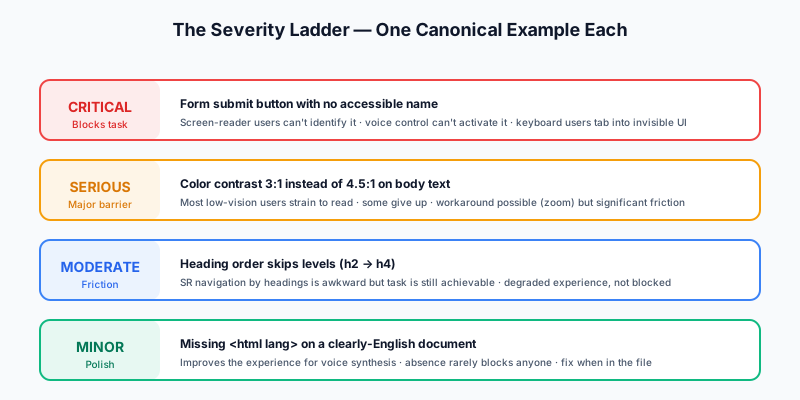
Severity in WCAG-aligned scanners follows axe-core's 4-level system: critical, serious, moderate, minor. The labels aren't arbitrary — they map to specific user-impact descriptions. Memorize the canonical examples for each.
Critical
Definition: Blocks users with disabilities from completing core functionality. The user cannot accomplish the task at all.
Canonical examples:
- A form submit button with no accessible name. Screen-reader users can't identify it; voice-control users can't activate it.
- A modal dialog with no focus trap. Keyboard users tab into the page behind the modal and interact with hidden elements.
- A keyboard-only flow that requires mouse interaction. Pure keyboard users can't proceed.
- A missing
alton the only image that conveys core information (a CAPTCHA, a chart that's the page's primary content, a product photo with no surrounding description).
SLA target: Fix within the current sprint. P0 in your tracker.
Serious
Definition: Major barrier; most affected users can work around with effort, but the workaround is significant. The user can accomplish the task but only after extra friction.
Canonical examples:
- Color contrast failing AA for primary body text (~3:1 instead of 4.5:1). Most users with low vision strain to read; some give up.
- A keyboard trap in a non-modal component (e.g., a date picker that swallows arrow keys). User has to refresh the page to escape.
- Inline form-validation errors with no
aria-live. SR users hear no error feedback but can re-read the form. - A missing visible focus indicator on hover-styled buttons. Keyboard users can navigate but with significant difficulty.
SLA target: Fix within the next sprint. P1.
Moderate
Definition: Usability issue; causes friction but rarely blocks. The task is achievable but the experience is degraded for affected users.
Canonical examples:
- Inconsistent heading order (
<h2>followed by<h4>skipping<h3>). SR navigation by headings is awkward. - Color-only differentiation for required fields (asterisk in red without text). Color-blind users may miss the indicator but the form still works.
- Generic alt text ("image", "photo") on functional images. Conveys some info but not what's needed.
- Tab order that's logical but not visually expected (e.g., right column gets focus before left).
SLA target: Fix within the next 2-3 sprints. P2.
Minor
Definition: Polish item; very rarely user-blocking. The fix improves the experience but the absence doesn't materially impair use.
Canonical examples:
- Missing
langattribute on<html>when the document language is obvious from context. - Decorative icons next to text labels marked as
<img>instead of properly hidden witharia-hidden. - Empty headings (
<h2></h2>) — usually a templating mistake that produces no actual content. <button>withouttype="button"inside a<form>(defaults to submit, often unintentional).
SLA target: Fix when you're already in the file. P3 / "maintenance" backlog.
Ownership: who fixes what
The single most useful artifact in any accessibility program is a clear ownership matrix mapping finding categories to owning teams. Without it, every finding starts as "who fixes this?" and stalls.

The default mapping that works for most teams:
The principle: owners should be one person or one team per category, not multi-team committees. A designer who owns contrast across the design system is faster than a contrast committee with reps from design, engineering, and QA.
The triage funnel
Once findings have severity and ownership, they flow through a state machine. The cleaner the funnel, the faster issues move through it.
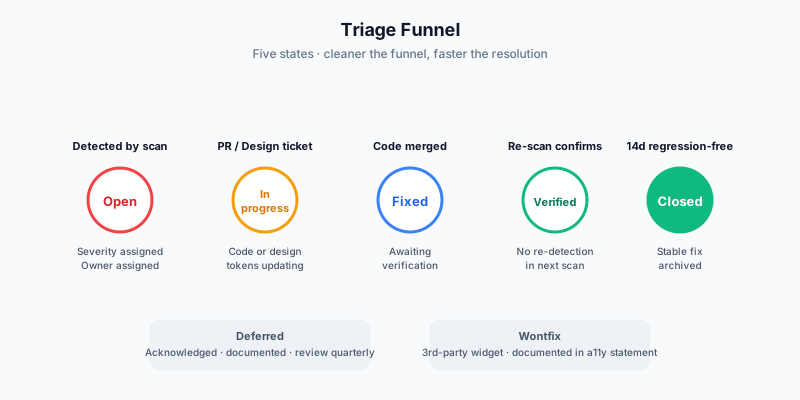
Five states cover the lifecycle:
- Open — newly detected by a scan. Severity assigned automatically by the scanner; owner assigned by category mapping.
- In progress — assigned to a specific engineer/designer; pull request open or design ticket in review.
- Fixed — code merged or design tokens updated; ready for verification.
- Verified — re-scanned (automated) or manually checked; confirmed resolved.
- Closed — fully resolved and not re-detected for 14+ days (regression-proofed).
Edge states: deferred (acknowledged, intentionally out-of-scope, with documented reason and date), and wontfix (decision not to fix, e.g., third-party widget the team doesn't control). Both should be rare; both should be reviewed quarterly.
SLA template
A working SLA per severity. Adopt verbatim or adjust for your team's velocity.
| Severity | Triage SLA | Fix SLA | Re-verify SLA | Escalation trigger | |---|---|---|---|---| | Critical | 4 hours from detection | 3 business days from triage | 24 hours from fix | Open past 5 days, or 2+ open simultaneously | | Serious | 1 business day | 10 business days | 3 business days | Open past 15 days | | Moderate | 3 business days | 2 sprints (4 weeks) | Next scheduled scan | Open past 8 weeks | | Minor | 1 sprint | "When you're in the file" | Next quarterly audit | Aging >6 months |
The triage SLA matters more than people expect. A finding that sits in "open" for a week unowned isn't a triage problem; it's an organizational problem masquerading as a triage problem. Tight triage SLAs (4 hours for critical, 1 business day for serious) keep findings moving.
API field name reminder: impact vs severity
A practical note when working with accessibility scanners' APIs and webhooks: what the docs / UI call "severity" is impact in the wire format. axe-core uses impact: "critical" | "serious" | "moderate" | "minor" as the field name in JSON output, and most scanners (TestKase included) preserve that naming for API compatibility.
Example finding in JSON:
{
  "id": "color-contrast",
  "impact": "serious",
  "tags": ["wcag2aa", "wcag143"],
  "description": "Ensures the contrast between foreground and background colors meets WCAG 2 AA contrast ratio thresholds",
  "nodes": [
    {
      "target": [".btn-secondary"],
      "html": "<button class='btn-secondary'>Cancel</button>",
      "failureSummary": "Element has insufficient color contrast of 3.8 (foreground color: #6b7280, background color: #f3f4f6)"
    }
  ]
}
Same four buckets, same meaning, just a different field name when consumed by code. Worth flagging in your team's onboarding doc — engineers writing webhook handlers will look for severity and find nothing.
Sharing findings without forwarding PDFs
The single most preventable cause of accessibility-program decay: PDFs.
Pattern that goes wrong: the QA team runs a scan, exports a 60-page PDF, emails it to engineering. Engineering opens it once, the issues live in PDF format with no way to integrate into the team's actual workflow tools, and within a week the PDF is forgotten in someone's downloads folder.
The pattern that works:
-
Findings live in your tracker. GitHub issues, Linear, Jira — wherever the team's other work lives. Each finding becomes a ticket with severity, owner, repro steps, and suggested fix (the six-field template from our flow-audits post).
-
Scans link to tickets, not produce reports. When a new scan finds a previously-unseen issue, the scanner's webhook auto-creates a ticket. Existing tickets get updated (e.g., "still failing on 2026-04-28 scan").
-
Comments and sign-off live in the ticket. Designer pushes back on a contrast finding? Comment on the ticket. Engineer claims the fix is shipped? Mark fixed; auto-verification runs on next scan. Audit trail is the ticket history.
-
Reports are summary, not source. When a stakeholder asks "what's our accessibility status?", point them to a dashboard (live, not exported) or generate a fresh PDF as an artifact-of-the-moment, not as the canonical source.
TestKase's team-sharing implements this pattern: scans share to teams, comments thread on each finding, sign-off creates an audit trail, and the export-to-PDF is for stakeholders only — never the working surface. Same effect with any tracker integration; the principle matters more than the tool.
Handling severity disputes
You'll get them. PM says a finding is "minor", QA says "critical". Here's the protocol:
-
Default to the higher severity. Cost of over-prioritizing is small; cost of under-prioritizing can be lawsuits, customer churn, or (most often) backlog rot.
-
Defer to the role closest to user impact. Usually QA or an accessibility specialist. PMs sometimes underestimate severity because they're optimizing for product velocity; designers sometimes underestimate because they wrote the design that produced the failure. The role most directly observing impact has the best calibration.
-
Document the decision in the ticket. Don't argue over the severity-classification line in private Slack and call it a day. Comment on the ticket: "Discussed 2026-04-28 — keeping as Critical because [user impact reason]. Reviewer: @accessibility-lead". Keeps the audit trail clean and prevents the same conversation in 3 months.
-
Escalate persistent disputes. If the same person is repeatedly arguing for lower severity across many findings, that's a process signal — the calibration conversation isn't a one-off, it's organizational. Run a calibration session with concrete examples.
Metrics that matter
Five metrics tell you whether the triage program is healthy. Most teams track at least 1-3; mature programs track all five.
1. Open by severity, over time
Plot critical / serious / moderate / minor open counts week-over-week. Healthy programs have:
- Critical: trending toward zero, occasional spikes that resolve within a week.
- Serious: stable or trending down. Spikes resolve within a sprint.
- Moderate: slowly trending down. Persistent backlog is fine; growing backlog is a signal.
- Minor: ignored except in deeper-cleanup sprints.
A multi-week growth in open critical findings without resolution is the canary for a degrading program — investigate before it becomes a crisis.
2. Mean time to fix (MTTF) per severity
How long, on average, from "open" to "fixed". Targets matching the SLAs above:
- Critical MTTF: under 3 days
- Serious MTTF: under 10 days
- Moderate MTTF: under 4 weeks
- Minor MTTF: under 1 quarter (or "as you're in the file")
MTTF rising over multiple sprints, especially for critical / serious, is a stronger signal than open-count metrics. Open count can hide a healthy backlog (lots of moderates, all moving). MTTF reveals systemic slowdown.
3. Regression rate
% of fixed findings that re-appear within 14 days. A healthy program has under 5%. Higher rates suggest:
- Fixes are partial (the change addressed one element but not the design pattern).
- The CI gate isn't catching regressions before merge.
- The fix is in code that other teams also touch and they don't know the constraint.
If regression rate is climbing, look at whether your CI gate is working (see Accessibility in CI/CD) and whether your design tokens are codifying the fixes (see Color Contrast).
4. Net new findings per sprint
How many new findings does each sprint introduce? Steady state is ~0 — your CI gate should prevent new violations. Spikes correlate with:
- New feature launches (touch many surfaces, introduce new patterns)
- Framework upgrades (Tailwind v3 → v4, React 17 → 18 — token mappings change)
- Onboarding new engineers (until trained on accessibility patterns)
Spike-and-recover is fine. Sustained high net-new is a process problem.
5. % of findings auto-resolved by CI
How many findings get caught at PR (CI scan) before they ever land on main. Mature programs see 70-90% auto-caught. Lower rates suggest the CI gate isn't running on all routes or the team is skipping gates frequently.
A 6-week rollout
If you have no triage policy today, here's how to put one in place without exhausting the team.
Week 1: Pick the severity buckets. Adopt the 4-level axe-core scheme verbatim. Don't invent your own.
Week 2: Build the ownership matrix. Adopt the table above as a starting point; adjust for your org's structure (e.g., if you don't have a content team, fold "alt text" into UX). Publish the matrix on your team wiki.
Week 3: Set the SLAs. Adopt the SLA template above; adjust to your team's velocity (a team on 2-week sprints might use longer fix SLAs than a team on 1-week sprints).
Week 4: Move existing findings into the tracker. Don't try to fix them all — just get them visible. Use the four buckets to triage.
Week 5: Run the first triage meeting. 30 minutes, weekly cadence. Review critical findings (status, blockers). Spot-check serious findings (any aging past SLA?). Don't try to discuss every finding — only the exceptions.
Week 6: Set up the dashboard. Track the five metrics above; pick a tool (your existing tracker's dashboard, a Grafana board, Notion). Make it visible to the wider team — not just accessibility specialists.
By end of week 6, you have an operating triage system. From there, the program runs itself; your role becomes monitoring metrics, escalating exceptions, and tuning the policy as the team grows.
Closing
Severity isn't an opinion. It's the bridge between "the scan found 247 issues" and "we have a working program that resolves issues at a sustainable pace". The four levels (critical / serious / moderate / minor) map cleanly to user impact; the SLAs map cleanly to engineering velocity; the ownership matrix maps cleanly to team boundaries.
Adopt the defaults, run the 6-week rollout, watch the metrics. The teams that get accessibility right aren't the ones with the smartest scanners — they're the ones with the cleanest triage and ownership.
For the broader rollout context, TestKase's team-sharing implements the "no PDFs" principle directly: scans live in shared workspaces, findings thread comments, sign-off creates an audit trail. Combined with the WCAG 2.2 AA checklist for what to check, color contrast deep-dive for the most-common category, and CI/CD integration for catching new issues at PR time, the triage policy in this post completes the full operational loop.
Set up your team's accessibility triage free →Stay up to date with TestKase
Get the latest articles on test management, QA best practices, and product updates delivered to your inbox.
SubscribeShare this article
Related Articles
Why Single-Page Accessibility Scans Miss Real Bugs (and What Multi-Page Audits Catch)
Single-URL accessibility scanners miss six entire categories of WCAG violations. Here's what falls through the gap, and how flow-aware audits catch the issues your users actually hit.
Read more →Accessibility Testing in CI/CD: Catching WCAG Issues Before They Ship
Three integration patterns, GitHub Actions / GitLab / CircleCI templates, and a 3-quarter rollout playbook to take an engineering team from zero accessibility in CI to block-on-fail.
Read more →Color Contrast: The #1 Accessibility Violation (and How to Fix It in 30 Minutes)
Color contrast is roughly 38% of every accessibility scan report. Here's the math, the 8 patterns that fail in 90% of apps, and a designer-developer playbook for fixing them without breaking your brand.
Read more →