Page Object Model: The Design Pattern Every Automation Engineer Needs

Page Object Model: The Design Pattern Every Automation Engineer Needs
You have a test suite with 300 automated tests. A designer moves the login button from the header to a sidebar. You open your codebase and realize that 47 tests reference that button's locator directly. Updating all 47 files takes you the better part of a day — and you miss two, which you only discover when the pipeline breaks at 2 AM.
This scenario plays out constantly in teams that write automation without design patterns. Tests accumulate locators, page-specific logic, and navigation flows inline, creating a web of dependencies that turns every small UI change into a maintenance nightmare.
The Page Object Model — POM — exists to solve exactly this problem. It is the single most impactful design pattern in test automation, and yet it is routinely implemented poorly or skipped entirely. In this guide, you will learn what POM actually is, how to implement it correctly across multiple frameworks, common variations worth knowing, and the anti-patterns that undermine its benefits.
What the Page Object Model Actually Is
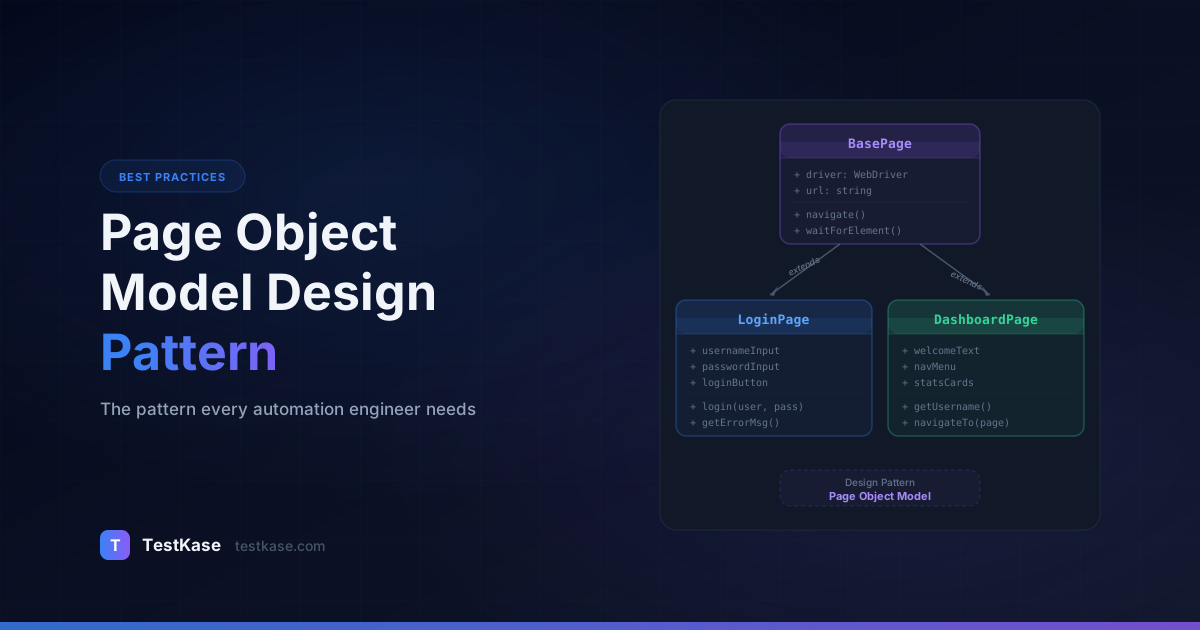
The Page Object Model is a design pattern where each page (or significant component) of your application gets its own class. That class encapsulates three things:
- Element locators — how to find the elements on that page
- Action methods — what a user can do on that page (fill forms, click buttons, navigate)
- State queries — what information the test can read from that page (is a message displayed, what is the current value)
Tests never touch locators or browser APIs directly. They interact with page object methods that read like natural language — loginPage.signIn(email, password) instead of driver.findElement(By.id("email")).sendKeys(email).
The maintenance math
Without POM, a locator change affects every test that uses that element. With POM, it affects exactly one file. If you have 500 tests that interact with your login flow, POM reduces the change surface from 500 files to 1. At 10 minutes per file, that is the difference between a 15-minute fix and an 83-hour project.
The pattern was first described by Simon Stewart (creator of WebDriver) and Martin Fowler. Its elegance lies in its simplicity — separate what you test from how you interact with the UI. That separation is what makes automation maintainable at scale.
Why POM Matters More Today
Modern web applications are more complex than the static HTML pages that existed when POM was first introduced. Single-page applications render components dynamically. Design systems change component libraries across the entire application in a single PR. Frontend teams ship UI updates weekly or even daily.
In this environment, the cost of tightly coupled tests is higher than ever. A 2024 Sauce Labs report found that UI locator changes account for 45% of all test maintenance effort in browser automation suites. POM directly attacks the largest single maintenance cost.
Consider what happens without POM in a realistic scenario:
- Your application has 15 pages
- Each page has 8–12 interactive elements
- You have 400 automated tests
- Over 6 months, the design team makes 30 locator changes (new data-testids, restructured forms, renamed components)
Without POM, each locator change requires finding and updating every test that references that locator. With 400 tests and an average of 3 locator references per test, a single change could affect dozens of files. Over 30 changes, the cumulative maintenance burden becomes overwhelming.
With POM, each of those 30 changes requires updating exactly one file — the page object. The 400 tests remain untouched.
Implementing POM in Playwright (TypeScript)
Playwright's architecture maps naturally to the Page Object Model. Here is a complete implementation.
The Base Page Class
Start with a base class that holds common functionality — navigation, waiting, screenshot capture — so individual page objects do not duplicate it.
import { Page, Locator } from '@playwright/test';

export abstract class BasePage {
  constructor(protected page: Page) {}

  async navigateTo(path: string) {
    await this.page.goto(path);
  }

  async getTitle(): Promise<string> {
    return this.page.title();
  }

  async waitForPageLoad() {
    await this.page.waitForLoadState('networkidle');
  }

  async screenshot(name: string) {
    await this.page.screenshot({ path: `screenshots/${name}.png` });
  }

  async isToastVisible(message: string): Promise<boolean> {
    const toast = this.page.locator(`[data-testid="toast"]:has-text("${message}")`);
    return toast.isVisible();
  }

  async waitForNavigation() {
    await this.page.waitForLoadState('domcontentloaded');
  }
}
The base class is a natural home for utility methods that apply across all pages — toast notifications, loading spinners, header/footer interactions. If you find yourself writing the same helper method in multiple page objects, move it to the base class.
A Concrete Page Object
import { Page, Locator, expect } from '@playwright/test';
import { BasePage } from './BasePage';

export class LoginPage extends BasePage {
  // Locators — defined once, used everywhere
  private readonly emailInput: Locator;
  private readonly passwordInput: Locator;
  private readonly submitButton: Locator;
  private readonly errorMessage: Locator;
  private readonly forgotPasswordLink: Locator;
  private readonly rememberMeCheckbox: Locator;
  private readonly socialLoginGoogle: Locator;

  constructor(page: Page) {
    super(page);
    this.emailInput = page.locator('[data-testid="login-email"]');
    this.passwordInput = page.locator('[data-testid="login-password"]');
    this.submitButton = page.locator('[data-testid="login-submit"]');
    this.errorMessage = page.locator('[data-testid="login-error"]');
    this.forgotPasswordLink = page.locator('a:has-text("Forgot password")');
    this.rememberMeCheckbox = page.locator('[data-testid="remember-me"]');
    this.socialLoginGoogle = page.locator('[data-testid="login-google"]');
  }

  // Actions
  async login(email: string, password: string) {
    await this.emailInput.fill(email);
    await this.passwordInput.fill(password);
    await this.submitButton.click();
  }

  async loginWithRememberMe(email: string, password: string) {
    await this.emailInput.fill(email);
    await this.passwordInput.fill(password);
    await this.rememberMeCheckbox.check();
    await this.submitButton.click();
  }

  async clickForgotPassword() {
    await this.forgotPasswordLink.click();
  }

  async clickGoogleLogin() {
    await this.socialLoginGoogle.click();
  }

  // State queries
  async getErrorText(): Promise<string> {
    return this.errorMessage.textContent() ?? '';
  }

  async isErrorVisible(): Promise<boolean> {
    return this.errorMessage.isVisible();
  }

  async isSubmitEnabled(): Promise<boolean> {
    return this.submitButton.isEnabled();
  }
}
Notice the structure: locators are private and readonly (encapsulated), actions are public methods with descriptive names, and state queries return values without making assertions. This separation is what makes POM powerful.
The Test
import { test, expect } from '@playwright/test';
import { LoginPage } from '../pages/LoginPage';
import { DashboardPage } from '../pages/DashboardPage';

test('user can log in with valid credentials', async ({ page }) => {
  const loginPage = new LoginPage(page);
  await loginPage.navigateTo('/login');
  await loginPage.login('user@example.com', 'validPassword123');

  const dashboard = new DashboardPage(page);
  await expect(dashboard.welcomeMessage).toContainText('Welcome');
});

test('login shows error for invalid credentials', async ({ page }) => {
  const loginPage = new LoginPage(page);
  await loginPage.navigateTo('/login');
  await loginPage.login('user@example.com', 'wrongPassword');

  expect(await loginPage.getErrorText()).toContain('Invalid credentials');
});

test('login button is disabled when fields are empty', async ({ page }) => {
  const loginPage = new LoginPage(page);
  await loginPage.navigateTo('/login');

  expect(await loginPage.isSubmitEnabled()).toBe(false);
});
Notice how the tests read like user stories. There are no CSS selectors, no page.click() calls, no implementation details. If the login form's markup changes entirely, you update LoginPage and every test continues to work.
Using Playwright Fixtures with POM
Playwright fixtures provide an elegant way to inject page objects into tests without manual instantiation:
// fixtures.ts
import { test as base } from '@playwright/test';
import { LoginPage } from './pages/LoginPage';
import { DashboardPage } from './pages/DashboardPage';
import { SettingsPage } from './pages/SettingsPage';

type PageFixtures = {
  loginPage: LoginPage;
  dashboardPage: DashboardPage;
  settingsPage: SettingsPage;
};

export const test = base.extend<PageFixtures>({
  loginPage: async ({ page }, use) => {
    await use(new LoginPage(page));
  },
  dashboardPage: async ({ page }, use) => {
    await use(new DashboardPage(page));
  },
  settingsPage: async ({ page }, use) => {
    await use(new SettingsPage(page));
  },
});

export { expect } from '@playwright/test';
Now tests become even cleaner:
import { test, expect } from '../fixtures';

test('user can log in', async ({ loginPage, dashboardPage }) => {
  await loginPage.navigateTo('/login');
  await loginPage.login('user@example.com', 'validPassword123');
  await expect(dashboardPage.welcomeMessage).toContainText('Welcome');
});
Fixtures also support dependency chaining. You can create an authenticatedPage fixture that logs in before the test runs, so tests that need an authenticated user skip the login flow entirely:
export const test = base.extend<PageFixtures>({
  authenticatedPage: async ({ page }, use) => {
    const loginPage = new LoginPage(page);
    await loginPage.navigateTo('/login');
    await loginPage.login(process.env.TEST_USER!, process.env.TEST_PASSWORD!);
    await page.waitForURL('/dashboard');
    await use(page);
  },
});
Implementing POM in Selenium (Python)
The same principles apply in Selenium, though the syntax differs.
from selenium.webdriver.common.by import By
from selenium.webdriver.support.ui import WebDriverWait
from selenium.webdriver.support import expected_conditions as EC

class BasePage:
    def __init__(self, driver):
        self.driver = driver
        self.wait = WebDriverWait(driver, 10)

    def find(self, locator):
        return self.wait.until(EC.presence_of_element_located(locator))

    def click(self, locator):
        self.wait.until(EC.element_to_be_clickable(locator)).click()

    def type_text(self, locator, text):
        element = self.find(locator)
        element.clear()
        element.send_keys(text)

    def get_text(self, locator):
        return self.find(locator).text

    def is_visible(self, locator):
        try:
            return self.wait.until(EC.visibility_of_element_located(locator)).is_displayed()
        except:
            return False


class LoginPage(BasePage):
    EMAIL = (By.CSS_SELECTOR, '[data-testid="login-email"]')
    PASSWORD = (By.CSS_SELECTOR, '[data-testid="login-password"]')
    SUBMIT = (By.CSS_SELECTOR, '[data-testid="login-submit"]')
    ERROR = (By.CSS_SELECTOR, '[data-testid="login-error"]')

    def login(self, email, password):
        self.type_text(self.EMAIL, email)
        self.type_text(self.PASSWORD, password)
        self.click(self.SUBMIT)

    def get_error_text(self):
        return self.find(self.ERROR).text

    def is_error_visible(self):
        return self.is_visible(self.ERROR)
And the corresponding pytest test:
import pytest
from pages.login_page import LoginPage
from pages.dashboard_page import DashboardPage

class TestLogin:
    def test_valid_login(self, driver):
        login_page = LoginPage(driver)
        driver.get("https://app.example.com/login")
        login_page.login("user@example.com", "validPassword123")

        dashboard = DashboardPage(driver)
        assert "Welcome" in dashboard.get_welcome_text()

    def test_invalid_login_shows_error(self, driver):
        login_page = LoginPage(driver)
        driver.get("https://app.example.com/login")
        login_page.login("user@example.com", "wrongPassword")

        assert login_page.is_error_visible()
        assert "Invalid credentials" in login_page.get_error_text()
Locator strategy matters
Use data-testid attributes as your primary locator strategy. They are immune to styling changes, unaffected by text translations, and signal intent — "this element is meant to be tested." Add them to your application's components during development, not as an afterthought.
Implementing POM in Cypress
Cypress has a different philosophy — it discourages traditional class-based page objects in favor of custom commands and app actions. However, POM still works well in Cypress for teams that prefer the pattern:
// cypress/pages/LoginPage.js
class LoginPage {
  get emailInput() { return cy.get('[data-testid="login-email"]'); }
  get passwordInput() { return cy.get('[data-testid="login-password"]'); }
  get submitButton() { return cy.get('[data-testid="login-submit"]'); }
  get errorMessage() { return cy.get('[data-testid="login-error"]'); }

  visit() {
    cy.visit('/login');
    return this;
  }

  login(email, password) {
    this.emailInput.type(email);
    this.passwordInput.type(password);
    this.submitButton.click();
    return this;
  }
}

export default new LoginPage();
// cypress/e2e/login.cy.js
import loginPage from '../pages/LoginPage';

describe('Login', () => {
  it('logs in with valid credentials', () => {
    loginPage.visit().login('user@example.com', 'validPassword123');
    cy.url().should('include', '/dashboard');
    cy.get('[data-testid="welcome-msg"]').should('contain', 'Welcome');
  });
});
The Cypress approach uses getter properties instead of constructor-initialized locators because Cypress commands are lazily evaluated. Each time you access this.emailInput, Cypress creates a fresh query rather than reusing a stale reference.
Handling Components, Not Just Pages
Real applications are not just pages — they are made of reusable components: navigation bars, modals, dropdown menus, data tables, date pickers. These components appear on multiple pages and deserve their own classes.
export class NavigationBar {
  constructor(private page: Page) {}

  private readonly searchInput = this.page.locator('[data-testid="nav-search"]');
  private readonly profileMenu = this.page.locator('[data-testid="nav-profile"]');
  private readonly notificationBell = this.page.locator('[data-testid="nav-notifications"]');

  async search(query: string) {
    await this.searchInput.fill(query);
    await this.searchInput.press('Enter');
  }

  async openProfile() {
    await this.profileMenu.click();
  }

  async getNotificationCount(): Promise<number> {
    const badge = this.page.locator('[data-testid="notification-count"]');
    const text = await badge.textContent();
    return parseInt(text ?? '0', 10);
  }
}
export class ConfirmationModal {
  constructor(private page: Page) {}

  private readonly modal = this.page.locator('[data-testid="confirm-modal"]');
  private readonly title = this.modal.locator('[data-testid="modal-title"]');
  private readonly confirmButton = this.modal.locator('[data-testid="modal-confirm"]');
  private readonly cancelButton = this.modal.locator('[data-testid="modal-cancel"]');

  async isVisible(): Promise<boolean> {
    return this.modal.isVisible();
  }

  async getTitleText(): Promise<string> {
    return this.title.textContent() ?? '';
  }

  async confirm() {
    await this.confirmButton.click();
  }

  async cancel() {
    await this.cancelButton.click();
  }
}
export class DataTable {
  constructor(private page: Page, private tableSelector: string) {}

  private get table() { return this.page.locator(this.tableSelector); }

  async getRowCount(): Promise<number> {
    return this.table.locator('tbody tr').count();
  }

  async getCellText(row: number, column: number): Promise<string> {
    return this.table.locator(`tbody tr:nth-child(${row}) td:nth-child(${column})`).textContent() ?? '';
  }

  async clickRow(row: number) {
    await this.table.locator(`tbody tr:nth-child(${row})`).click();
  }

  async sortByColumn(columnHeader: string) {
    await this.table.locator(`th:has-text("${columnHeader}")`).click();
  }
}
Page objects then compose these components:
export class DashboardPage extends BasePage {
  readonly nav = new NavigationBar(this.page);
  readonly confirmModal = new ConfirmationModal(this.page);
  readonly projectsTable = new DataTable(this.page, '[data-testid="projects-table"]');
  readonly welcomeMessage = this.page.locator('[data-testid="welcome-msg"]');

  async deleteProject(rowIndex: number) {
    await this.projectsTable.clickRow(rowIndex);
    await this.page.locator('[data-testid="delete-btn"]').click();
    await this.confirmModal.confirm();
  }
}
This composition approach keeps your page objects lean and your components reusable. The DataTable component can be used on any page that has a table — projects, users, test cases — without duplicating the table interaction logic.
Locator Strategies: A Practical Guide
Your choice of locator strategy directly impacts how resilient your page objects are to UI changes.
Playwright's recommended approach is to use role-based locators for interactive elements and data-testid for everything else:
// Preferred: role-based for buttons, links, inputs
this.submitButton = page.getByRole('button', { name: 'Sign In' });
this.emailInput = page.getByRole('textbox', { name: 'Email' });

// Preferred: data-testid for non-interactive or ambiguous elements
this.errorMessage = page.locator('[data-testid="login-error"]');
this.loadingSpinner = page.locator('[data-testid="spinner"]');
Role-based locators have a compelling advantage: they double as accessibility checks. If your button is not exposed with the correct ARIA role, the locator will fail — surfacing accessibility issues during test automation rather than requiring a separate audit.
Project Folder Structure
A well-organized POM project follows a predictable structure:
tests/
├── pages/
│   ├── BasePage.ts
│   ├── LoginPage.ts
│   ├── DashboardPage.ts
│   ├── SettingsPage.ts
│   └── CheckoutPage.ts
├── components/
│   ├── NavigationBar.ts
│   ├── Modal.ts
│   ├── DataTable.ts
│   └── DatePicker.ts
├── specs/
│   ├── auth/
│   │   ├── login.spec.ts
│   │   └── registration.spec.ts
│   ├── dashboard/
│   │   └── dashboard.spec.ts
│   └── checkout/
│       └── checkout.spec.ts
├── fixtures/
│   ├── auth.fixture.ts
│   └── testData.ts
└── utils/
    ├── helpers.ts
    └── api-helpers.ts
Naming Conventions That Scale
As your page object library grows past 20–30 files, consistent naming becomes essential for discoverability:
- Page objects: Name them after the page or screen they represent —
LoginPage,DashboardPage,UserSettingsPage. Avoid generic names likePage1orMainPage. - Component objects: Name them after the component type —
NavigationBar,ConfirmationModal,SearchDropdown. If a component variant exists only on one page, consider making it a private method on that page's object rather than a separate class. - Action methods: Use verb phrases that describe user intent —
login(),submitForm(),searchFor(query),deleteItem(id). Avoid technical names likeclickButton()orfillInput(). - State query methods: Use
getprefix for values andis/hasprefix for booleans —getErrorText(),getItemCount(),isErrorVisible(),hasUnsavedChanges().
Variations and Alternatives
The Screenplay Pattern
The Screenplay Pattern takes POM further by modeling tests around actors, tasks, and questions rather than pages. Instead of loginPage.login(user), you write actor.attemptsTo(Login.withCredentials(user)). This pattern excels in complex workflows that span many pages but adds verbosity that is often unnecessary for simpler applications.
// Screenplay style — more verbose but more expressive
const actor = Actor.named('Alice');
await actor.attemptsTo(
  Navigate.to('/login'),
  Enter.theValue('alice@example.com').into(LoginForm.emailField),
  Enter.theValue('password123').into(LoginForm.passwordField),
  Click.on(LoginForm.submitButton),
);
const welcomeText = await actor.asks(Text.of(Dashboard.welcomeMessage));
expect(welcomeText).toContain('Welcome');
The Screenplay Pattern is most valuable when:
- Tests describe complex business workflows spanning many pages
- You need to model different user personas with different capabilities
- Your domain language matters more than your UI structure
- Multiple teams contribute to the test suite and need a consistent vocabulary
For most web applications with straightforward CRUD interfaces, POM provides sufficient abstraction without Screenplay's overhead.
App Actions (Cypress Style)
Cypress encourages "app actions" — directly invoking application methods or making API calls to set up state, rather than navigating through the UI. Instead of using a page object to fill the login form, you call cy.request('POST', '/api/login', credentials) and set the auth cookie directly. This is faster and less flaky for setup steps but does not test the actual UI interaction.
The practical guidance: use app actions for test setup and teardown, but use page objects for the interactions you are actually testing. If a test verifies the login form, it should interact with the form through a page object. If a test verifies the dashboard but needs to be logged in first, use an API call to authenticate.
Fluent Page Objects
Fluent POM methods return this (or the next page object) to enable method chaining:
export class LoginPage extends BasePage {
  async enterEmail(email: string): Promise<LoginPage> {
    await this.emailInput.fill(email);
    return this;
  }

  async enterPassword(password: string): Promise<LoginPage> {
    await this.passwordInput.fill(password);
    return this;
  }

  async submit(): Promise<DashboardPage> {
    await this.submitButton.click();
    return new DashboardPage(this.page);
  }
}

// Usage
const dashboard = await loginPage
  .enterEmail('user@example.com')
  .then(p => p.enterPassword('password'))
  .then(p => p.submit());
This reads beautifully but can make debugging harder — when a chain fails, the stack trace does not always pinpoint which step broke. The fluent pattern works best when your page objects have a clear, linear flow (like a multi-step wizard) and less well for pages with many independent actions.
Section Objects for Large Pages
When a single page is too complex for one page object — think a settings page with six tabs, each containing multiple forms — use section objects:
export class SettingsPage extends BasePage {
  readonly profileSection = new ProfileSection(this.page);
  readonly securitySection = new SecuritySection(this.page);
  readonly notificationsSection = new NotificationsSection(this.page);
  readonly billingSection = new BillingSection(this.page);

  async navigateToTab(tabName: string) {
    await this.page.locator(`[data-testid="settings-tab-${tabName}"]`).click();
  }
}

class ProfileSection {
  constructor(private page: Page) {}

  private readonly nameInput = this.page.locator('[data-testid="profile-name"]');
  private readonly bioInput = this.page.locator('[data-testid="profile-bio"]');
  private readonly saveButton = this.page.locator('[data-testid="profile-save"]');

  async updateName(name: string) {
    await this.nameInput.fill(name);
    await this.saveButton.click();
  }

  async updateBio(bio: string) {
    await this.bioInput.fill(bio);
    await this.saveButton.click();
  }
}
This keeps each section focused and prevents the SettingsPage class from becoming a 500-line monster.
POM Anti-Patterns to Avoid
Giant page objects. If your page object has 50 methods and 30 locators, it is doing too much. Break it into smaller components or section objects. The "page" in POM does not have to be a full page — it can be a panel, a form, or a widget. A good rule of thumb: if your page object file exceeds 200 lines, look for extraction opportunities.
Assertions inside page objects. Page objects should describe what the page can do, not what the test expects. Keep assertions in your test files. When a page object contains assertions, you cannot reuse it for tests with different expectations.
// BAD — assertion inside page object
async verifyLoginSuccess() {
  const message = await this.welcomeMessage.textContent();
  expect(message).toContain('Welcome'); // Don't do this
}

// GOOD — return data, let the test assert
async getWelcomeText(): Promise<string> {
  return this.welcomeMessage.textContent() ?? '';
}
Exposing locators publicly. If tests can access loginPage.emailInput directly and call Playwright/Selenium methods on it, you have broken the encapsulation that makes POM valuable. Expose behavior methods, not raw locators. The one exception is read-only locators used with Playwright's expect() API — that is an acceptable pattern since Playwright's assertions are designed to work with locators directly.
Not using a base class. Without a base class, every page object reinvents common utilities — waits, navigation, error handling. A shared base eliminates that duplication.
Creating page objects for pages that do not need them. If a page appears in exactly one test and has two elements, a full page object class is overkill. Use POM where it provides actual reuse value.
Hardcoding test data inside page objects. Page objects should accept data as parameters, not contain it. loginPage.login(email, password) is correct. loginPage.loginAsAdmin() with hardcoded credentials is an anti-pattern — it couples the page object to specific test data.
Common Mistakes
Building page objects bottom-up. Do not create page objects for every page in your application and then write tests. Build them top-down — write the test first, describe the interactions you need, and then implement the page object to support those interactions. This ensures you only build what you need.
Ignoring wait strategies. A page object that does not wait for elements to be ready before interacting with them will produce flaky tests. Build waits into your action methods — not in the tests. Playwright's auto-wait handles most cases, but for Selenium you need explicit waits in every action method.
Mixing page object granularity. Be consistent. If LoginPage is a full-page object, NavigationBar should be a component object — not a method buried inside DashboardPage. Inconsistency confuses contributors and creates duplication.
Not handling page transitions. When an action on one page navigates to another page, the method should clearly signal this. Some teams return the new page object from the action method:
async submitOrder(): Promise<OrderConfirmationPage> {
  await this.submitButton.click();
  await this.page.waitForURL('/order/confirmation');
  return new OrderConfirmationPage(this.page);
}
This makes the test's page flow explicit and prevents tests from using a stale page object after navigation.
Over-abstracting too early. Do not build a generic FormPage base class that handles every possible form interaction before you know what your forms look like. Write three or four concrete page objects first, then extract the common patterns into a base class. Premature abstraction leads to rigid hierarchies that are harder to change than duplicated code.
Managing Page Objects and Test Cases with TestKase
As your page object library grows, so does the number of test scenarios it supports. TestKase helps you keep track of what is automated, what is still manual, and where your coverage gaps are.
Organize your test cases in TestKase with the same structure as your page objects — by feature area, by page, by workflow. Link each automated test to its corresponding TestKase test case, and you get full traceability from requirement to page object to execution result.
When a UI change breaks a page object, TestKase's execution history shows you which tests were affected and when the regression started. This makes it easier to identify the root cause and prioritize fixes — instead of discovering broken tests one at a time across different test runs.
When your team builds new page objects, TestKase's AI can generate initial test scenarios for that page — giving your automation engineers a clear starting list of what to implement rather than guessing at coverage. Describe the page's functionality, and TestKase produces structured test cases with steps, expected results, and edge cases that map directly to page object methods.
Organize Your Test Cases with TestKaseConclusion
The Page Object Model is not glamorous, but it is the difference between a test suite that scales and one that collapses under its own weight. Encapsulate locators and actions in dedicated classes, compose page objects from reusable components, keep assertions in your tests, and resist the urge to overengineer.
The key principles to remember:
- Every locator should exist in exactly one place
- Page objects describe capability, tests describe expectations
- Compose complex pages from focused component objects
- Build top-down from test needs, not bottom-up from page inventory
- Use data-testid or role-based locators for maximum resilience
- Extract base classes and shared components only after you see real duplication
When these rules hold, UI changes become five-minute fixes instead of full-day projects. Your automation suite becomes an asset that accelerates development rather than a liability that slows it down.
Stay up to date with TestKase
Get the latest articles on test management, QA best practices, and product updates delivered to your inbox.
SubscribeShare this article
Related Articles
Critical, Serious, Moderate, Minor: How to Triage Accessibility Issues by Severity
A practical triage policy template — SLAs per severity, ownership across design / engineering / content / QA, and how to share findings cross-team without forwarding PDFs.
Read more →Accessibility Testing in CI/CD: Catching WCAG Issues Before They Ship
Three integration patterns, GitHub Actions / GitLab / CircleCI templates, and a 3-quarter rollout playbook to take an engineering team from zero accessibility in CI to block-on-fail.
Read more →Color Contrast: The #1 Accessibility Violation (and How to Fix It in 30 Minutes)
Color contrast is roughly 38% of every accessibility scan report. Here's the math, the 8 patterns that fail in 90% of apps, and a designer-developer playbook for fixing them without breaking your brand.
Read more →