Building a Test Automation Framework from Scratch

Building a Test Automation Framework from Scratch
You just ran your 200th manual regression test this quarter. Each cycle takes your team three full days, and somewhere around test 150, the copy-paste fatigue sets in — steps get skipped, edge cases get ignored, and bugs slip through. Your manager asks, "Why don't we just automate this?" You nod, open a blank project, and realize you have no idea where to start.
That gap between "we should automate" and "we have a working framework" is where most teams stall. They install Selenium, write a few scripts, and within weeks the suite is a tangled mess of hardcoded waits, duplicated locators, and tests that break every time the UI changes. The problem was never the tool — it was the absence of a framework around it.
Building a test automation framework from scratch is not as intimidating as it sounds, but it does require deliberate architectural decisions upfront. This guide walks you through every layer — from selecting your language and tooling to structuring your project for long-term maintainability. By the end, you will have a clear blueprint for a framework that can scale from 10 tests to 10,000 without collapsing under its own weight.
Framework vs. Tool: Understanding the Difference
Before writing a single line of code, you need to internalize a distinction that trips up most beginners: a tool is not a framework.
Selenium, Playwright, and Cypress are tools — they provide APIs to interact with browsers. A framework is the scaffolding you build around those tools: configuration management, test data handling, reporting, logging, reusable utilities, and design patterns that keep your codebase clean as it grows from 10 tests to 10,000.
Why this matters
Teams that skip the framework step and jump straight to writing test scripts typically hit a wall at around 50–100 tests. Maintenance costs spike, test runs become unreliable, and the suite gets abandoned within six months. A well-designed framework reduces maintenance effort by 40–60% over the first year.
Think of it this way: the tool is the engine, the framework is the car. You would not hand someone an engine block and tell them to drive to work. The framework gives your tests structure, consistency, and the ability to scale without collapsing under their own weight.
What a Framework Actually Provides
A mature framework provides these capabilities, none of which come from the automation tool alone:
- Environment management — Running the same tests against dev, staging, and production with a single configuration change
- Test data isolation — Each test creates and cleans up its own data, enabling parallel execution
- Centralized locator management — UI element selectors live in page objects, not scattered across test files
- Reusable action libraries — Common workflows (login, navigation, form fill) are encapsulated in methods
- Automatic failure handling — Screenshots, videos, and logs captured on failure without manual intervention
- Configurable retry logic — Flaky tests can be automatically retried before being reported as failures
- Result reporting — HTML reports, CI artifacts, and integration with test management platforms
Without a framework, each of these capabilities requires ad-hoc code in every test file. With a framework, they are built once and available everywhere.
The Cost of Not Having a Framework
The numbers tell a stark story. A 2024 survey by Test Automation University found that teams without structured frameworks spend:
- 65% of automation time on maintenance vs. 25% for teams with well-designed frameworks
- 3x more time debugging test failures that turn out to be infrastructure issues, not real bugs
- 2.5x longer to onboard new team members into the automation codebase
These costs compound. A 5-person QA team spending 65% of their time on maintenance effectively has only 1.75 engineers doing productive work. A well-designed framework flips that ratio, freeing 3.75 engineers to write new tests and improve coverage.
The Three-Layer Architecture
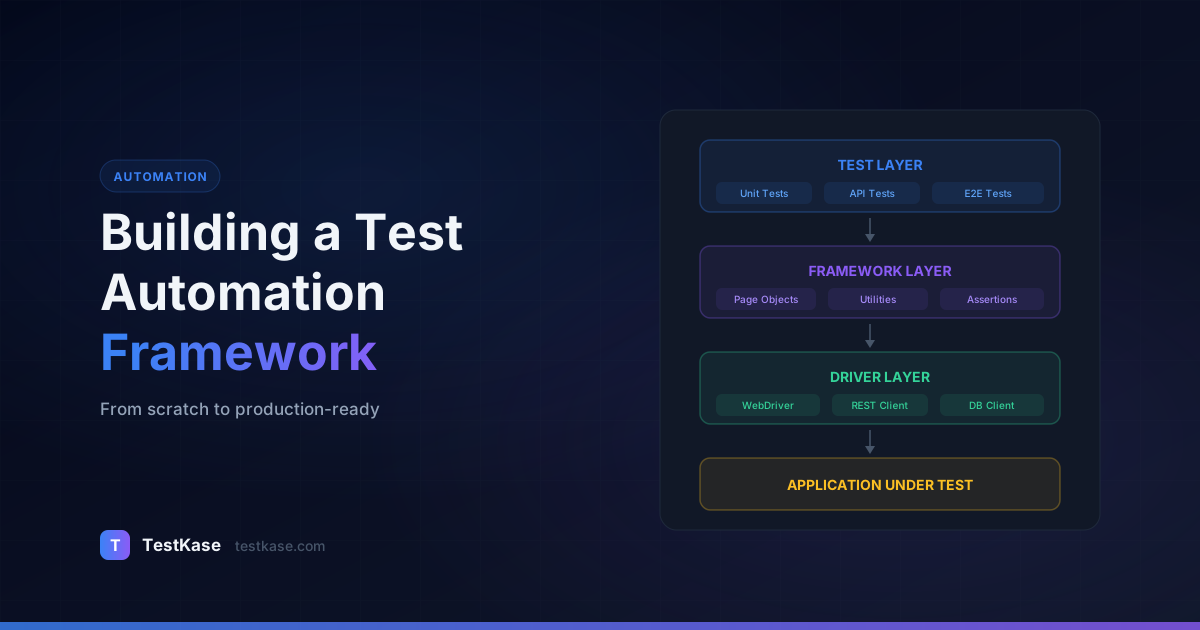
Every robust automation framework follows a layered architecture. The specifics vary, but the concept stays the same — separate concerns so that changes in one area do not cascade across the entire codebase.
Layer 1: The Driver Layer
This is the lowest level. It wraps your automation tool's API and provides a clean interface for browser interactions. If you are using Selenium, this layer abstracts away WebDriver initialization, browser configuration, implicit and explicit waits, and screenshot capture.
The driver layer should be the only place in your codebase that directly imports tool-specific classes. If you ever need to swap Selenium for Playwright, you change this layer — everything above it remains untouched.
// src/core/BrowserManager.ts
import { Browser, BrowserContext, Page, chromium, firefox, webkit } from '@playwright/test';
import { getConfig } from '../config/ConfigReader';

export class BrowserManager {
  private browser: Browser | null = null;
  private context: BrowserContext | null = null;

  async launch(): Promise<Page> {
    const config = getConfig();
    const browserType = config.browser === 'firefox' ? firefox
      : config.browser === 'webkit' ? webkit
      : chromium;

    this.browser = await browserType.launch({
      headless: config.headless,
      slowMo: config.slowMo ?? 0,
    });

    this.context = await this.browser.newContext({
      viewport: { width: 1280, height: 720 },
      screenshot: 'only-on-failure',
    });

    return this.context.newPage();
  }

  async close(): Promise<void> {
    await this.context?.close();
    await this.browser?.close();
  }
}
Layer 2: The Framework Layer
This is where your reusable components live: page objects, utility functions, custom assertions, test data factories, configuration readers, and reporting hooks. The framework layer consumes the driver layer and exposes high-level methods like loginPage.signIn(user) or checkoutFlow.completePurchase(cart).
The framework layer is your team's most valuable asset. Well-designed page objects and utilities make the difference between a test that takes 45 minutes to write and one that takes 10 minutes.
Layer 3: The Test Layer
Tests themselves. Each test file should read almost like plain English — describing what the test does, not how the browser achieves it. A good test at this layer looks like:
def test_user_can_add_item_to_cart():
    home = HomePage(driver)
    home.search_for("wireless headphones")
    results = SearchResultsPage(driver)
    results.add_first_item_to_cart()
    cart = CartPage(driver)
    assert cart.item_count() == 1
No locators, no waits, no browser plumbing — just behavior.
Why Layering Matters: A Real Example
Consider a scenario where your team decides to migrate from Selenium to Playwright. Without layered architecture, every test file imports Selenium classes directly. Migration means rewriting every test.
With layered architecture, only the Driver Layer changes. Your page objects still expose the same methods (login(), search(), addToCart()), and your tests still call those same methods. The migration touches dozens of framework files instead of hundreds of test files.
A team at an e-commerce company reported that their layered architecture allowed two engineers to migrate 800 tests from Selenium to Playwright in six weeks — because they only had to rewrite the driver layer and update page object internals. The 800 test files themselves required zero changes.
The Base Page Class: Foundation of the Framework Layer
The base page class is the single most important piece of your framework. It provides the common methods that every page object inherits:
// src/core/BasePage.ts
import { Page, Locator } from '@playwright/test';

export abstract class BasePage {
  constructor(protected page: Page) {}

  async navigateTo(path: string) {
    await this.page.goto(path);
  }

  async getTitle(): Promise<string> {
    return this.page.title();
  }

  async waitForPageLoad() {
    await this.page.waitForLoadState('networkidle');
  }

  async screenshot(name: string) {
    await this.page.screenshot({ path: `screenshots/${name}.png` });
  }

  async getCurrentUrl(): Promise<string> {
    return this.page.url();
  }

  async isElementVisible(locator: Locator): Promise<boolean> {
    return locator.isVisible();
  }

  async waitForElement(locator: Locator, timeout: number = 10000) {
    await locator.waitFor({ state: 'visible', timeout });
  }
}
Every page object in your framework extends this class. Common operations — navigation, screenshots, visibility checks — are defined once and available everywhere. When you need to add a new common utility (say, a toast notification checker), you add it to the base class and every page object gains access immediately.
Choosing Your Language and Tooling
Your choice of programming language should be driven by two factors: what your team already knows, and what your application stack uses.
If your application is built in JavaScript/TypeScript, Playwright or Cypress with TypeScript is a natural fit — your developers can contribute to the test codebase without learning a new language. If your backend is Java or Python, Selenium with that same language keeps the barrier low.
Practical advice
Do not pick a language because it is "best for automation." Pick the one that maximizes contribution from your team. A framework in Python that five engineers can maintain beats a framework in Kotlin that only one person understands.
Here is a quick decision guide:
- JavaScript/TypeScript teams — Playwright (modern, fast, great DX) or Cypress (if you only need Chrome-family browsers and value simplicity)
- Java teams — Selenium with TestNG or JUnit 5, or Playwright for Java
- Python teams — Selenium with pytest, or Playwright for Python
- C#/.NET teams — Selenium with NUnit or Playwright for .NET
Essential Dependencies Beyond the Automation Tool
Regardless of which tool you choose, your framework needs supporting libraries:
| Category | JavaScript/TypeScript | Java | Python | |---|---|---|---| | Test runner | Playwright Test, Jest | TestNG, JUnit 5 | pytest | | Assertions | Playwright expect, chai | AssertJ, Hamcrest | pytest assertions | | Test data | Faker.js | JavaFaker | Faker | | Config | dotenv, config | Typesafe Config | python-dotenv | | Reporting | Playwright HTML, Allure | Allure, ExtentReports | Allure, pytest-html | | API helpers | Axios, got | RestAssured | requests | | Linting | ESLint, Prettier | Checkstyle | flake8, black |
Install these from the start. Retrofitting linting or reporting into an existing framework is painful — adding them upfront takes minutes.
Designing Your Project Structure
A clean folder structure prevents your framework from turning into a junk drawer. Here is a battle-tested layout for a Playwright + TypeScript project:
automation-framework/
├── config/
│   ├── default.json
│   ├── staging.json
│   └── production.json
├── src/
│   ├── core/
│   │   ├── BrowserManager.ts
│   │   └── BasePage.ts
│   ├── pages/
│   │   ├── LoginPage.ts
│   │   ├── DashboardPage.ts
│   │   └── CheckoutPage.ts
│   ├── components/
│   │   ├── NavigationBar.ts
│   │   └── Modal.ts
│   ├── utils/
│   │   ├── TestDataFactory.ts
│   │   ├── ApiHelper.ts
│   │   └── FileUtils.ts
│   └── fixtures/
│       └── auth.fixture.ts
├── tests/
│   ├── smoke/
│   ├── regression/
│   └── e2e/
├── test-data/
│   ├── users.json
│   └── products.json
├── reports/
├── playwright.config.ts
├── package.json
└── tsconfig.json
A few principles behind this layout: pages mirror your application's UI structure, tests are grouped by suite type (smoke, regression, end-to-end), configuration is environment-aware, and test data lives separate from test logic. The core/ directory holds framework infrastructure that rarely changes.
Naming Conventions That Scale
Consistent naming prevents confusion as your team grows:
- Page objects:
PascalCasematching the page name —LoginPage.ts,CheckoutPage.ts - Component objects:
PascalCasematching the component —NavigationBar.ts,Modal.ts - Test files:
kebab-casewith suite prefix —smoke/login.spec.ts,regression/checkout.spec.ts - Utility files:
PascalCasefor classes,camelCasefor pure functions —TestDataFactory.ts,helpers.ts - Config files:
lowercasematching the environment —staging.json,production.json
Growing the Structure Over Time
Your initial framework will not have every folder. That is fine. Start with:
automation-framework/
├── config/
│   └── default.json
├── src/
│   ├── core/
│   │   └── BasePage.ts
│   └── pages/
│       └── LoginPage.ts
├── tests/
│   └── login.spec.ts
├── playwright.config.ts
└── package.json
Add folders as you need them. When you write your third test and realize you need shared test data, create test-data/. When you add a second environment, create config/staging.json. When you build your fifth page object and notice the NavigationBar is duplicated across three of them, create components/. Let real needs drive structural evolution.
Configuration Management
Hardcoded values are the fastest way to make your framework environment-dependent and fragile. Externalize everything: base URLs, credentials, timeouts, browser settings, and API endpoints.
Use environment-specific config files that merge with a default config:
// config/default.json
{
  "baseUrl": "https://staging.example.com",
  "timeout": 30000,
  "retries": 1,
  "browser": "chromium",
  "headless": true
}

// config/production.json
{
  "baseUrl": "https://www.example.com",
  "retries": 2
}
Your framework reads the target environment from an environment variable (TEST_ENV=production) and merges the configs. This way, the same test suite runs against staging, production, or a local dev server without changing a single test file.
Here is a configuration reader that implements this merge strategy:
// src/config/ConfigReader.ts
import defaultConfig from '../../config/default.json';
import fs from 'fs';
import path from 'path';

interface FrameworkConfig {
  baseUrl: string;
  timeout: number;
  retries: number;
  browser: 'chromium' | 'firefox' | 'webkit';
  headless: boolean;
  slowMo?: number;
}

let cachedConfig: FrameworkConfig | null = null;

export function getConfig(): FrameworkConfig {
  if (cachedConfig) return cachedConfig;

  const env = process.env.TEST_ENV ?? 'default';
  let envConfig = {};

  const envConfigPath = path.join(__dirname, `../../config/${env}.json`);
  if (fs.existsSync(envConfigPath)) {
    envConfig = JSON.parse(fs.readFileSync(envConfigPath, 'utf-8'));
  }

  cachedConfig = { ...defaultConfig, ...envConfig } as FrameworkConfig;
  return cachedConfig;
}
Secrets Management
Configuration files should never contain secrets. Use environment variables for credentials, API keys, and tokens:
// Access secrets from environment variables, never from config files
const testUser = process.env.TEST_USER ?? 'default-test-user@example.com';
const testPassword = process.env.TEST_PASSWORD;

if (!testPassword) {
  throw new Error('TEST_PASSWORD environment variable is required');
}
In CI, inject these through GitHub Actions secrets, GitLab CI variables, or your pipeline's secret management system. Locally, use a .env file (added to .gitignore) with the dotenv package.
Design Patterns That Pay Off
Two patterns are non-negotiable in any serious automation framework:
Page Object Model (POM)
Encapsulate each page's elements and actions inside a dedicated class. When a UI element changes — say, a button's data-testid goes from submit-btn to submit-order — you update one file, not forty tests.
export class LoginPage extends BasePage {
  private emailInput = this.page.locator('[data-testid="email"]');
  private passwordInput = this.page.locator('[data-testid="password"]');
  private submitButton = this.page.locator('[data-testid="login-submit"]');
  private errorMessage = this.page.locator('[data-testid="login-error"]');

  async login(email: string, password: string) {
    await this.emailInput.fill(email);
    await this.passwordInput.fill(password);
    await this.submitButton.click();
  }

  async getErrorText(): Promise<string> {
    return await this.errorMessage.textContent() ?? '';
  }

  async isErrorVisible(): Promise<boolean> {
    return await this.errorMessage.isVisible();
  }
}
Factory Pattern for Test Data
Instead of hardcoding test data inside tests, use factories that generate data dynamically:
import { faker } from '@faker-js/faker';

export interface User {
  email: string;
  password: string;
  name: string;
  role?: string;
}

export class UserFactory {
  static createStandard(): User {
    return {
      email: `user_${Date.now()}_${Math.random().toString(36).slice(2)}@test.com`,
      password: "SecurePass123!",
      name: faker.person.fullName(),
    };
  }

  static createAdmin(): User {
    return { ...this.createStandard(), role: "admin" };
  }

  static createWithRole(role: string): User {
    return { ...this.createStandard(), role };
  }
}
Dynamic data generation eliminates conflicts when tests run in parallel — no two tests fight over the same user account.
API Helper for Fast Test Setup
Not every test needs to set up data through the UI. An API helper lets you create preconditions quickly:
// src/utils/ApiHelper.ts
import { getConfig } from '../config/ConfigReader';

export class ApiHelper {
  private baseUrl: string;
  private token: string | null = null;

  constructor() {
    this.baseUrl = getConfig().baseUrl;
  }

  async authenticate(email: string, password: string): Promise<void> {
    const response = await fetch(`${this.baseUrl}/api/auth/login`, {
      method: 'POST',
      headers: { 'Content-Type': 'application/json' },
      body: JSON.stringify({ email, password }),
    });
    const data = await response.json();
    this.token = data.accessToken;
  }

  async createUser(userData: Record<string, unknown>): Promise<Record<string, unknown>> {
    const response = await fetch(`${this.baseUrl}/api/users`, {
      method: 'POST',
      headers: {
        'Content-Type': 'application/json',
        'Authorization': `Bearer ${this.token}`,
      },
      body: JSON.stringify(userData),
    });
    return response.json();
  }

  async deleteUser(userId: string): Promise<void> {
    await fetch(`${this.baseUrl}/api/users/${userId}`, {
      method: 'DELETE',
      headers: { 'Authorization': `Bearer ${this.token}` },
    });
  }
}
Using API calls for setup reduces test execution time dramatically. A login flow that takes 5 seconds through the UI takes 200ms via API. Over a 500-test suite, that difference adds up to 40 minutes saved.
Custom Assertions for Domain-Specific Validation
Beyond the standard assertion libraries, build custom assertions that match your application's domain:
// src/utils/CustomAssertions.ts
import { expect, Locator } from '@playwright/test';

export async function expectToastMessage(page: Page, message: string) {
  const toast = page.locator('[data-testid="toast"]');
  await expect(toast).toBeVisible();
  await expect(toast).toContainText(message);
  // Wait for toast to auto-dismiss
  await expect(toast).toBeHidden({ timeout: 10000 });
}

export async function expectTableRowCount(table: Locator, expectedCount: number) {
  const rows = table.locator('tbody tr');
  await expect(rows).toHaveCount(expectedCount);
}

export async function expectFormValidationError(form: Locator, fieldName: string, errorMessage: string) {
  const errorElement = form.locator(`[data-testid="error-${fieldName}"]`);
  await expect(errorElement).toBeVisible();
  await expect(errorElement).toContainText(errorMessage);
}
Custom assertions reduce duplication across tests and make failure messages more descriptive. When expectToastMessage fails, the error clearly says "expected toast with message 'User created' but toast was not visible" — far more helpful than a generic "element not found."
Reporting and CI Integration
Your framework is only as useful as the feedback it provides. Invest early in reporting:
- HTML reports — Playwright's built-in HTML reporter or Allure for rich, interactive reports
- Screenshots on failure — Capture the browser state automatically when a test fails
- Video recording — Playwright and Cypress both support video capture for debugging
- CI integration — Publish reports as build artifacts in GitHub Actions, GitLab CI, or Jenkins
A minimal GitHub Actions workflow looks like this:
name: E2E Tests
on: [push, pull_request]
jobs:
  test:
    runs-on: ubuntu-latest
    steps:
      - uses: actions/checkout@v4
      - uses: actions/setup-node@v4
      - run: npm ci
      - run: npx playwright install --with-deps
      - run: npx playwright test
      - uses: actions/upload-artifact@v4
        if: always()
        with:
          name: test-reports
          path: reports/
The if: always() ensures reports upload even when tests fail — which is exactly when you need them most.
Configuring Playwright for Maximum Feedback
// playwright.config.ts
import { defineConfig } from '@playwright/test';
import { getConfig } from './src/config/ConfigReader';

const config = getConfig();

export default defineConfig({
  testDir: './tests',
  timeout: config.timeout,
  retries: config.retries,
  workers: process.env.CI ? 4 : 1,
  fullyParallel: true,

  reporter: [
    ['html', { open: 'never', outputFolder: 'reports/html' }],
    ['junit', { outputFile: 'reports/junit-results.xml' }],
    ['list'],
  ],

  use: {
    baseURL: config.baseUrl,
    screenshot: 'only-on-failure',
    video: 'retain-on-failure',
    trace: 'on-first-retry',
  },

  projects: [
    { name: 'chromium', use: { browserName: 'chromium' } },
    { name: 'firefox', use: { browserName: 'firefox' } },
    { name: 'webkit', use: { browserName: 'webkit' } },
  ],
});
This configuration captures screenshots, video, and traces only when tests fail — minimizing storage overhead while ensuring you have debugging data when you need it.
Slack and Team Notifications
For teams that need immediate feedback, add CI notifications:
# Add to your GitHub Actions workflow
- name: Notify on failure
  if: failure()
  uses: slackapi/slack-github-action@v1
  with:
    payload: |
      {
        "text": "E2E tests failed on ${{ github.ref_name }}. ${{ github.run_url }}"
      }
  env:
    SLACK_WEBHOOK_URL: ${{ secrets.SLACK_WEBHOOK }}
Fast feedback loops are essential. The sooner engineers know about a test failure, the cheaper it is to fix. A failure caught in a PR check takes 15 minutes to fix. The same failure discovered in a nightly run takes 2 hours because the context has been lost.
Test Isolation and Parallel Execution
Tests that depend on each other are the single biggest source of fragility in automation frameworks. Two rules will save you countless hours:
- Each test creates its own data — Never assume data from another test exists
- Each test cleans up after itself — Use
afterEachhooks to delete created entities
test.describe('User management', () => {
  let apiHelper: ApiHelper;
  let createdUserId: string;

  test.beforeAll(async () => {
    apiHelper = new ApiHelper();
    await apiHelper.authenticate('admin@test.com', 'adminpass');
  });

  test.afterEach(async () => {
    if (createdUserId) {
      await apiHelper.deleteUser(createdUserId);
      createdUserId = '';
    }
  });

  test('admin can create a new user', async ({ page }) => {
    const user = UserFactory.createStandard();
    const dashboardPage = new DashboardPage(page);
    await dashboardPage.navigateTo('/admin/users');

    const usersPage = new UsersPage(page);
    await usersPage.clickCreateUser();
    await usersPage.fillUserForm(user);
    await usersPage.submitForm();

    createdUserId = await usersPage.getLastCreatedUserId();
    expect(await usersPage.isUserVisible(user.name)).toBe(true);
  });
});
Parallel Execution Configuration
Parallel execution requires isolated tests. Here is a practical approach to verifying isolation before enabling parallelism:
- Run your suite sequentially and ensure all tests pass
- Run the suite in reverse order (
--shard 1/1with shuffled test order) — if tests fail, they have hidden dependencies - Enable 2 workers and run repeatedly — intermittent failures indicate shared state
- Scale to 4-8 workers once isolation is confirmed
// playwright.config.ts — gradual parallelization
export default defineConfig({
  workers: process.env.CI ? 4 : 1,  // Start with 4 in CI
  fullyParallel: true,               // Parallelize within describe blocks too
  retries: process.env.CI ? 2 : 0,   // Retry failures in CI (catches rare timing issues)
});
Common Mistakes When Building a Framework
Overengineering from day one. You do not need a custom logging library, a plugin system, and an abstraction layer over your abstraction layer before you have written your first test. Start simple. Add complexity only when you feel the pain of not having it.
Ignoring test isolation. Tests that depend on each other — where test B assumes test A already ran and created some data — are a ticking time bomb. Each test should set up its own preconditions and clean up after itself.
Writing framework code nobody asked for. Building a beautiful wrapper around browser alerts when your app does not use browser alerts is wasted effort. Let your application's actual behavior drive framework development.
Skipping code reviews for test code. Test code is production code. It deserves the same review rigor, the same linting rules, and the same refactoring attention. Teams that treat test code as second-class end up with unmaintainable suites.
Not versioning your framework. As the framework matures, pin versions of your dependencies, tag releases, and maintain a changelog. When a Playwright update introduces a breaking change, you want to know exactly which framework version worked.
Copying code from tutorials without understanding it. Online examples demonstrate concepts but rarely show production-ready patterns. A tutorial sleep(3000) becomes a production reliability problem. Understand what each line does before incorporating it into your framework.
Building for the wrong scale. A 5-person team testing a single application does not need the same framework architecture as a 50-person platform engineering team. Match your framework's complexity to your actual needs, with room for growth but not over-preparation.
Not measuring framework health. Track key metrics from the start: test execution time, flaky test rate, time to write a new test, and time to fix a broken test. These metrics tell you whether your framework is healthy or degrading.
Framework Evolution: A Realistic Timeline
Here is how a well-planned framework typically evolves over its first year:
Weeks 1–2: Minimum Viable Framework
- Driver layer with browser management
- Base page class with navigation and screenshot
- 2–3 page objects for your most-tested pages
- Configuration reader with staging/production support
- 10–15 initial tests covering critical paths
Weeks 3–6: Stabilization
- Test data factories for user and entity creation
- API helper for fast test setup
- CI pipeline with test execution and report publishing
- 30–50 tests across smoke and regression suites
Months 2–3: Scaling
- Component objects for shared UI elements
- Parallel execution configured and validated
- Custom reporter for test management integration
- 100–150 tests with full team contributing
Months 4–12: Maturity
- Cross-browser testing in CI
- Performance baseline assertions
- Flaky test detection and quarantine
- 200–500 tests with stable daily runs
Measuring Framework Maturity
Use these benchmarks to assess your framework's health:
| Metric | Immature | Healthy | Excellent | |---|---|---|---| | Time to write a new test | 1+ hours | 15-30 minutes | Under 15 minutes | | Flaky test rate | Over 15% | 3-8% | Under 3% | | Test maintenance ratio | 60%+ of automation time | 20-30% | Under 20% | | CI feedback time | 30+ minutes | 10-15 minutes | Under 10 minutes | | Onboarding time for new engineer | 2+ weeks | 3-5 days | 1-2 days |
If your metrics trend in the wrong direction, it is time to invest in framework improvements before adding more tests. A framework with 200 healthy tests delivers more value than one with 500 flaky tests.
How TestKase Fits Into Your Framework
A test automation framework handles execution — but test management is a separate concern. You need a place to define manual and automated test cases, track which automated tests map to which requirements, and report results across runs.
TestKase bridges this gap. You can organize your test cases — both manual and automated — in a structured repository with folders, tags, and priorities. When your CI pipeline runs your automation suite, results flow back into TestKase, giving you a unified view of quality across manual and automated testing.
This integration is especially valuable during the early weeks of framework development. Before you automate a test, it exists as a manual test case in TestKase. As you automate each case, it transitions from manual to automated — but the traceability to requirements and the execution history remain intact. You always know which requirements are covered by automation and which still need manual testing.
TestKase also supports AI-powered test case generation, which accelerates the process of writing the test scenarios your framework will eventually automate. Instead of starting from a blank page, you start from an intelligently generated set of cases that you refine and implement. This is particularly valuable during the early weeks of framework development when you need to identify which tests to build first.
Start Managing Your Test Cases with TestKaseConclusion
Building a test automation framework from scratch is fundamentally about architecture, not tooling. Separate your concerns into clear layers, choose a language your team can rally around, externalize configuration, and adopt proven patterns like Page Object Model and test data factories. Start small, resist the urge to overengineer, and let real pain points guide your framework's evolution.
The teams that succeed with automation are not the ones with the fanciest tools — they are the ones with the most maintainable frameworks. A well-layered framework turns UI changes from day-long projects into 15-minute fixes, enables parallel execution without data conflicts, and gives every team member the confidence to contribute tests without breaking existing ones.
The blueprint in this guide is not theoretical. It reflects patterns used by hundreds of automation teams across industries — from fintech startups with 50 tests to enterprise platforms with 5,000. The scale varies, but the principles remain the same: layer your architecture, isolate your tests, externalize your configuration, and invest in the foundation before scaling the suite.
Invest in that foundation now, and your future self will thank you every regression cycle.
Stay up to date with TestKase
Get the latest articles on test management, QA best practices, and product updates delivered to your inbox.
SubscribeShare this article
Related Articles
Why Single-Page Accessibility Scans Miss Real Bugs (and What Multi-Page Audits Catch)
Single-URL accessibility scanners miss six entire categories of WCAG violations. Here's what falls through the gap, and how flow-aware audits catch the issues your users actually hit.
Read more →Accessibility Testing in CI/CD: Catching WCAG Issues Before They Ship
Three integration patterns, GitHub Actions / GitLab / CircleCI templates, and a 3-quarter rollout playbook to take an engineering team from zero accessibility in CI to block-on-fail.
Read more →Auditing Pages Behind a Login: A Practical Guide to Authenticated Accessibility Scanning
Most accessibility scanners stop at your login page. Here's how to audit the 70% of your app that lives behind authentication — cookie, login form, and header methods compared.
Read more →