TestKase vs Qase: Feature Comparison and Pricing Breakdown

TestKase vs Qase: Feature Comparison and Pricing Breakdown
Your team is shopping for a test management tool. You've narrowed it down to two modern platforms — TestKase and Qase — and at first glance they look strikingly similar. Both have clean interfaces. Both offer free tiers. Both position themselves as modern alternatives to legacy tools like TestRail. So what actually differentiates them?
The differences become clear once you get past the marketing pages and into daily workflows. How does the test case editor actually feel when you're writing your fiftieth case of the week? How does test cycle management work when you have 300 cases assigned across four team members? What happens when you need AI to help you scale coverage before a release?
These are the questions that determine whether a tool survives the 90-day evaluation period or gets abandoned for something else. And the answers are different for TestKase and Qase in ways that matter.
This comparison covers the features both tools share, where each one has an edge, and — based on specific team profiles — which tool is the better fit. We'll dig into test case management, execution workflows, automation integration, AI capabilities, pricing, and the real-world tradeoffs that don't show up on feature comparison pages.
Platform Overview
Qase is a cloud-based test management platform launched in 2018. It gained traction by offering a modern alternative to heavyweight tools like TestRail and HP ALM, with a focus on clean design and developer-friendly APIs. Qase supports both manual and automated test management, with integrations across CI/CD platforms and issue trackers.
TestKase is a cloud-native test management platform built with AI at its foundation. It offers structured test case management, test cycle execution, real-time dashboards, and deep Jira integration through a dedicated Forge app. TestKase's free tier provides full-feature access for small teams, with paid plans that include AI-powered test generation and coverage analysis.
Both tools are modern — but built on different philosophies
Qase prioritizes developer-centric workflows and broad integration coverage. TestKase prioritizes AI-powered efficiency and streamlined QA-specific workflows. Your team's priorities determine which philosophy is the better fit.
Key Differences at a Glance
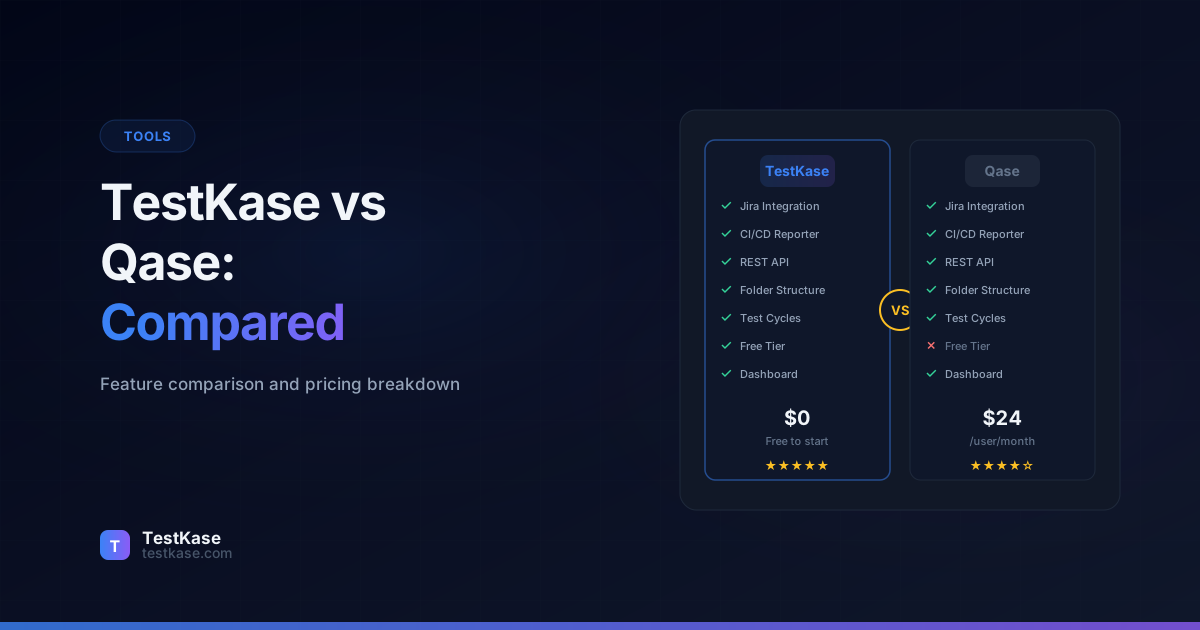
Before diving into the details, here's a high-level summary of where each platform stands out:
- TestKase strengths: AI-powered test generation, lower pricing, full-feature free tier, dedicated Jira Forge app, keyboard-optimized execution
- Qase strengths: Broader automation framework support, more mature API, multi-tracker integration (Jira + GitHub + GitLab + Azure DevOps), shared steps feature
The rest of this comparison explores each area in depth so you can assess which differences matter most for your team's workflow.
Test Case Management
Both platforms support hierarchical folder organization, custom fields, and structured test case editors. The core experience is comparable — but the details diverge in meaningful ways.
Qase provides a test case editor with preconditions, steps, expected results, post-conditions, and attachments. Cases can be organized into suites (Qase's term for folders), and you can create shared steps that are reusable across multiple cases. Qase also supports test case versioning, which lets you track how a case has changed over time and compare versions.
TestKase offers a similarly structured editor — preconditions, numbered steps, expected results, and test data fields. Folder organization supports drag-and-drop and nested hierarchies. The differentiator is AI-powered test case generation: describe a feature, paste a user story, or outline a workflow, and TestKase generates complete, structured test cases that you can review, edit, and save.
The AI generation capability changes the economics of test case creation. Writing a thorough test case — with clear steps, precise expected results, and edge case coverage — takes a skilled QA engineer 15-25 minutes. TestKase's AI generates a comparable case in seconds, leaving the engineer to review and refine rather than write from scratch.
For teams that need to build test coverage quickly — new products, major feature launches, or teams catching up on technical debt — this difference in case creation speed compounds rapidly. A team writing 50 test cases per week saves 10-15 hours by using AI generation with human review versus writing from scratch.
Shared Steps and Reusability
Qase has a clear advantage with its shared steps feature. You can define a common sequence (like logging in, navigating to a specific page, or setting up test data) as a shared step and reference it across multiple test cases. When the shared step changes, all referencing cases update automatically.
TestKase's shared steps feature is on the roadmap. Currently, you can duplicate steps across cases, but changes aren't automatically propagated. For teams with heavily reusable test sequences, this is a consideration worth noting.
That said, the impact of shared steps depends on your workflow. Teams with many overlapping preconditions (e.g., "log in as admin, navigate to settings, open the billing tab") benefit significantly. Teams with mostly unique test flows find shared steps less critical.
Test Case Organization
Both tools support hierarchical folders, but the interaction patterns differ:
- TestKase: Drag-and-drop folder management, unlimited nesting depth, folder-level filtering for test cycle creation. The interface is designed for QA engineers who spend most of their time organizing and executing tests.
- Qase: Suite-based organization with a clean tree view, test case cloning across suites, and a "quick add" feature for rapidly creating multiple cases. The interface appeals to teams with developer-QA overlap.
Test Runs and Cycles
Qase uses "test runs" as its execution model. You create a run by selecting test cases from your repository, assign the run to team members, and set a target completion date. The execution view shows each case with its steps, and testers mark results as passed, failed, blocked, or invalid. Qase supports environment tagging, so you can track results across staging, UAT, and production environments.
TestKase uses "test cycles" with a similar workflow — select cases, assign to team members, execute with real-time progress tracking. The execution interface is designed for keyboard-driven navigation, allowing testers to move through cases quickly without reaching for the mouse between every action.
One notable difference: Qase supports defect linking to GitHub Issues, GitLab Issues, and Azure DevOps work items in addition to Jira. If your team uses a non-Jira issue tracker, Qase offers broader integration coverage here.
The Execution Experience in Practice
The daily experience of executing tests matters more than any feature comparison table. When a tester runs 40-60 test cases per day, small friction points add up:
- Navigation speed: TestKase's keyboard-driven execution lets testers move through cases using shortcuts — pass, fail, skip, add comment, next case — without leaving the keyboard. This can save 1-2 seconds per case, which adds up to 10-20 minutes across a full day of execution.
- Defect reporting: Both tools let you create bug reports from a failed test. TestKase auto-populates Jira issues with test steps and actual results. Qase does the same across multiple issue trackers.
- Batch operations: Both support bulk status updates, but the workflow differs. TestKase allows selecting multiple cases and applying a result in one action. Qase supports similar bulk operations through its run management view.
Automation Integration
Qase has invested heavily in automation integration. Its open-source reporters support popular frameworks — Cypress, Playwright, Jest, Pytest, JUnit, TestNG, and more. When your automated tests run in CI/CD, results are automatically pushed to Qase and linked to the corresponding test cases. Qase also provides a comprehensive REST API for custom integrations.
TestKase supports API-based result ingestion from automation frameworks, allowing CI/CD pipelines to push results into TestKase after automated test execution. The API follows RESTful conventions and supports batch operations for efficient result reporting.
Evaluate automation integration with your actual stack
Don't just check whether a tool "supports" your automation framework. Set up a proof-of-concept with your actual CI/CD pipeline, your actual test framework, and your actual test suite. The quality of integration varies significantly between "we have a connector" and "results flow seamlessly with zero maintenance."
Qase's automation reporter ecosystem is more mature, with dedicated packages for more frameworks and more detailed documentation for each integration. If automation integration is your top priority and you use a diverse set of test frameworks, Qase has an edge in this area.
Framework Support Comparison
For teams using a single framework (the most common case), both tools work well. The difference becomes significant for organizations running multiple frameworks across different services — Qase's dedicated reporters reduce the setup and maintenance burden compared to custom API integrations.
API and Webhooks
Both platforms provide REST APIs for programmatic access.
Qase offers a comprehensive API covering test cases, runs, results, environments, projects, and custom fields. The API documentation is thorough and includes code examples in multiple languages. Qase also supports webhooks for real-time notifications when test events occur (run completed, case failed, etc.).
TestKase provides a REST API for test case management, cycle execution, and result reporting. The API supports batch operations for efficiency when dealing with large test suites. Webhook support and expanded API endpoints are being actively developed.
For teams building custom reporting dashboards, automated workflows, or integrations with internal tools, API maturity matters. Qase's API is more comprehensive today, while TestKase's API covers the core workflows that most teams need.
When API Maturity Matters
API depth becomes critical in specific scenarios:
- Custom dashboards: If you build executive quality dashboards pulling data from your test management tool, you need comprehensive read APIs. Qase's broader API surface is advantageous here.
- Automated workflows: If you want to auto-create test runs when a Jira sprint starts or auto-assign test cases based on component ownership, webhook + API combinations enable these flows. Qase's webhook support makes this easier today.
- Data migration: Both tools support CSV import/export and API-based migration. Neither locks your data behind proprietary formats.
For teams that primarily interact through the UI and use standard CI/CD integrations, the API differences are less impactful.
AI Features: The Biggest Differentiator
This is where the comparison tilts decisively in one direction.
Qase has introduced some AI-assisted features, including AI-generated test cases and AI-powered exploratory testing suggestions. The AI capabilities are available on higher-tier plans and represent Qase's response to the growing demand for AI in QA tooling.
TestKase was architected with AI as a foundational capability, not an add-on. The AI features include:
- Test case generation — provide a feature description, user story, or acceptance criteria, and TestKase produces structured test cases with steps, expected results, and edge case scenarios. The AI understands testing patterns and generates cases that a senior QA engineer would recognize as thorough.
- Coverage gap analysis — the AI examines your existing test suite against your product's features and identifies areas with insufficient coverage. This prevents the common problem of having 200 test cases for login flows and zero for data export.
- Intelligent suggestions — as you create and organize test cases, the AI suggests improvements, flags potential gaps, and recommends priority levels based on the feature's complexity and risk.
The depth of AI integration is the key difference. TestKase's AI isn't a separate feature you invoke occasionally — it's woven into the test case creation workflow. The result is that teams using TestKase's AI features report writing test cases 3-4x faster than manual creation, with comparable or better coverage.
AI in Practice: A Real Scenario
Consider a team launching a new "team billing" feature with the following user story:
"As an admin user, I can upgrade my team's subscription plan, add or remove seats, update billing information, and view invoicing history."
Without AI (manual creation): A senior QA engineer spends 3-4 hours writing 25-30 test cases covering positive flows, negative scenarios, edge cases (e.g., downgrade during active billing period, adding seats beyond plan limit), and data validation.
With TestKase AI: Paste the user story, and within seconds TestKase generates 20-25 structured test cases covering the core scenarios. The QA engineer spends 30-45 minutes reviewing, adjusting, and adding team-specific edge cases. Total time: under 1 hour for comparable coverage.
The time savings compound across a team. If your QA team writes 100 test cases per week, AI-assisted generation could save 15-20 hours weekly — nearly half a full-time engineer's capacity.
Pricing Tiers
Both platforms offer free tiers, which is unusual in the test management space and makes evaluation easier.
Two pricing differences stand out:
-
Free tier limitations. TestKase's free tier includes full features with a user limit. Qase's free tier caps you at 500 test cases, which most teams outgrow within a few months. Once you hit that cap, you're forced to upgrade or delete old cases.
-
Per-user cost. TestKase's paid plans start at $10/user/month versus Qase's $24/user/month. For a team of 15 users on a professional plan, that's $300/month with TestKase versus $540/month with Qase — a difference of $2,880 per year.
The AI features that TestKase includes in its $20/user/month plan would require the higher-tier plan from Qase, further widening the value gap.
Total Cost of Ownership
Price per user is the visible cost, but total cost of ownership includes setup time, maintenance, and the productivity impact of the tool. Consider:
- Onboarding time: Both tools have clean interfaces and low learning curves. Qase's developer-centric design may feel more natural to engineering teams; TestKase's QA-focused design may feel more natural to dedicated testing teams.
- Integration maintenance: Qase's dedicated automation reporters require less custom code to maintain. TestKase's API-based integrations offer flexibility but may need more initial setup.
- AI productivity gains: If your team writes test cases regularly, TestKase's AI features can save 15-20 hours per week for a mid-size QA team — a productivity gain worth $1,500-$2,500/month at typical QA salary rates.
When you factor in both the license cost and the productivity impact, the total cost picture can differ significantly from the sticker price.
Migration Between Platforms
Migrating test cases between platforms is straightforward for both tools.
From Qase to TestKase: Export test cases from Qase in CSV format, then import into TestKase using the CSV import tool with field mapping. Folder hierarchy and case metadata transfer cleanly.
From TestKase to Qase: TestKase supports CSV export, and Qase supports CSV import. The same process works in reverse — no vendor lock-in on either side.
Both platforms also support API-based migration for teams that want programmatic control over the process. Neither platform locks your data behind proprietary formats.
Migration Tips
- Map fields before importing: Different platforms name fields differently. Map "Suite" (Qase) to "Folder" (TestKase), "Severity" to "Priority," etc., before starting the import.
- Migrate in stages: Start with one project or module, verify the import, then migrate the rest. This catches field mapping issues early.
- Preserve execution history: CSV exports typically don't include execution history. If historical results matter, use the API to migrate run/cycle data separately.
Who Should Choose TestKase
TestKase is the better fit for teams that:
- Need to build test coverage quickly: AI-generated test cases accelerate coverage from zero to comprehensive in days, not weeks.
- Have budget constraints: Lower per-user pricing and a full-feature free tier mean your test management budget goes further.
- Use Jira as their primary issue tracker: The dedicated Forge app provides enterprise-grade integration without API token management.
- Prioritize execution speed: Keyboard-optimized workflows make daily test execution faster for QA engineers who live in the tool.
- Are growing rapidly: The unlimited free tier (no case cap) lets you scale without hitting artificial limits during evaluation.
Who Should Choose Qase
Qase is the better fit for teams that:
- Run diverse automation frameworks: Dedicated reporters for Cypress, Playwright, Jest, Pytest, and more reduce integration overhead.
- Use non-Jira issue trackers: Native support for GitHub Issues, GitLab Issues, and Azure DevOps provides flexibility.
- Need a mature API: Teams building custom integrations, dashboards, or automated workflows benefit from Qase's broader API surface.
- Rely on shared steps: Teams with heavily reusable test sequences gain significant efficiency from Qase's shared steps feature.
- Have developer-QA crossover: The developer-centric design feels natural for teams where engineers write and run test cases alongside QA.
Common Mistakes When Comparing TestKase and Qase
Choosing based on automation integration alone. Qase's broader framework support matters only if you use those specific frameworks. If your team uses Playwright and Jira — the most common combination — both tools serve you equally well.
Ignoring the free tier limitations. Qase's 500-case cap on the free tier catches teams by surprise. If you're evaluating with a real project, you may hit that limit during the evaluation itself, which doesn't give you a fair picture of the free experience.
Undervaluing AI test generation. Teams that haven't used AI-generated test cases often assume the output will be generic or low-quality. TestKase's AI produces cases that reflect real testing expertise — edge cases, boundary conditions, negative scenarios. Try it with one of your actual features before dismissing it.
Not testing the execution workflow. The test case editor gets all the attention during demos, but QA teams spend more time executing tests than creating them. Run an actual test cycle in both tools and pay attention to how many clicks each result takes.
Comparing only features, not workflows. A feature checklist doesn't capture how a tool feels in daily use. Spend at least a week running real test cycles in each tool before deciding. The difference between "has this feature" and "this feature works well for our workflow" is significant.
How TestKase Addresses the Gaps
TestKase combines the modern design sensibility that makes Qase appealing with AI capabilities that go deeper. The Jira Forge integration provides enterprise-grade connectivity without the complexity of managing API tokens and webhook configurations. And the pricing model means your test management budget goes further — or your free tier lasts longer.
For teams that have outgrown spreadsheets but don't want to pay enterprise prices, TestKase offers a path that doesn't require compromises on features, speed, or intelligence.
Compare plans and start freeConclusion
Qase and TestKase share a common design philosophy — modern, clean, and accessible. Where they diverge is in AI depth, pricing, and integration architecture. Qase offers broader automation framework support and a more mature API. TestKase offers deeper AI features, lower pricing, and a free tier without case count limits.
If your team's biggest bottleneck is writing test cases fast enough to keep up with development, TestKase's AI features will deliver immediate value. If your team's priority is connecting a diverse set of automation frameworks to a central test management hub, Qase's integration ecosystem deserves consideration.
Either way, both tools offer free tiers — start there, run a real test cycle, and let your team's hands-on experience guide the decision. The best test management tool is the one your team actually uses every day, not the one with the longest feature list.
Stay up to date with TestKase
Get the latest articles on test management, QA best practices, and product updates delivered to your inbox.
SubscribeShare this article
Related Articles
Critical, Serious, Moderate, Minor: How to Triage Accessibility Issues by Severity
A practical triage policy template — SLAs per severity, ownership across design / engineering / content / QA, and how to share findings cross-team without forwarding PDFs.
Read more →Why Single-Page Accessibility Scans Miss Real Bugs (and What Multi-Page Audits Catch)
Single-URL accessibility scanners miss six entire categories of WCAG violations. Here's what falls through the gap, and how flow-aware audits catch the issues your users actually hit.
Read more →Accessibility Testing in CI/CD: Catching WCAG Issues Before They Ship
Three integration patterns, GitHub Actions / GitLab / CircleCI templates, and a 3-quarter rollout playbook to take an engineering team from zero accessibility in CI to block-on-fail.
Read more →