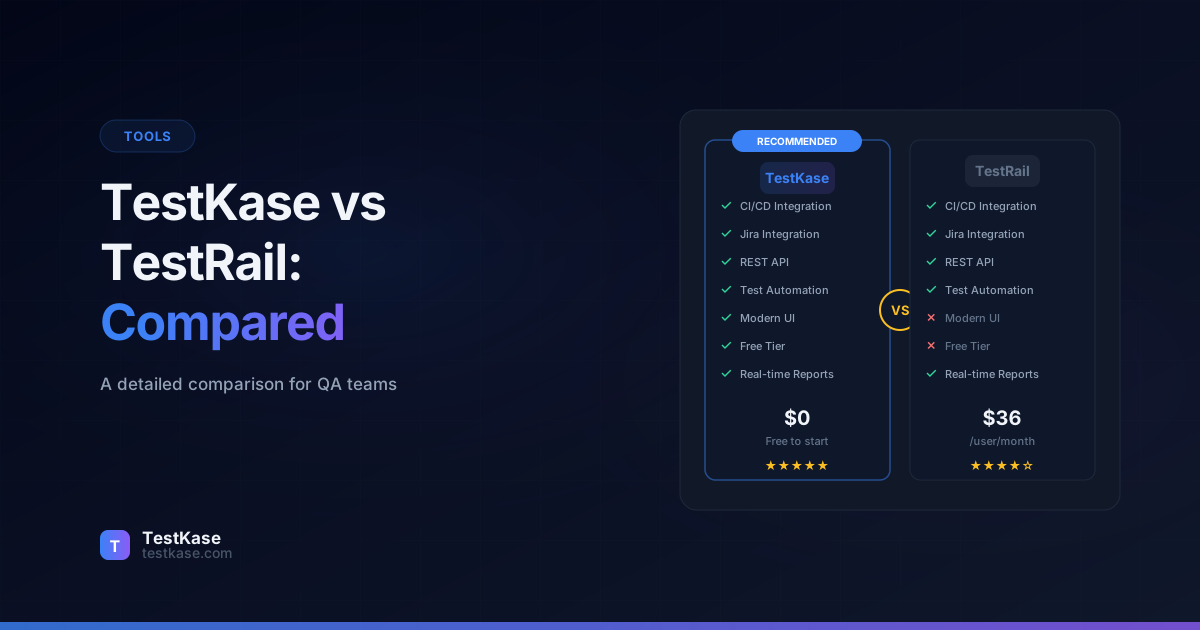
TestKase vs TestRail: A Detailed Comparison for QA Teams

TestKase vs TestRail: A Detailed Comparison for QA Teams
Choosing a test management tool feels like it should be straightforward — until you are three demos deep, two free trials in, and still unsure which platform your team will actually use six months from now. The switching cost is real. Migrating test cases, retraining your team, reconfiguring integrations — pick the wrong tool and you are looking at weeks of lost productivity.
TestRail has been a dominant player in test management for over a decade. It is well-known, widely adopted, and has a mature feature set that large enterprises rely on. But maturity comes with trade-offs — an interface that has not kept pace with modern design standards, pricing that escalates quickly, and limited AI capabilities in an era where AI is transforming how QA teams work.
TestKase is the newer entrant — built from the ground up with a modern tech stack, AI-native features, and a pricing model designed for teams that do not want to spend $50+ per user per month on test management. But newer also means a smaller ecosystem and less brand recognition.
This comparison lays out the differences honestly. We will cover where TestKase excels, where TestRail still has strengths, and which tool fits different team profiles. The goal is to help you make an informed decision based on your team's specific needs, size, and budget.
Platform Overview
TestRail launched in 2004 and was acquired by Gurock Software, later becoming part of Idera. It is a web-based test management platform used by over 30,000 teams globally. TestRail offers both cloud-hosted and on-premise (Server) editions, though the on-premise version carries a significantly higher price tag.
TestKase is a modern, cloud-native test management platform built for speed and simplicity. It emphasizes clean UI, AI-powered test generation, and tight Jira integration. TestKase offers a generous free tier and scales affordably as teams grow.
At a glance
TestRail has 20+ years of market presence and deep enterprise adoption. TestKase was designed for how QA teams work today — fast iteration, AI assistance, and modern collaboration patterns.
How the Platforms Evolved
Understanding each platform's origin explains many of their design decisions.
TestRail was built in an era when test management meant replacing spreadsheets with a web application. Its core architecture reflects that origin — it is fundamentally a database-backed CRUD application with reporting layers added over time. This is not a criticism; it is context. The platform works well for teams that need structured test case storage, execution tracking, and reporting.
TestKase was built in 2024-2025, during the AI transformation of software development. Its architecture was designed from day one to incorporate AI capabilities, modern frontend frameworks, and API-first design. This means features like AI test generation are not bolted on — they are core to the platform's identity.
The philosophical gap matters. TestRail optimizes for comprehensive documentation — detailed test plans, formal test runs with sign-offs, and audit trails that satisfy compliance requirements. TestKase optimizes for velocity — getting tests written, executed, and analyzed as fast as possible. Teams in regulated industries (ISO 26262, DO-178C, FDA validation) may value TestRail's formality. Agile teams shipping weekly or daily will prefer TestKase's speed-first design.
UI and User Experience
The first thing you notice when switching between TestRail and TestKase is the interface.
TestRail's UI is functional but dated. Navigation relies heavily on nested menus, the visual hierarchy can feel cluttered, and performing common actions — creating a test run, assigning cases, filtering results — often takes more clicks than it should. The interface was designed in an era before modern design systems became standard, and while TestRail has made incremental improvements, the core layout has not fundamentally changed.
TestKase's interface follows current design conventions — clean typography, clear visual hierarchy, keyboard shortcuts for power users, and a sidebar-driven navigation that keeps you oriented. Creating test cases, organizing folders, and launching test cycles all feel snappy. The UI was built with React and Next.js, which translates to fast page loads and responsive interactions.
For teams onboarding new QA engineers, the learning curve matters. A tool that is intuitive from day one reduces training time and increases adoption. This is where TestKase's modern design provides a tangible advantage — most users can navigate the platform without reading documentation.
Daily Workflow Comparison
To make the UX comparison concrete, here is how a common workflow — creating a test case, adding it to a test cycle, and executing it — compares across both platforms:
In TestRail:
- Navigate to Test Cases section
- Select the target suite and section
- Click "Add Test Case"
- Fill in title, type, priority, and template fields
- Add steps in a table or text format
- Save the test case
- Navigate to Test Runs and Results
- Create a new test run, select the suite, filter cases
- Start the run, navigate to the test case
- Mark the result, add comments
In TestKase:
- Navigate to Test Cases via sidebar
- Select or create a folder
- Click "Create Test Case" (or use keyboard shortcut)
- Fill in structured fields (title, preconditions, steps, expected results)
- Save (or let AI generate the initial draft from a feature description)
- Navigate to Test Cycles
- Create a cycle, select test cases with folder filtering
- Assign to team members
- Execute with keyboard-driven navigation between cases
- Mark results with one-click status buttons
The difference is subtle in description but tangible in practice. TestKase's workflow requires fewer page loads, fewer navigational steps, and supports keyboard-driven execution that is faster for high-volume test runs.
A mid-size SaaS company that evaluated both tools during a two-week sprint executing 450 test cases reported measurable differences: average time per test case execution (marking result plus adding notes) was 45 seconds in TestKase versus 65 seconds in TestRail. That 20-second difference across 450 cases translates to 2.5 hours saved in a single sprint — time that goes back to exploratory testing or defect investigation.
Test Case Management
Both platforms support hierarchical folder structures for organizing test cases, custom fields, and test case templates. Here is where they differ:
TestRail supports rich-text test case descriptions with inline images, references to other cases, and custom fields of various types (dropdowns, multi-select, date pickers). Test case versioning is available but requires the Professional or Enterprise plan. The bulk editing capabilities are solid for making changes across many cases at once.
TestKase offers a streamlined test case editor with structured fields — preconditions, steps, expected results, and test data — that enforce consistency across your team. AI-powered test case generation lets you describe a feature in plain language and receive well-structured test cases that you can review and customize. Folder management supports drag-and-drop reorganization, and you can move cases between folders without breaking references.
The AI generation capability is a significant differentiator. Instead of spending 20 minutes writing a test case from scratch, you describe the scenario and refine the AI output in 2-3 minutes. For teams that need to scale test coverage quickly — say, before a major release — this saves hours of manual writing.
Test Case Organization at Scale
As test suites grow from hundreds to thousands of cases, organization becomes critical. Here is how each platform handles scale:
TestRail uses a suite-and-section hierarchy. You can create multiple suites per project and nest sections within them. This works well but can become unwieldy with deep nesting. Searching across suites requires navigating to each one separately, and moving test cases between suites can break references in existing test runs.
TestKase uses a single-hierarchy folder structure with tagging. Folders provide the primary organization, while tags enable cross-cutting views — for example, seeing all "regression" test cases across all folders, or all "critical priority" cases regardless of module. The search function works across the entire project, and folder reorganization preserves all references.
For teams with 1,000+ test cases, the combination of folders and tags provides more flexibility than a rigid suite hierarchy. You can reorganize your structure without breaking existing test cycles — a significant advantage for growing products where the test organization needs to evolve alongside the application architecture.
Templates and Reusability
TestRail offers built-in test case templates (Test Case - Text, Test Case - Steps, Exploratory Session) and lets you create custom templates with different field configurations. Templates are configured at the project level, meaning you cannot share them across projects without manual duplication.
TestKase takes a different approach: rather than predefined templates, every test case follows a consistent structure (title, preconditions, steps with expected results, priority, tags). The AI-powered generation acts as a dynamic template — describe what you need, and the AI produces test cases following your team's conventions. This is more flexible than static templates because it adapts to the specific feature being tested.
Test Execution and Cycles
TestRail uses "test runs" and "test plans" as its execution model. A test run is a collection of test cases to execute, and a test plan groups multiple runs together (useful for testing across multiple configurations). Testers can mark results as passed, failed, blocked, or retest, and attach screenshots or comments to individual results.
TestKase uses "test cycles" as the primary execution unit. Each cycle contains selected test cases, can be assigned to team members, and tracks progress in real time. The execution workflow is designed for efficiency — testers can move through cases with keyboard shortcuts, mark results quickly, and add notes without leaving the execution view.
One practical difference: TestKase's test cycle view shows completion percentage, pass/fail distribution, and remaining work at a glance. TestRail provides similar data, but it is spread across multiple views and requires more navigation to get the full picture.
Multi-Configuration Testing
TestRail has a clear strength in multi-configuration testing. Its test plans allow you to define configurations (operating systems, browsers, devices) and automatically create test runs for each combination. For a team testing across Chrome, Firefox, Safari, and Edge on both Windows and macOS, TestRail generates 8 runs from a single plan — one for each combination.
TestKase handles multi-configuration testing through separate test cycles with naming conventions and tags. While this approach is less automated than TestRail's configuration matrix, it offers more flexibility in which test cases apply to which configurations. Not every test needs to run on every browser, and TestKase's approach makes it easy to include different case subsets per configuration.
For teams that heavily rely on cross-browser or cross-platform matrix testing, TestRail's configuration management is more streamlined. For teams that test a smaller number of configurations or prefer explicit control over each cycle, TestKase's approach works well.
Reporting and Dashboards
TestRail's reporting is more mature and offers greater customization, especially for enterprise teams that need scheduled reports delivered to stakeholders. TestKase's dashboards prioritize real-time visibility and simplicity — you get the metrics that matter without configuring complex report templates.
What Stakeholders Actually Want
In practice, the reports that stakeholders request most frequently are:
- Test progress by module — How much testing is complete for each feature area?
- Defects by severity — How many critical vs. minor issues remain open?
- Pass rate trend — Is quality improving or degrading over time?
- Execution velocity — How many tests are being executed per day?
TestKase surfaces these metrics on its default dashboards without configuration. TestRail requires setting up custom dashboard widgets or generating reports. Both platforms ultimately deliver the data — the difference is time-to-value. TestKase gives you actionable dashboards immediately; TestRail requires upfront investment in configuration but offers more customization once set up.
Integrations
Both tools integrate with Jira, which is the most critical integration for most QA teams.
TestRail offers integrations through its API and pre-built connectors for Jira, Jenkins, GitLab CI, and several automation frameworks. The Jira integration allows linking test cases to Jira issues and pushing defects. However, the integration depth depends on your TestRail plan — some features require the Professional or Enterprise tier.
TestKase provides a native Jira integration through a dedicated Forge app, which means it runs within Atlassian's infrastructure for better security and performance. Test cases can be linked to Jira issues, and test execution results are visible directly within Jira tickets. The Forge-based approach also means smoother installation and updates compared to third-party marketplace plugins.
Jira integration depth matters
If your team lives in Jira, pay close attention to how deeply each tool integrates. Surface-level linking (creating a Jira issue from a failed test) is table stakes. Look for bidirectional sync, in-Jira visibility of test results, and the ability to track coverage per Jira epic or story.
For CI/CD integration, TestRail provides a CLI tool and API endpoints that allow test results from automation frameworks (Selenium, Cypress, Playwright) to be pushed into TestRail. TestKase supports similar API-based result ingestion, with plans for deeper native integrations with popular CI/CD platforms.
Automation Framework Integration
Both tools support importing results from automated test runs, but the mechanics differ:
TestRail uses its API to accept test results from automation frameworks. The typical pattern involves a reporter library (available for most frameworks) that maps automated test results to TestRail test cases by ID or title. The setup requires configuring API credentials, mapping test IDs, and handling the case where automated tests do not map 1:1 to manual test cases.
TestKase provides a dedicated reporter package (testkase-reporter) that integrates with popular JavaScript test runners. The reporter automatically maps test results to TestKase test cases and updates test cycle status. For teams using Playwright, Cypress, or Jest, the integration is straightforward:
// Example: TestKase reporter configuration for Playwright
import { defineConfig } from '@playwright/test';

export default defineConfig({
  reporter: [
    ['testkase-reporter', {
      apiKey: process.env.TESTKASE_API_KEY,
      projectId: 'your-project-id',
      cycleId: 'your-cycle-id',
    }],
  ],
});
The key difference is that TestKase's reporter was designed alongside the platform, so field mapping and status synchronization work out of the box. TestRail's reporters are typically community-maintained, which can lead to compatibility issues when either the framework or TestRail updates.
API Comparison
Both platforms offer REST APIs for automation. Key differences:
- TestRail's API is well-documented with over 40 endpoints covering test cases, runs, results, and configuration. Rate limits apply, and some endpoints are restricted to higher-tier plans.
- TestKase's API is designed for modern usage patterns with consistent JSON responses, clear error messages, and generous rate limits even on free plans. The API surface is growing as the platform adds features.
For teams that build custom automation around their test management tool, API quality and documentation matter as much as the features themselves.
AI Capabilities
This is where the gap between the two platforms is widest.
TestRail has limited AI features as of early 2026. The platform was built before the AI wave, and while Idera has signaled plans for AI enhancements, the current offering does not include AI-powered test generation, smart suggestions, or automated coverage analysis.
TestKase was built with AI at its core. The AI features include:
- Test case generation — describe a feature or user story, and TestKase generates structured test cases with steps, expected results, and edge cases. You review and customize the output rather than writing from scratch.
- AI-assisted coverage analysis — identify gaps in your test suite based on your application's feature set.
- Smart tagging and organization — AI suggests tags, priorities, and folder placement for new test cases.
For teams that want to scale their test coverage without proportionally scaling their QA headcount, TestKase's AI capabilities provide a meaningful productivity multiplier.
AI in Practice: A Real-World Scenario
Consider a QA engineer tasked with creating test cases for a new "password reset" feature. The traditional approach:
- Read the feature specification (10 minutes)
- Identify test scenarios — happy path, edge cases, error conditions (15 minutes)
- Write each test case with preconditions, steps, and expected results (30-45 minutes)
- Review for completeness (10 minutes)
Total: approximately 65-80 minutes for 8-12 test cases.
With TestKase's AI:
- Paste the feature description or user story into the AI generator (1 minute)
- AI generates 10-15 structured test cases covering positive, negative, boundary, and security scenarios (seconds)
- Review, edit, and refine the generated cases (15-20 minutes)
- Add any domain-specific scenarios the AI missed (5-10 minutes)
Total: approximately 25-35 minutes for 10-15 test cases, with typically better coverage of edge cases because the AI systematically considers boundary values, error conditions, and security scenarios that human authors sometimes overlook.
The time savings compound across a team. A team of 5 QA engineers creating an average of 20 test cases per week each saves approximately 15-20 hours weekly — nearly half a full-time engineer's worth of productivity.
Pricing Comparison
Pricing is often the deciding factor, especially for growing teams.
The pricing difference is substantial. For a team of 10 QA engineers, TestRail Professional Cloud costs $360/month. TestKase's comparable plan costs $100-$200/month, depending on feature needs. Over a year, that is a savings of $1,920-$3,120.
TestKase's free tier is also a significant advantage for small teams and startups. You can use the platform with full functionality for up to 3 users at no cost — no credit card required, no feature restrictions, no time limit.
Total Cost of Ownership
Per-user pricing is only part of the picture. Consider the full cost:
TestRail hidden costs:
- Annual billing required for best rates (less flexibility)
- On-premise deployment requires infrastructure and maintenance staff
- Advanced features (custom reports, API access) gated behind higher tiers
- Training time due to steeper learning curve (estimate: 4-8 hours per user)
TestKase cost advantages:
- Month-to-month billing with no lock-in
- Free tier eliminates cost for small teams entirely
- AI features included in mid-tier (no separate add-on)
- Lower training time due to intuitive interface (estimate: 1-2 hours per user)
One often-overlooked factor: who needs access? In most organizations, it is not just core QA engineers. Developers review test results. Product managers check coverage. Engineering managers monitor dashboards. If 10 QA engineers, 5 developers, and 3 managers all need access, that is 18 users. At TestRail's $36/user/month, that is $648/month ($7,776/year). At TestKase's $10/user/month, it is $180/month ($2,160/year). The savings of $5,616/year is enough to fund additional QA tooling, training, or even a part-time contract tester.
Migration Considerations
Switching test management tools is never painless, but some migrations are easier than others.
TestKase supports CSV import for test cases, which means you can export your TestRail test cases (TestRail supports CSV export) and import them into TestKase with field mapping. The import process preserves folder hierarchy, custom field values, and test case metadata.
For teams with thousands of test cases and years of historical execution data, migration requires planning. Execution history typically does not transfer between platforms — you are migrating your test case library, not your historical results. Factor in time for folder reorganization, field mapping review, and team training.
Run tools in parallel during migration
The safest migration approach is to run both tools simultaneously for one or two test cycles. Execute your current sprint's tests in both platforms, let the team compare the experience, and switch over fully once everyone is comfortable. TestKase's free tier makes this cost-effective.
Migration Checklist
If you decide to migrate, follow this sequence:
- Export test cases from TestRail as CSV with all custom fields
- Map fields between TestRail and TestKase (preconditions, steps, expected results)
- Import into TestKase and verify folder hierarchy preserved
- Spot-check 10-20 test cases for data accuracy
- Recreate folder structure if needed (TestKase supports drag-and-drop reorg)
- Set up Jira integration in TestKase
- Run one parallel test cycle in both tools
- Gather team feedback after the parallel cycle
- Full cutover — make TestKase the primary tool
- Archive TestRail — keep read access for historical reference during the transition period
Most teams complete the migration in 3-5 weeks. The parallel execution phase is the most important — it builds confidence and surfaces issues before full commitment.
Security and Compliance
TestRail offers SOC 2 Type II compliance for its cloud offering, with the on-premise option providing full data control for organizations with strict data residency requirements. Role-based access control supports granular permissions at the project, suite, and milestone levels.
TestKase is cloud-native with data encryption at rest and in transit. Role-based access control manages permissions at the project level. The Jira integration through Atlassian Forge means authentication data stays within Atlassian's security perimeter.
For highly regulated industries (healthcare, finance, defense) that require on-premise deployment, TestRail's Server edition is currently the only option between the two. TestKase's cloud-only model simplifies administration but limits deployment flexibility for organizations with strict data sovereignty requirements.
Common Mistakes When Comparing Test Management Tools
Focusing only on feature lists. A tool can have 200 features but if the 10 you use daily are clunky, your team's productivity suffers. Prioritize the workflows your team performs most — creating cases, executing runs, reviewing results — and evaluate those specifically.
Ignoring the total cost. TestRail's per-user pricing adds up quickly, especially when you include QA engineers, developers who review test results, and managers who check dashboards. Count everyone who needs access, not just your core QA team.
Underestimating onboarding time. A tool with a steep learning curve costs you in training hours and reduced productivity during the transition. Get your team's input during evaluation — a tool they find intuitive will see higher adoption.
Overlooking future needs. If AI-assisted testing is on your roadmap, evaluate which platform is better positioned to support that vision. Retrofitting AI into a legacy architecture is harder than building on a platform designed for it.
Deciding based on brand recognition alone. "Nobody gets fired for choosing TestRail" is the same logic that kept teams on outdated tools for decades. Evaluate based on your team's actual needs, not industry inertia.
Not involving the actual users. Managers often select tools without consulting the QA engineers who will use them daily. Run a hands-on evaluation with your team — the people executing test cases for hours every day will notice usability differences that a demo does not reveal.
Which Tool Is Right for You?
Choose TestRail if: you are an enterprise team with established workflows, need on-premise deployment, require advanced custom reporting, and have the budget for premium pricing. TestRail's maturity and market presence also matter if you need a tool that auditors and compliance teams will recognize. Teams with heavy multi-configuration testing requirements (many OS/browser/device combinations) will also benefit from TestRail's configuration matrix feature.
Choose TestKase if: you want a modern, fast interface, value AI-powered test generation, need strong Jira integration, and prefer affordable per-user pricing. TestKase is particularly well-suited for startups, mid-size teams, and any organization that wants to scale test coverage without scaling costs proportionally. Teams that prioritize speed of adoption and low training overhead will see faster ROI with TestKase.
For teams currently on TestRail considering a switch: Evaluate whether you are using TestRail's advanced features (custom reports, on-premise, configuration matrix) or primarily using it for test case storage and execution tracking. If the latter, TestKase delivers a better experience for those core workflows at a lower price point.
Try TestKase free — no credit card requiredConclusion
TestRail is a proven platform with deep enterprise roots, but its aging interface, high pricing, and limited AI capabilities leave room for modern alternatives. TestKase offers a faster, cleaner experience with AI features that help teams write better tests in less time — at a fraction of the cost.
The best way to decide is to try both. TestKase's free tier means you can run a real evaluation with your actual test cases and your actual team. No sales calls, no time-limited trial pressure — just hands-on experience that tells you which tool fits how your team works. Import a subset of your test cases, run one test cycle, and let the daily experience guide your decision.
The test management tool market is evolving rapidly, and the right choice today depends on where your team is headed — not just where it is now. A tool that supports AI-powered workflows, modern integrations, and affordable scaling positions your QA practice for the next five years, not just the next quarter.
Stay up to date with TestKase
Get the latest articles on test management, QA best practices, and product updates delivered to your inbox.
SubscribeShare this article
Related Articles
Critical, Serious, Moderate, Minor: How to Triage Accessibility Issues by Severity
A practical triage policy template — SLAs per severity, ownership across design / engineering / content / QA, and how to share findings cross-team without forwarding PDFs.
Read more →Why Single-Page Accessibility Scans Miss Real Bugs (and What Multi-Page Audits Catch)
Single-URL accessibility scanners miss six entire categories of WCAG violations. Here's what falls through the gap, and how flow-aware audits catch the issues your users actually hit.
Read more →Accessibility Testing in CI/CD: Catching WCAG Issues Before They Ship
Three integration patterns, GitHub Actions / GitLab / CircleCI templates, and a 3-quarter rollout playbook to take an engineering team from zero accessibility in CI to block-on-fail.
Read more →