TestKase vs Zephyr: Which Test Management Tool Is Right for You?

TestKase vs Zephyr: Which Test Management Tool Is Right for You?
You're evaluating test management tools and Zephyr keeps showing up on every shortlist. That makes sense — it's one of the most widely used testing platforms in the Atlassian ecosystem. But "widely used" and "best fit for your team" aren't the same thing, and Zephyr's product lineup is more confusing than most people realize.
There are actually two distinct Zephyr products: Zephyr Squad (formerly Zephyr for Jira) and Zephyr Scale (formerly TM4J, or Test Management for Jira). They serve different audiences, have different architectures, and carry different price tags. If you've read reviews that contradict each other, it's probably because the reviewers were evaluating different products under the same brand.
That fragmentation creates a real problem for teams trying to make a decision. Do you pick Squad for its simplicity and lower price? Do you pick Scale for its enterprise features? Or do you look beyond the Zephyr ecosystem entirely?
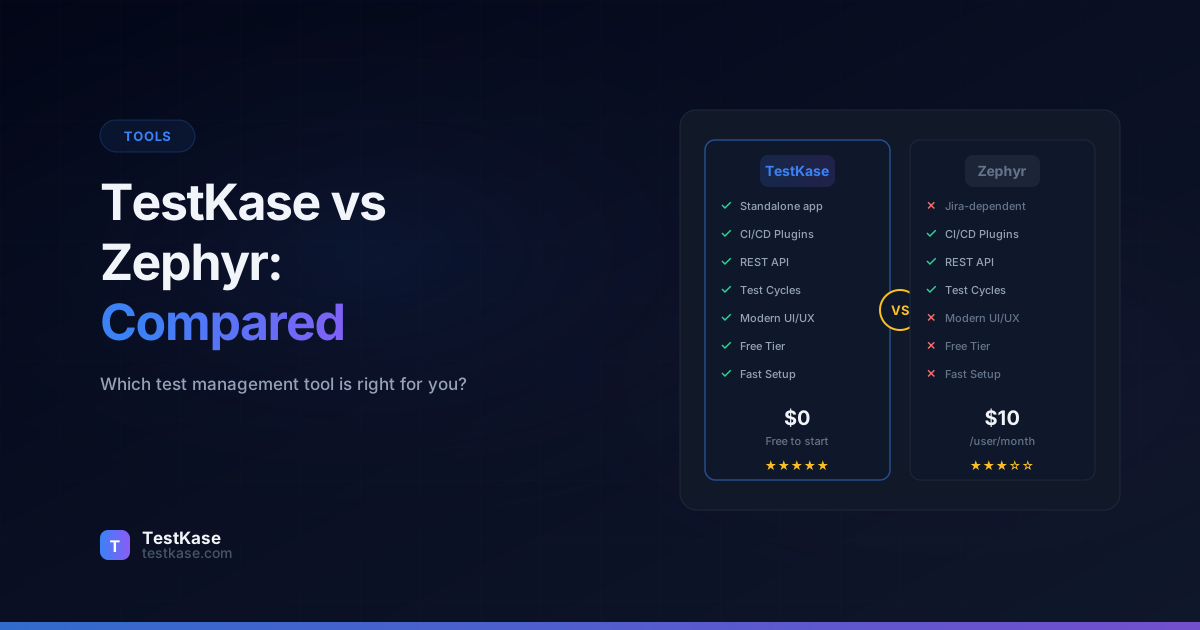
TestKase offers a third path — a modern, standalone test management platform with deep Jira integration, AI-powered features, and pricing that undercuts both Zephyr products. This comparison covers how all three options stack up across the features that matter most to QA teams, engineering managers, and anyone who needs to organize, execute, and report on testing.
Understanding Zephyr's Product Lineup
Before comparing anything, you need to understand what you're actually comparing.
Zephyr Squad is a lightweight test management add-on that lives entirely within Jira. You create and execute tests without leaving the Jira interface. It's designed for small teams that want basic test management without a separate tool. The trade-off: limited reporting, no folder hierarchy for test cases, and features that feel constrained by Jira's UI boundaries.
Zephyr Scale is a more fully-featured product — also a Jira add-on, but with its own dedicated interface panels, folder structures, test cycles, custom fields, and robust reporting. Scale is the product most enterprise teams evaluate, and it competes directly with standalone tools like TestRail and TestKase.
Naming confusion
Zephyr Scale was previously known as TM4J (Test Management for Jira) before SmartBear acquired it and rebranded it. If you see references to TM4J in older reviews or documentation, they're describing what is now Zephyr Scale.
Both Zephyr products are available only through the Atlassian Marketplace, which means they require a Jira instance to function. If your team ever moves away from Jira — or uses Jira alongside other project management tools — your test management data is locked inside the Atlassian ecosystem.
TestKase is a standalone platform with its own infrastructure. It integrates with Jira through a dedicated Forge app, but your test data lives independently. You can use TestKase with or without Jira, and your test case library isn't dependent on any third-party platform.
The Architectural Difference at a Glance
This fundamental difference — embedded vs. standalone — affects everything from performance to data portability to who can access the system:
| Consideration | Zephyr (Embedded) | TestKase (Standalone) | |---|---|---| | Data storage | Inside Jira's database | Independent infrastructure | | Performance impact | Affects Jira speed at scale | No impact on Jira | | User access | Requires Jira license | Independent user management | | Data portability | Locked to Atlassian ecosystem | Export anytime | | Availability | Down when Jira is down | Independent uptime | | Customization | Limited by Jira's UI framework | Full control over interface |
Why Architecture Matters More Than Features
Most comparison articles jump straight to feature checklists. But the embedded vs. standalone distinction has deeper implications that affect your team daily.
When Atlassian performs maintenance on Jira Cloud — which happens regularly — embedded add-ons go down too. Your QA team cannot access test cases, update execution results, or run test cycles. With a standalone tool, Jira downtime does not affect test management workflows.
Data backup is another consideration. Jira Cloud's backup and restore process includes all add-on data, which means your test data backup schedule is dictated by your Jira admin's policies. With a standalone tool, you control backup frequency and retention independently.
API rate limits also come into play. Atlassian enforces rate limits on Jira Cloud API calls. When embedded add-ons perform complex operations (generating reports, running bulk updates), they consume your organization's API quota — potentially affecting other Jira integrations. Standalone tools use their own API infrastructure without impacting your Jira quota.
Jira Integration: Embedded vs. Standalone
This is the most important architectural difference, and it affects almost every other aspect of the comparison.
Zephyr's embedded approach means test management happens inside Jira's interface. The advantage: your team doesn't need to learn a new tool or switch between platforms. The disadvantage: you're constrained by Jira's UI, Jira's performance, and Jira's data model.
As your test suite grows — 5,000, 10,000, 20,000+ test cases — Jira add-ons can introduce noticeable performance degradation. Every test case is stored as Jira metadata, and complex queries against large test suites can slow down your Jira instance for everyone, not just the QA team.
A real-world example: a 200-person engineering organization using Zephyr Scale with 15,000 test cases reported that Jira page load times increased by 2–3 seconds across the board, and test case search queries took 8–12 seconds to return results. The Jira administrator traced the slowdown directly to the test management add-on's data volume.
TestKase's standalone approach means your test data lives on its own infrastructure. The Jira integration is bidirectional — test cases link to Jira issues, execution results appear in Jira tickets, and defects sync between platforms. But the heavy lifting (test case storage, execution tracking, reporting) happens on TestKase's servers, so your Jira instance stays fast.
Ask your Jira admin
If your Jira instance already runs slowly or your organization has strict Jira performance policies, an embedded add-on may not be an option regardless of features. Check with your Jira administrator before committing to an embedded tool.
How TestKase's Jira Integration Works in Practice
TestKase connects to Jira through Atlassian's Forge platform — the same secure framework that powers first-party Atlassian integrations. Here's what the integration provides:
- Bidirectional linking — Create links between TestKase test cases and Jira issues (stories, bugs, epics). Links are visible in both platforms.
- Defect creation from test execution — When a test fails, create a Jira bug directly from the TestKase execution screen. The bug includes test steps, expected vs. actual results, and attachments.
- Status sync — When a linked Jira issue moves to "Done," TestKase can update the associated test case status automatically.
- Jira panel view — A TestKase panel appears directly in Jira issues, showing linked test cases, their latest execution status, and coverage metrics — without leaving Jira.
The key difference from Zephyr: all of this happens through API calls between separate systems. Your Jira database stays clean, and your test data remains portable.
Integration Depth Comparison
| Integration Feature | Zephyr Squad | Zephyr Scale | TestKase | |---|---|---|---| | Link test cases to Jira issues | Yes | Yes | Yes | | Create bugs from failed tests | Basic | Yes | Yes (with full context) | | View test status in Jira | Yes (native) | Yes (dedicated panel) | Yes (Forge panel) | | Sync status bidirectionally | Limited | Yes | Yes | | Requirement traceability matrix | No | Yes | Yes | | Works without Jira | No | No | Yes | | Supports Jira Server + Cloud | Cloud only (as of 2024) | Cloud + Data Center | Cloud (Forge-based) |
Test Case Management
All three products support creating test cases with steps, expected results, and metadata. The differences are in structure, flexibility, and efficiency.
Zephyr Squad provides minimal test case structure. Cases are essentially Jira issues with a special type, which means they inherit Jira's field system but lack QA-specific organizational features. There's no folder hierarchy — you organize tests using Jira labels, components, and filters. For teams with more than a few dozen test cases, this flat structure becomes unwieldy quickly.
Zephyr Scale offers proper folder structures, custom fields, test case parameters (data-driven testing), and the ability to create reusable shared steps across cases. The editor supports rich text, attachments, and links to other Jira issues. Scale's test case management is mature and covers most enterprise requirements.
TestKase provides a structured editor with preconditions, numbered steps, expected results, and test data fields. Folder organization supports drag-and-drop, nested hierarchies, and bulk operations. The standout feature is AI-powered test case generation — describe a feature or paste a user story, and TestKase generates complete test cases that you can review and customize.
AI Test Case Generation: A Practical Example
To illustrate the difference AI makes, consider a common scenario: your product manager writes a user story for a password reset feature. With Zephyr, a QA engineer manually creates test cases — typically spending 30–60 minutes writing 8–12 cases.
With TestKase, you paste the user story into the AI generator:
"As a user, I want to reset my password via email so that I can regain access to my account when I forget my credentials."
TestKase's AI generates test cases covering:
- Happy path: successful password reset flow
- Invalid email address
- Expired reset link
- Already-used reset link
- Password complexity requirements
- Rate limiting on reset requests
- Cross-browser email link behavior
- Account locked during reset
The AI-generated cases include full steps, expected results, and priority assignments. The QA engineer reviews, adjusts, and approves — cutting the authoring time from 45 minutes to 10 minutes while catching edge cases they might have missed.
Beyond Generation: AI-Powered Coverage Analysis
TestKase's AI capabilities extend beyond initial test case generation:
Coverage gap detection — After you've created test cases for a feature, TestKase's AI analyzes them against the feature description and identifies missing scenarios. For the password reset example, it might flag: "No test case covers the scenario where the user's email provider delays delivery by more than 5 minutes" or "Missing test for password reset when the account uses SSO authentication."
Test case improvement suggestions — The AI reviews existing test cases and flags issues: vague expected results ("Page should update" instead of "Success message 'Password updated' should appear within 3 seconds"), missing preconditions, and redundant test cases that cover the same scenario.
Regression impact analysis — When a Jira story is linked to test cases, and the story's scope changes, TestKase can suggest which test cases need updates based on the change description.
These capabilities save time not just in creation but in the ongoing maintenance that consumes the majority of test management effort.
Test Execution Workflows
Zephyr Squad keeps execution simple — you create a test cycle, add cases, and mark them as pass, fail, blocked, or WIP. It's adequate for small teams running a handful of tests, but the in-Jira execution view can feel cramped for teams running hundreds of cases per cycle.
Zephyr Scale provides a more polished execution experience with dedicated execution screens, environment tagging, build tracking, and the ability to execute across multiple configurations. The execution view shows progress metrics and allows inline defect creation.
TestKase offers a focused execution workflow designed for speed. Testers navigate cases with keyboard shortcuts, mark results quickly, and add comments or attachments without leaving the execution view. Real-time progress tracking shows completion percentage, pass/fail distribution, and remaining assignments.
The practical difference becomes apparent during large test cycles. When you're executing 200+ test cases for a release, every extra click matters. TestKase's streamlined execution flow reduces the friction that accumulates across hundreds of individual test results.
Execution Speed Comparison
A practical benchmark: how long does it take to execute 100 test cases (marking results only, no actual testing)?
| Tool | Average time per case | Total for 100 cases | Notes | |---|---|---|---| | Zephyr Squad | 15–20 seconds | 25–33 minutes | Limited by Jira page transitions | | Zephyr Scale | 8–12 seconds | 13–20 minutes | Dedicated execution screen helps | | TestKase | 5–8 seconds | 8–13 minutes | Keyboard shortcuts, minimal page loads |
Over a release cycle with multiple test passes, this efficiency difference translates into hours saved per tester per cycle.
Test Cycle Management
Test cycles — the organizational unit for grouping test executions around a release, sprint, or milestone — work differently across the three tools:
Zephyr Squad creates cycles as a simple collection of test cases with start and end dates. Cycles are flat — no nesting or hierarchical organization. For teams managing multiple releases or sprints simultaneously, tracking becomes manual.
Zephyr Scale supports more sophisticated cycle management with folder organization, environment configurations, and the ability to clone cycles for regression testing. You can create cycle templates for recurring test passes.
TestKase provides test plans and test cycles as separate concepts. Test plans define the scope and strategy (which test cases are included, how they're organized), while test cycles track individual execution passes. This separation makes it easy to run the same test plan across multiple cycles — different environments, different builds, different testers — without duplicating the plan definition.
Test Plan: "Release 4.2 Regression"
├── Test Cycle: "Sprint 18 - Chrome" (Assigned to Alice)
├── Test Cycle: "Sprint 18 - Firefox" (Assigned to Bob)
├── Test Cycle: "Sprint 18 - Safari" (Assigned to Carol)
└── Test Cycle: "Sprint 18 - Mobile" (Assigned to David)
This structure gives QA leads clear visibility into who is testing what, on which browser, and how much progress has been made — across all configurations at once.
Reporting and Analytics
Zephyr Squad reporting is basic — you get test execution status summaries and can create Jira dashboards with testing gadgets. For anything beyond simple pass/fail counts, you'll need to export data and build reports externally.
Zephyr Scale provides solid reporting with traceability matrices, execution progress charts, and the ability to track quality across releases. Reports can be generated at the project, cycle, or folder level, and the data is accessible via API for custom reporting.
TestKase focuses on actionable dashboards that surface the metrics QA leads and engineering managers care about — cycle completion rates, defect density by module, pass/fail trends over time, and assignment workload distribution. The dashboards update in real time, so you always see the current state without refreshing or regenerating reports.
What Stakeholders Actually Need
Different stakeholders need different views of test data:
- QA leads need cycle progress, assignment distribution, and blocker identification
- Engineering managers need pass/fail trends, regression frequency, and release readiness signals
- Product managers need feature coverage status and defect density by module
- Executives need release quality summaries and trend directions
TestKase's dashboard system provides role-appropriate views out of the box. Zephyr Scale can achieve similar reporting but requires more manual configuration through Jira dashboard gadgets and custom JQL queries.
Reporting Data Comparison
| Report Type | Zephyr Squad | Zephyr Scale | TestKase | |---|---|---|---| | Pass/fail summary | Yes | Yes | Yes | | Trend over time | No | Yes | Yes (real-time) | | Traceability matrix | No | Yes | Yes | | Defect density by module | No | Via JQL | Built-in | | Workload distribution | No | Limited | Built-in | | Custom dashboards | Jira dashboards | Jira dashboards + built-in | Fully customizable | | Export to PDF/CSV | Limited | Yes | Yes | | API access for custom reporting | Limited | Yes | Yes |
AI Capabilities
This is the category with the clearest gap between the platforms.
Neither Zephyr Squad nor Zephyr Scale offers AI-powered features as of early 2026. SmartBear has discussed AI roadmap items, but nothing has shipped that changes the day-to-day testing workflow.
TestKase was built with AI as a core capability, not a bolt-on feature. The AI engine can:
- Generate test cases from feature descriptions, user stories, or requirements documents. You provide context, and the AI produces structured test cases with steps, expected results, and edge case coverage.
- Analyze coverage gaps — identify areas of your application that lack test coverage based on your existing test suite and feature set.
- Suggest test case improvements — flag cases with vague expected results, missing preconditions, or redundant steps.
For a QA team writing 50 test cases per week, AI generation can reduce that effort by 60–70%, freeing up time for exploratory testing and test strategy work.
The ROI of AI-Powered Test Management
Consider the economics for a team of 5 QA engineers:
| Metric | Without AI | With TestKase AI | |---|---|---| | Test cases written per week | 50 | 50 (same output) | | Time spent writing cases | 25 hours/week | 8 hours/week | | Time saved for exploratory testing | 0 | 17 hours/week | | Edge cases identified | Varies by experience | Consistently higher | | Time to full coverage for new feature | 2–3 days | 4–6 hours |
The time savings alone justify the tool cost for most teams. But the real value is in the consistency — AI-generated test cases follow a structured format, cover edge cases systematically, and provide a baseline that human testers can enhance rather than build from scratch.
What AI Cannot Replace
AI-powered test management accelerates the mechanical parts of testing — writing steps, identifying standard edge cases, formatting expected results. It does not replace:
- Exploratory testing intuition — The ability to follow hunches, probe unexpected behaviors, and discover bugs that no test case would have covered
- Domain expertise — Understanding business rules that are not documented, knowing which workflows customers actually use, and recognizing when a technically correct behavior is a bad user experience
- Risk assessment — Deciding which features need extensive testing and which can be covered lightly based on business impact, change frequency, and historical defect patterns
The best use of AI in test management is to handle the routine work quickly and accurately, freeing human testers to focus on the creative, judgment-intensive work that delivers the highest value.
Pricing Breakdown
Pricing for Jira add-ons uses Atlassian's tiered model based on user count. Here's how the costs compare:
Zephyr Squad is the cheapest option at scale, but it lacks the features most growing teams need. Zephyr Scale's pricing climbs steeply and can exceed $15,000/year for mid-size teams. TestKase's free tier covers small teams completely, and its paid plans offer strong value given the AI features included.
Remember that Zephyr's pricing is in addition to your Jira license cost — it's an add-on to a platform you're already paying for.
Hidden Costs to Consider
Beyond the sticker price, factor in these often-overlooked costs:
- Jira license requirements: Every Zephyr user needs a Jira seat ($8.15/user/month for Standard Cloud). TestKase users who only need test management access don't need Jira licenses.
- Performance overhead: If Zephyr slows down your Jira instance, the productivity cost affects every Jira user, not just QA.
- Migration risk: Extracting data from a Jira add-on is harder than exporting from a standalone tool. If you ever switch tools, the migration cost with Zephyr is higher.
- Training time: Zephyr users need to understand both Jira and the add-on's UI patterns. TestKase has its own streamlined interface designed specifically for test management.
- Admin overhead: Jira add-on management falls on your Jira administrator, adding to their workload. Standalone tools have their own admin interfaces that don't burden the Jira admin team.
Total Cost of Ownership: A 25-User Scenario
For a concrete comparison, consider a 25-person team over one year:
| Cost Category | Zephyr Scale | TestKase | |---|---|---| | Tool license | ~$3,744/year | ~$3,000–$6,000/year | | Jira licenses for QA-only users (5 users) | ~$4,890/year | $0 (not required) | | Jira performance mitigation | $0–$2,000 (varies) | $0 | | Training time (estimated) | 40 hours | 20 hours | | Migration cost (if switching later) | High (data locked in Jira) | Low (independent export) | | Estimated annual total | $8,634–$10,634 | $3,000–$6,000 |
The five QA-only team members who don't need Jira for anything else are a significant hidden cost with Zephyr. With TestKase, they access test management directly without Jira licenses.
CI/CD Integration
Zephyr Scale provides a REST API and supports integration with CI tools, but the setup requires custom scripting. You need to map test cases to automated tests and build the pipeline integration yourself.
Zephyr Squad has limited CI/CD integration capabilities. Most teams using Squad handle test results manually.
TestKase provides a dedicated CLI reporter that works with major test frameworks (Playwright, Jest, Pytest, JUnit) and CI systems (GitHub Actions, GitLab CI, Jenkins). Results flow from your pipeline into TestKase automatically:
# Example: Push Playwright results to TestKase after CI test run
npx testkase-reporter --framework playwright --suite regression --run-id $CI_RUN_ID
For teams with automated test suites running in CI, this integration closes the gap between automated execution and test management reporting.
CI/CD Integration Depth
| CI/CD Feature | Zephyr Squad | Zephyr Scale | TestKase | |---|---|---|---| | Push results from CI | No | REST API (custom setup) | CLI reporter (plug-and-play) | | Supported frameworks | N/A | Custom mapping needed | Playwright, Jest, Pytest, JUnit | | GitHub Actions integration | No | Custom workflow | Pre-built action available | | Automatic test case mapping | No | By custom ID matching | By annotation or naming convention | | Execution history per build | No | Yes (via API) | Yes (built-in dashboard) | | Flaky test detection | No | No | Built-in trend analysis |
The practical difference: with TestKase, you can go from "no CI integration" to "automated results flowing into test management" in under an hour. With Zephyr Scale, the same setup typically takes a full day of scripting and testing the integration pipeline.
Data Portability and Vendor Lock-In
This factor is often underestimated during tool selection but becomes critical when organizational needs change.
Zephyr stores all test data as Jira entities or Jira metadata. Exporting that data requires either the Zephyr API (with rate limits and pagination complexity) or Jira's built-in export features (which may not capture all add-on data cleanly). Teams that have tried migrating away from Zephyr report that the process takes 2–4 weeks of engineering effort for a mid-size test suite.
TestKase provides straightforward data export in standard formats. Your test cases, execution history, and attachments can be exported independently of any other platform. If you decide to switch tools or bring data in-house, the migration path is clear and well-documented.
This portability has practical implications beyond migration. For audit and compliance purposes, being able to export complete test evidence (cases, results, defect links) into an independent archive is valuable — especially in regulated industries where testing records must be retained for years.
Best Fit Scenarios
Choose Zephyr Squad if: you're a small team (under 5 people) that wants the absolute simplest test management inside Jira, doesn't need folder hierarchies or advanced reporting, and wants the lowest possible cost.
Choose Zephyr Scale if: you're an enterprise team deeply invested in the Atlassian ecosystem, need advanced traceability and reporting within Jira, and are comfortable with the pricing. Scale is particularly strong for teams that require configuration-based testing across multiple environments.
Choose TestKase if: you want modern UI/UX, AI-powered test generation, standalone infrastructure that doesn't affect Jira performance, and affordable pricing. TestKase is the best fit for teams that value speed, efficiency, and AI assistance — whether they use Jira or not.
Explore TestKase's AI-powered test managementCommon Mistakes When Evaluating Jira-Based Test Tools
Assuming embedded means better integration. An add-on living inside Jira doesn't automatically mean deeper integration. TestKase's Forge-based connector provides bidirectional sync without the performance overhead of storing test data in Jira's database.
Ignoring scale limitations. Jira add-ons that work great with 500 test cases may struggle at 10,000+. If your test suite is growing, evaluate performance at your projected scale, not your current one.
Forgetting about non-Jira users. Not everyone who needs test management access has a Jira license. With embedded tools, every user needs a Jira seat. With standalone tools like TestKase, you can grant access to QA contractors, business analysts, or stakeholders without additional Jira licenses.
Locking into an ecosystem. If there's any chance your organization might move away from Jira or adopt a multi-tool strategy, having your test data locked inside a Jira add-on creates a painful migration scenario.
Evaluating based on current team size only. A tool that works for 5 users may not work for 25. Consider your growth trajectory when making the decision. TestKase's pricing scales more predictably than Zephyr Scale's steep per-user tiers.
Skipping the trial with real data. Feature comparisons on paper don't capture the day-to-day experience. Import your actual test cases, run a real test cycle, and measure how long each workflow takes. The tools that feel fastest during a real evaluation are almost always the right choice.
Not involving the Jira admin early. If you're considering an embedded tool, your Jira administrator should be part of the evaluation. They can assess performance impact, security implications, and whether the add-on conflicts with existing Jira customizations. Many teams discover too late that their Jira admin has a policy against data-heavy add-ons.
Conclusion
Zephyr offers two products that serve different segments — Squad for simplicity, Scale for enterprise features. Both are tightly coupled to Jira, which is an advantage for pure Atlassian shops but a limitation for everyone else.
TestKase provides the features of Zephyr Scale with a modern interface, AI capabilities that neither Zephyr product matches, and the flexibility of a standalone platform. The free tier lets you evaluate with real test cases and real workflows — no Marketplace trials, no license negotiations.
The decision ultimately comes down to three questions: How important is Jira independence? Do you want AI-assisted test management today? And does your team include non-Jira users who need test management access? If the answer to any of these is yes, TestKase deserves a serious evaluation.
If AI-assisted test management, clean UX, and cost-effective scaling matter to your team, TestKase is worth a serious look. The best way to decide is to run your actual test workflows in both tools and compare the experience firsthand.
Stay up to date with TestKase
Get the latest articles on test management, QA best practices, and product updates delivered to your inbox.
SubscribeShare this article
Related Articles
Critical, Serious, Moderate, Minor: How to Triage Accessibility Issues by Severity
A practical triage policy template — SLAs per severity, ownership across design / engineering / content / QA, and how to share findings cross-team without forwarding PDFs.
Read more →Why Single-Page Accessibility Scans Miss Real Bugs (and What Multi-Page Audits Catch)
Single-URL accessibility scanners miss six entire categories of WCAG violations. Here's what falls through the gap, and how flow-aware audits catch the issues your users actually hit.
Read more →Accessibility Testing in CI/CD: Catching WCAG Issues Before They Ship
Three integration patterns, GitHub Actions / GitLab / CircleCI templates, and a 3-quarter rollout playbook to take an engineering team from zero accessibility in CI to block-on-fail.
Read more →