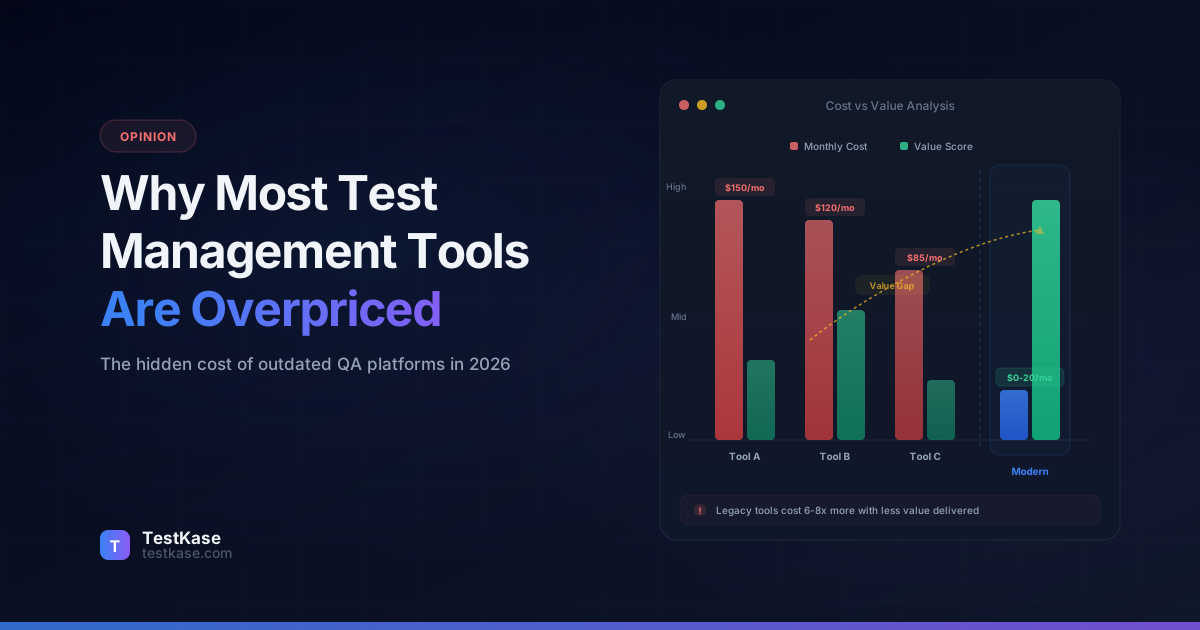
Why Most Test Management Tools Are Overpriced and Outdated in 2026

Why Most Test Management Tools Are Overpriced and Outdated in 2026
You've been there. Your QA team needs a test management tool, so you start evaluating options. You sign up for a few trials, compare features, and then you see the pricing page.
$36 per user per month. $49 per user per month. "Contact sales for a quote."
For a 15-person QA team, you're looking at $5,400 to $8,800 per year — for software that looks like it was designed in 2013. No AI. No modern UX. No free tier. Just the same old spreadsheet-with-extra-steps wrapped in an enterprise pricing model.
Something doesn't add up.
The test management market has a pricing problem, and it's been getting worse. While every other category of developer tooling has moved toward transparent pricing, generous free tiers, and modern user experiences, test management tools remain stuck in the enterprise software era — charging premium prices for commodity features.
This article breaks down why test management tools cost what they do, what you're actually paying for, and what the modern alternatives look like.
The Pricing Problem — What You're Actually Paying For
Let's start with the numbers. Here's what the most popular test management tools charge per user per month in 2026:
The gap is striking. A 15-person team choosing TestRail over TestKase pays an extra $5,580 per year. Over three years, that's $16,740 — enough to hire a junior QA engineer for several months.
But pricing isn't just the per-seat number. Legacy tools come with hidden costs that inflate the real spend:
- Annual contracts — Most enterprise tools require 12-month commitments. Cancel after month three? You're still paying for the full year.
- Tiered support — Basic support is "email only, 48-hour response." Want priority support or a dedicated account manager? That's an additional tier at 20-30% premium.
- Onboarding fees — Several tools charge $2,000-$10,000 for "onboarding packages" that amount to a few training calls and a PDF guide.
- Feature gating — Core features like API access, advanced reporting, or SSO are locked behind higher pricing tiers, pushing teams toward more expensive plans.
- Migration costs — Switching away is deliberately painful, with limited export options and proprietary data formats.
The enterprise pricing trap
Enterprise test management tools thrive on inertia. Once your team has 5,000 test cases in a platform, the perceived cost of switching feels higher than the actual cost of staying — even when the tool is clearly overpriced. This lock-in is a feature, not a bug, of the enterprise pricing model.
The "Legacy Tax" — Paying Premium for Decade-Old Software
Pricing aside, there's a deeper problem: most test management tools haven't meaningfully evolved in years.
TestRail was founded in 2004. PractiTest launched in 2007. Zephyr and qTest both emerged in the 2012-2013 era. These tools were built for a different world — waterfall methodologies, manual testing as the primary approach, and teams that measured productivity in "test cases executed per day."
Two decades later, QA has transformed. Teams practice shift-left testing. Automation frameworks handle 60-80% of regression suites. CI/CD pipelines run thousands of tests per commit. AI can generate test cases from user stories.
But the tools? They largely look the same.
The UX gap
Open TestRail and open any modern developer tool — GitHub, Linear, Figma, Notion — side by side. The difference is immediately visible. Legacy test management tools have:
- Cluttered interfaces with every possible option visible at once, creating cognitive overload
- Slow navigation — clicking through nested menus and full-page reloads to perform basic actions
- No keyboard shortcuts for common workflows like creating test cases, navigating folders, or updating execution status
- Mobile experiences that range from poor to non-existent
- Dated visual design that makes daily use feel like a chore rather than a tool that helps you work faster
This isn't cosmetic. Poor UX directly impacts productivity. A 2025 study by Forrester found that QA teams using modern, well-designed tools completed test planning 35% faster than teams using legacy platforms — not because of feature differences, but because of reduced friction in everyday workflows.
The AI gap
This is where legacy tools fall the furthest behind. As of 2026:
Most legacy tools have no AI capabilities at all. The few that have added "AI features" typically offer a basic chatbot integration that generates generic test case suggestions — not the structured, context-aware test generation that actually saves time.
Meanwhile, teams using AI-powered test generation report 60-70% reduction in test case creation time. That's not a marginal improvement — it's a fundamental shift in how test cases are written.
Try AI-powered test management freeWhat a Modern Test Management Tool Should Look Like in 2026
Before comparing specific tools, let's define what "modern" means in 2026. A test management tool built today should have:
AI-powered test generation
Not a chatbot sidebar. Real AI integration that reads a feature description, user story, or requirements document and generates structured test cases with steps, expected results, preconditions, and edge cases. The output should be editable, organized into folders, and immediately usable — not a rough draft that needs 30 minutes of cleanup.
Sub-second performance
Modern web applications load instantly. Your test management tool should too. Navigating between folders, opening test cases, running searches, and loading dashboards should feel instantaneous, even with 10,000+ test cases.
Native CI/CD integration
Automated test results from your CI/CD pipeline should flow directly into your test management tool. Support for popular frameworks — JUnit, Playwright, Cypress, TestNG, NUnit, Cucumber — via a simple CLI reporter. No complex configuration, no middleware, no third-party connectors.
Flexible, transparent pricing
A free tier that's actually usable — not a 14-day trial or a plan capped at 50 test cases. Transparent per-user pricing without sales calls. No annual lock-in requirements. The ability to scale up and down as your team changes.
API-first architecture
Every action available in the UI should be available via API. Personal access tokens for authentication. Webhook support for event-driven workflows. MCP server support for AI agent integration.
Native integrations that work
Jira integration that actually performs well — not a laggy iframe that takes 5 seconds to load. Native apps built on modern frameworks (Forge, not legacy Connect) that provide real-time sync without the overhead.
The Real Cost Comparison — Legacy vs Modern
Let's put real numbers to this. Here's what a QA team actually pays across different team sizes:
The savings are real
A 15-person team switching from TestRail to TestKase saves $5,580 per year. Over 3 years, that's $16,740. A 50-person team saves $18,600 per year — $55,800 over 3 years. That's a real budget line item that could fund additional QA headcount, automation infrastructure, or performance testing tools.
But cost alone doesn't tell the full story. Here's how the tools compare on features that matter in 2026:
The pattern is clear: modern tools deliver equivalent or better functionality at a fraction of the price. The premium you pay for legacy tools buys you brand recognition and on-premise deployment — not better features.
Why Teams Are Switching in 2026
The migration from legacy to modern test management tools has accelerated in the past year. Here's what's driving it:
AI test generation changes the economics
When your tool can generate 12 structured test cases from a single feature description in 30 seconds, the ROI calculation shifts dramatically. A QA engineer who spends 3 hours writing test cases for a feature now spends 20 minutes reviewing and refining AI-generated cases. Multiply that across every sprint, and you're recovering hundreds of engineering hours per year.
This isn't theoretical. Teams using TestKase's AI generation consistently report 60-70% reduction in test case creation time. That time goes back into exploratory testing, automation development, and the high-value work that actually prevents production bugs.
Free tiers eliminate the procurement barrier
Getting budget approval for a new tool takes weeks or months in most organizations. Getting your team to sign up for a free tier takes minutes. Modern tools with generous free plans let teams evaluate without procurement overhead, prove value with real data, and then upgrade when the ROI is obvious.
TestKase's free tier — 3 users with full features, no case limits, no expiration — means a small team can run their entire test management workflow for free. No "your trial expires in 12 days" pressure. No feature restrictions that make the evaluation meaningless.
Modern UX reduces onboarding time
Legacy tools typically require 2-3 days of training before a new team member is productive. Modern tools with intuitive interfaces, keyboard shortcuts, and familiar UX patterns (borrowed from tools like Linear, Notion, and GitHub) reduce this to hours — often minutes.
This matters more than it seems. QA teams have turnover. New hires join. Contractors come and go. Every hour saved on onboarding is an hour gained on actual testing.
Native Jira integration that actually works
Most legacy test management tools integrate with Jira through iframe-based add-ons that are slow, visually jarring, and prone to authentication issues. TestKase's native Jira Forge app provides a seamless experience — test cases linked to issues, execution status visible from the Jira ticket, AI-powered test generation from Jira issue descriptions, all without the performance overhead of legacy integration approaches.
CI/CD automation reporting
Modern QA teams run thousands of automated tests in CI/CD pipelines. The results need to flow back into the test management tool automatically. TestKase's CLI reporter supports 15+ test frameworks — JUnit, Playwright, Cypress, TestNG, NUnit, Cucumber, and more — with a single command:
npx @testkase/reporter report \
  --token $TESTKASE_PAT \
  --project-id PRJ-1 \
  --org-id 1173 \
  --format junit \
  --results-file test-results/junit.xml
No complex setup. No middleware. Results mapped to test cases via Automation IDs and reported to your test cycles in seconds.
Compare TestKase pricingBut What About Enterprise Features?
The most common objection when teams consider switching from a legacy tool: "Sure, it's cheaper, but can it handle our enterprise requirements?"
Let's address this directly.
Role-based permissions
TestKase supports owner, project admin, user, and guest roles with configurable permissions per project. You can control who creates test cases, who executes them, who views reports, and who manages project settings. This matches or exceeds the permission models in TestRail and PractiTest.
Custom fields
Need to track regulatory compliance tags, automation status, or business criticality on your test cases? TestKase supports custom fields with dropdown, text, and multi-select types — configurable per project.
Reporting
TestKase offers 40+ report types: execution summaries, coverage trends, defect analysis, risk heatmaps, tester workload, cycle comparisons, burndown charts, and more. Reports are available in the dashboard and exportable for stakeholder presentations.
Audit trails and traceability
Full test case history tracking, execution logs with timestamps and evidence, requirements-to-test-case traceability, and defect linking. Every change is recorded and attributable.
What legacy tools still do better
We're going to be honest here. There are areas where established tools still have an edge:
- On-premise deployment — TestRail offers on-premise installation. TestKase is cloud-only. If your organization requires on-premise hosting for compliance reasons, this is a legitimate constraint.
- Third-party ecosystem — TestRail has more third-party integrations, tutorials, and community resources, simply because it's been around for 20 years.
- Deeply customizable workflows — Some legacy tools offer highly configurable workflow engines that support complex approval chains. TestKase focuses on streamlined workflows that cover 95% of use cases.
For most teams, these differences don't justify a 3-4x price premium. But if on-premise deployment is a hard requirement, that narrows your options regardless of pricing.
How to Switch Without Disrupting Your Team
Migration anxiety is real. Teams with thousands of test cases in a legacy platform worry about losing data, disrupting workflows, and the learning curve of a new tool. Here's a practical migration approach:
Step 1: Export your data
Most legacy tools support CSV export. Export your test cases with metadata (title, description, steps, expected results, priority, folder structure). TestRail, Zephyr, and Qase all support this.
Step 2: Import into the new tool
TestKase supports bulk CSV import with field mapping. Upload your exported file, map columns to TestKase fields, and import. For a 5,000-case suite, this takes about 10 minutes.
Step 3: Run in parallel
Keep your legacy tool active (read-only) for 2-4 weeks while your team works in the new tool. This provides a safety net and lets team members reference the old tool while getting comfortable with the new one.
Step 4: Validate and cut over
After the parallel period, verify that all critical test cases, cycles, and reports are working correctly in the new tool. Then deactivate the legacy tool and cancel the subscription.
Migration timeline
Most teams complete the full migration in 1-2 weeks. The biggest time investment is reviewing imported test cases for accuracy — not the technical migration itself. Teams typically report that the new tool's improved UX makes up for the migration effort within the first sprint.
The Bottom Line
The test management market in 2026 has a clear divide:
Legacy tools — built 10-20 years ago, charging $30-50/user/month, with dated interfaces, no AI, and enterprise sales models designed to lock you in.
Modern tools — built on current technology, offering AI-powered workflows, transparent pricing ($5/user/month or free), modern UX, and native integrations with the tools teams actually use.
The features are comparable. The AI capabilities favor modern tools by a wide margin. The pricing gap is 3-5x.
The question isn't whether modern test management tools are capable enough. The question is whether the brand recognition of a legacy tool is worth $4,500-$18,000 per year in additional cost — for software that looks and feels a decade behind.
For most teams, the answer is no.
Start free, decide later
TestKase is free for up to 3 users with full features — no test case limits, no feature restrictions, no expiration. Sign up in 30 seconds, import your test cases, and see for yourself whether modern test management lives up to the promise.
Share this article
Related Articles
Critical, Serious, Moderate, Minor: How to Triage Accessibility Issues by Severity
A practical triage policy template — SLAs per severity, ownership across design / engineering / content / QA, and how to share findings cross-team without forwarding PDFs.
Read more →Why Single-Page Accessibility Scans Miss Real Bugs (and What Multi-Page Audits Catch)
Single-URL accessibility scanners miss six entire categories of WCAG violations. Here's what falls through the gap, and how flow-aware audits catch the issues your users actually hit.
Read more →Accessibility Testing in CI/CD: Catching WCAG Issues Before They Ship
Three integration patterns, GitHub Actions / GitLab / CircleCI templates, and a 3-quarter rollout playbook to take an engineering team from zero accessibility in CI to block-on-fail.
Read more →