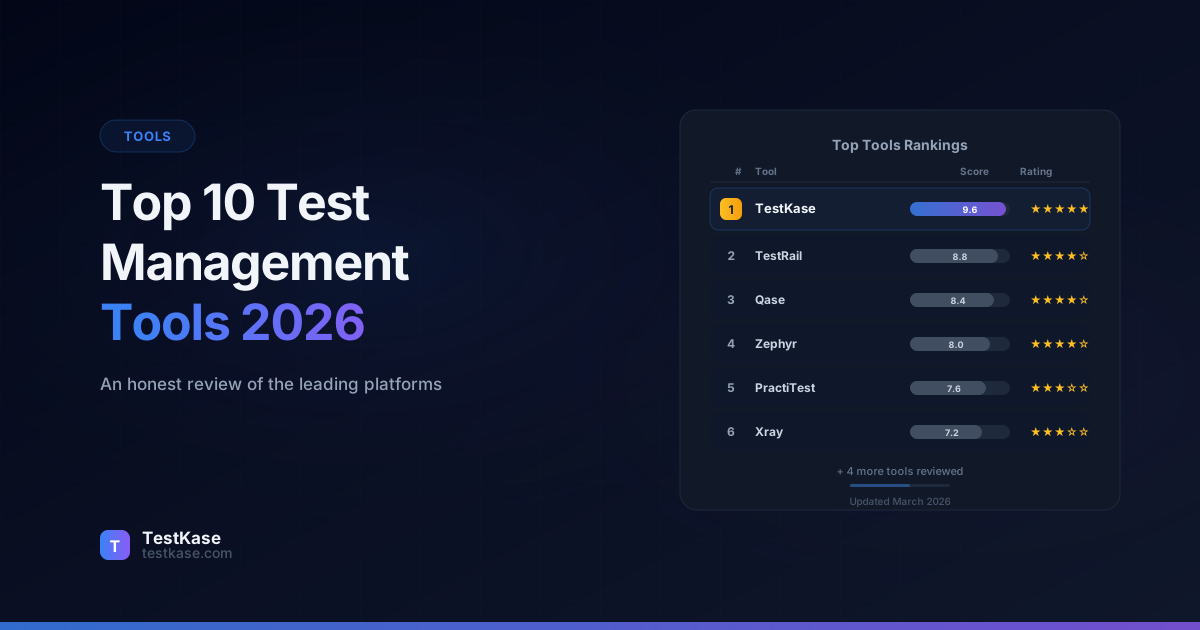
Top 10 Test Management Tools in 2026: An Honest Review

Top 10 Test Management Tools in 2026: An Honest Review
Every year, QA teams evaluate their tooling. Maybe your current platform raised prices again. Maybe your team doubled and your spreadsheet-based approach finally broke. Maybe you've been using the same tool for five years and you're wondering what else is out there.
Whatever brought you here, this guide cuts through the noise. The test management market is crowded — over 40 tools claim to be the best — and most "top 10" lists read like paid advertisements. This one doesn't. We'll cover each tool's genuine strengths, real weaknesses, approximate pricing, and the type of team it fits best.
Yes, TestKase is on this list — and yes, we'll be upfront about our own limitations too. Credibility matters more than spin.
Why Test Management Tools Matter in 2026
Before diving into individual tools, it's worth understanding why dedicated test management platforms exist — and why spreadsheets, wikis, and issue trackers fall short.
A 2025 survey by the World Quality Report found that 68% of QA teams still managing tests in spreadsheets reported "significant challenges" with traceability, reporting, and collaboration. Teams using dedicated test management tools reported 40% faster test planning, 55% better stakeholder visibility, and 30% fewer escaped defects compared to spreadsheet-based teams.
The core capabilities a test management tool should provide:
- Structured test case storage with folders, tags, and metadata
- Test cycle execution with pass/fail tracking and evidence attachment
- Requirements traceability linking tests to stories, requirements, or features
- Reporting and dashboards for stakeholders and release decisions
- Collaboration features for distributed QA teams
- Integration with issue trackers (Jira, GitHub, Azure DevOps) and CI/CD pipelines
- API access for automation framework integration
In 2026, AI capabilities have become a differentiating factor. Tools that leverage AI for test case generation, coverage gap analysis, and duplicate detection offer meaningful productivity gains — Capgemini's research estimates 30-50% time savings on test creation for teams using AI-assisted tools.
How We Evaluated These Tools
Every tool on this list was assessed against five criteria:
Evaluation criteria
Usability — How intuitive is the interface? How fast can a new team member become productive? Features — Test case management, execution workflows, reporting, and integrations. AI capabilities — Does the tool leverage AI for test generation, coverage analysis, or workflow automation? Pricing — Total cost for teams of 5, 15, and 50 users. Hidden costs and minimum commitments. Scalability — How well does the tool perform as test suites grow from 500 to 50,000+ cases?
Tools are listed in order of overall recommendation, but the "best" tool depends entirely on your team's size, workflow, budget, and tech stack.
We also evaluated each tool against real-world scenarios: importing 2,000 test cases, running a test cycle with 10 concurrent users, generating reports for stakeholders, and integrating with Jira Cloud. These hands-on evaluations reveal practical differences that feature comparison charts miss.
1. TestKase
TestKase is a cloud-native test management platform built with AI at its core. It offers structured test case management, test cycle execution, real-time dashboards, and a dedicated Jira Forge integration. The platform launched with AI-powered test case generation as a first-class feature — not a bolt-on.
Key strengths:
- AI-generated test cases that produce structured, thorough cases from feature descriptions. This single feature can reduce test case creation time by 60-70%. In our evaluation, describing a "user registration with email verification" feature produced 12 well-structured test cases covering happy paths, validation errors, email delivery edge cases, and security scenarios — in under 30 seconds.
- Clean, modern interface with keyboard shortcuts and intuitive navigation. New users are productive within minutes. The UI was clearly designed by people who understand daily QA workflows — bulk actions, inline editing, and drag-and-drop folder management are all smooth.
- Free tier with full features for up to 3 users — no case count limits, no feature restrictions, no expiration. This is the most generous free tier in the market. Most competitors either cap test case counts, restrict features, or limit to 14-day trials.
- Jira integration through a native Forge app, providing bidirectional sync without the performance overhead of embedded add-ons. Test cases link to Jira issues, and execution status is visible from the Jira ticket.
- Fast performance even with large suites. Importing 5,000 test cases and navigating the suite showed no perceptible lag.
Key weaknesses:
- Newer platform with a smaller community compared to established tools. Fewer third-party tutorials and resources available. You won't find a dozen YouTube tutorials on advanced TestKase workflows yet.
- Shared steps feature is still in development. Teams that rely heavily on shared/reusable steps across test cases will need to manage this with copy-paste for now.
- Integration ecosystem is growing but doesn't yet cover as many automation frameworks as some competitors. Jira integration is mature, but integrations with Azure DevOps, GitHub Issues, and specific CI/CD platforms are still being expanded.
Pricing: Free for up to 3 users. Paid plans from $10/user/month. AI features included at $20/user/month.
Best for: Teams that want AI-powered test management, startups and mid-size teams seeking modern UX at affordable pricing, and any team that values speed over legacy feature depth.
Try TestKase free2. TestRail
TestRail is one of the oldest and most recognized test management platforms, used by over 30,000 teams worldwide. Owned by Idera, it offers both cloud and on-premise editions with deep enterprise features.
Key strengths:
- Mature reporting engine with custom reports, scheduled email reports, and milestone-based comparisons. The reporting is genuinely best-in-class for enterprise needs. You can build reports that track defect trends across releases, compare test coverage between milestones, and generate compliance-ready documentation.
- Extensive integration ecosystem — pre-built connectors for most CI/CD platforms, automation frameworks, and issue trackers. If you need to connect to a specific tool, TestRail probably already has a connector.
- On-premise edition available for teams with strict data residency or compliance requirements.
- Large community with extensive documentation, tutorials, and third-party resources. Any question you have has probably been answered on their forums.
Key weaknesses:
- Dated interface that hasn't kept pace with modern design standards. Navigation is clunky, and common actions take too many clicks. Bulk editing test cases requires more steps than it should, and the test run execution view feels cramped on smaller screens.
- Pricing starts at $36/user/month (Professional Cloud) and escalates quickly. No free tier — only a 14-day trial. For a 15-person team, you're looking at $540/month minimum — and that's before enterprise features like SSO and advanced reporting.
- Limited AI capabilities. The platform was built well before the AI era, and retrofitting AI into a legacy architecture is inherently constrained. Don't expect AI test generation here anytime soon.
- Performance degrades with very large suites. Teams with 20,000+ test cases report slow page loads and sluggish search. Cloud performance has improved but still trails modern competitors.
Pricing: From $36/user/month (cloud). On-premise pricing is significantly higher with annual licensing.
Best for: Large enterprise teams that need advanced custom reporting, on-premise deployment, or a tool with deep market recognition for compliance purposes.
3. Zephyr Scale
Zephyr Scale (formerly TM4J) is SmartBear's enterprise-grade test management add-on for Jira. It lives within the Atlassian ecosystem and provides folder hierarchies, custom fields, traceability matrices, and robust execution workflows.
Key strengths:
- Deep Jira embedding — test management happens without leaving the Jira interface, which reduces context switching. For teams whose entire workflow centers on Jira, this is a significant advantage.
- Strong traceability features linking test cases to requirements, user stories, and defects. The traceability matrix is one of the best in the market for Jira-based workflows.
- Configuration-based testing allows execution across multiple environments and platforms within a single test plan. Test the same cases on Chrome, Firefox, and Safari without duplicating test cycles.
- Custom fields and workflows that mirror Jira's flexibility. If you've invested in customizing Jira, Zephyr Scale follows the same patterns.
Key weaknesses:
- Performance degrades with large test suites because data is stored within Jira's database. Teams with 10,000+ cases report noticeable slowdowns — search, filtering, and report generation become visibly slower. This is a fundamental architectural limitation.
- Requires Jira — if your team moves away from Jira, your test data doesn't move with you. You're locked into the Atlassian ecosystem.
- No AI features as of early 2026. SmartBear has mentioned AI plans but hasn't shipped anything yet.
- Cost adds up: Zephyr Scale pricing plus Jira licensing plus potential Atlassian Cloud Premium for larger teams. The total stack cost is higher than it appears.
Pricing: From approximately $12.50/user/month through the Atlassian Marketplace (in addition to Jira licensing costs).
Best for: Teams deeply invested in the Atlassian ecosystem that need enterprise test management features without a separate platform.
4. Qase
Qase is a modern, cloud-based test management platform that gained popularity by offering clean design and developer-friendly APIs. It supports both manual and automated test management with broad integration coverage.
Key strengths:
- Excellent automation framework integration with open-source reporters for Cypress, Playwright, Jest, Pytest, JUnit, and more. If your team runs automated tests, Qase makes it easy to consolidate results alongside manual tests.
- Comprehensive REST API with solid documentation and webhook support. Everything you can do in the UI, you can do via API — enabling custom integrations and automation workflows.
- Clean, modern interface that appeals to developer-oriented QA teams. The test case editor is particularly well-designed with markdown support and inline media.
- Shared steps library that allows reusing common test steps across multiple test cases.
Key weaknesses:
- Free tier is limited to 500 test cases, which most teams outgrow within a few months. Once you hit the limit, you're forced to upgrade — and the jump to paid plans is significant.
- Pricing climbs steeply at higher tiers — $36-$48/user/month for professional and enterprise features. SSO and audit logs require the highest tier.
- AI features are available but less mature than TestKase's implementation. The AI test generation works but produces less structured output that requires more manual editing.
- Reporting is functional but not as deep as TestRail's. Custom reports and scheduled exports are limited compared to enterprise competitors.
Pricing: Free for up to 3 users (500-case limit). Paid plans from $24/user/month.
Best for: Developer-heavy teams that prioritize automation integration and API access, especially those using diverse testing frameworks.
5. PractiTest
PractiTest is a comprehensive QA management platform that covers test case management, requirements management, and issue tracking in a single platform. It's popular in regulated industries thanks to its audit trail and compliance features.
Key strengths:
- End-to-end QA management — requirements, test cases, execution, and defects in one platform. No need for separate tools. This is particularly valuable for teams that need to demonstrate a complete quality process for audits.
- Strong compliance and audit features, including full activity logging and electronic signatures — critical for healthcare, finance, and government teams. Every action is logged with timestamps and user attribution.
- Advanced filter and dashboard system that supports complex queries across your testing data. You can build views that combine requirements coverage, execution status, and defect trends in a single dashboard.
- Reusable test steps and test data parameterization for data-driven testing.
Key weaknesses:
- Interface feels dense and takes longer to learn than simpler tools. New users often need formal training. The initial setup process — configuring custom fields, workflows, and permissions — can take a full day.
- Pricing is not transparent — you must contact sales for a quote, which is a signal that it's enterprise-priced. Expect a minimum commitment and per-user rates that exceed most competitors.
- Limited AI capabilities. The platform focuses on process compliance rather than AI-assisted productivity. There's no AI test generation.
- Search functionality is adequate but not exceptional. Finding specific tests in large suites sometimes requires knowing the exact filter combinations.
Pricing: Contact sales. Estimated at $35-$49/user/month based on team size.
Best for: Teams in regulated industries (healthcare, finance, defense) that need compliance-grade audit trails and end-to-end requirements traceability.
6. TestMonitor
TestMonitor is a test management tool that emphasizes simplicity and visual reporting. It's designed for teams that want test management without the complexity of enterprise platforms.
Key strengths:
- Intuitive, visually appealing interface with a focus on risk-based testing. The risk matrix view helps teams prioritize what to test first. For teams practicing risk-based testing, this visual approach is genuinely useful.
- Milestone-based test planning that maps testing activities to project milestones. This makes it easy to see which milestones have sufficient test coverage and which are at risk.
- Good getting-started experience with templates and guided setup. New teams can be importing test cases and running their first test cycle within an hour.
- Results sharing — stakeholders can view test results and dashboards without needing a licensed account.
Key weaknesses:
- Limited integrations compared to competitors — fewer CI/CD and automation framework connectors. If you need to pull automated test results into the platform, options are limited.
- Fewer advanced features for large teams (limited custom fields, no shared steps). Teams with complex workflows may find it restrictive.
- Smaller market presence means less community support and fewer third-party resources.
- No AI features. The product roadmap mentions AI but nothing has shipped.
Pricing: From $25/user/month with volume discounts.
Best for: Small to mid-size teams that value simplicity and visual risk management over advanced customization.
7. Kualitee
Kualitee offers test management, defect tracking, and project management in a single platform. It's particularly popular with teams in South Asia and the Middle East, with a growing international presence.
Key strengths:
- All-in-one platform with built-in defect tracking — no need for a separate issue tracker for QA-specific bugs. The defect workflow is tightly integrated with test execution.
- Mobile app for test execution on the go — useful for field testing and hardware QA. The mobile app supports test execution, defect logging with photos, and basic reporting.
- Affordable pricing with a free tier for small teams. For budget-constrained teams, Kualitee offers solid functionality at the lowest price point in this list.
- Built-in project management features (sprints, releases, milestones) reduce the need for external PM tools.
Key weaknesses:
- Interface design lags behind modern competitors. Some views feel cluttered and navigation can be confusing. The UI hasn't been significantly updated in several years.
- Integration ecosystem is limited — Jira integration exists but is less polished than competitors. CI/CD integrations are basic.
- Reporting capabilities are basic compared to tools like TestRail or PractiTest. Custom reports are limited, and export options are minimal.
- Performance can be slow with large test suites. Page load times increase noticeably above 3,000 test cases.
Pricing: Free for up to 3 users. Paid plans from $15/user/month.
Best for: Small teams that want test management with built-in defect tracking at a low price point, especially those that need mobile test execution.
8. SpiraTest
SpiraTest by Inflectra is an integrated quality management platform that covers requirements, test cases, defects, and source code — all in one tool. It's the testing module within Inflectra's broader SpiraPlan suite.
Key strengths:
- Deep requirements traceability — trace tests back to requirements and forward to defects, with coverage analysis at every level. The traceability matrix is comprehensive and suitable for regulatory environments.
- Both cloud and on-premise editions available, with a self-hosted option that gives teams full data control. The on-premise option includes perpetual licensing, which can be cost-effective long-term.
- Built-in project management features including task boards, releases, and resource management. It's a full ALM (Application Lifecycle Management) tool.
- Built-in test automation integration that can orchestrate and schedule automated test runs from within the platform.
Key weaknesses:
- Interface feels dated and enterprise-heavy. The learning curve is steep, especially for teams used to modern SaaS tools. Navigation requires familiarity with the platform's terminology and menu structure.
- Configuration complexity — setting up workflows, custom fields, and permissions can take days, not hours. You'll likely need a dedicated admin for initial setup.
- Overkill for teams that just need test case management without the full ALM suite. The breadth of features can be overwhelming when you only need test management.
- Documentation, while comprehensive, assumes familiarity with ALM concepts that smaller teams may not have.
Pricing: From $41/user/month (cloud). On-premise licensing available with perpetual options.
Best for: Enterprise teams that need a full application lifecycle management suite with deep requirements-to-defects traceability.
9. Testiny
Testiny is a lightweight, modern test management tool built for small and mid-size teams. It launched as a simpler alternative to heavyweight platforms, focusing on ease of use and fast setup.
Key strengths:
- Extremely quick setup — create an account and start creating test cases within minutes. No configuration overhead. This is the fastest time-to-value of any tool on this list.
- Clean, focused interface that avoids feature bloat. It does test case management and execution well without trying to be an ALM platform. If you want simple test management without 200 features you'll never use, Testiny delivers.
- Affordable pricing with a generous free tier. For micro-teams (1-3 people), the free tier covers all essential needs indefinitely.
- Good keyboard navigation and fast performance. The interface is responsive even on slower connections.
Key weaknesses:
- Limited feature depth for larger teams — no custom fields, basic reporting, and fewer integration options. Teams will outgrow Testiny's capabilities as their process matures.
- Smaller development team means features ship less frequently than larger competitors. Feature requests may take months to implement.
- Not suitable for enterprise compliance requirements — no audit logs or electronic signatures. Regulated industries should look elsewhere.
- No import/export for complex data structures. Migrating to or from Testiny requires manual effort.
Pricing: Free for up to 3 users. Paid plans from $12/user/month.
Best for: Small teams and startups that want a no-frills test management tool with fast setup and low cost.
10. aqua ALM
aqua ALM is a German-engineered quality management platform that combines requirements management, test management, and defect tracking. It has introduced AI-powered features including AI test case generation and has a focus on the European market.
Key strengths:
- AI-powered test case generation — one of the earlier tools to integrate AI into the test creation workflow. The AI can generate test cases from requirements or user story descriptions, though the output quality varies by input specificity.
- Strong requirements management with traceability matrices and coverage analysis. The requirements-to-test-to-defect traceability chain is well-implemented.
- GDPR-compliant with EU-hosted data centers — important for European teams with data sovereignty requirements. Data never leaves the EU.
- Good automation integration with support for Selenium, JUnit, and other frameworks. Test results from automated runs integrate cleanly into the reporting dashboard.
Key weaknesses:
- Smaller market presence outside of Europe, which means fewer community resources and English-language support materials. Finding answers to specific questions can take longer.
- Pricing is not transparent and requires contacting sales. The sales process is typical of enterprise tools — expect demos, quotes, and minimum commitments.
- Interface design is functional but not as polished as newer entrants like TestKase or Qase. The UI works well enough but doesn't feel modern.
- Limited third-party integrations beyond the core set. If your toolchain includes less common tools, integration may require custom API work.
Pricing: Contact sales. Estimated at $30-$45/user/month.
Best for: European teams that need GDPR-compliant hosting, requirements management, and AI-assisted test generation in a single platform.
Comparison Matrix
Cost Comparison for Real Teams
Raw per-user pricing doesn't tell the full story. Here's what each tool actually costs for different team sizes, including common add-ons:
5-person team (startup/small QA):
| Tool | Monthly Cost | Notes | |------|-------------|-------| | TestKase | $0-$50 | Free for 3 users; $10/user for 4-5 | | Testiny | $0-$24 | Free for 3 users; $12/user for 4-5 | | Kualitee | $0-$30 | Free for 3 users; $15/user for 4-5 | | Qase | $120 | Free tier has 500-case limit; most teams need paid | | TestMonitor | $125 | No free tier | | TestRail | $180 | No free tier | | SpiraTest | $205 | No free tier | | PractiTest | ~$175-$245 | Requires sales contact | | aqua ALM | ~$150-$225 | Requires sales contact |
15-person team (mid-size QA):
| Tool | Monthly Cost | Notes | |------|-------------|-------| | TestKase | $150 | $10/user | | Testiny | $180 | $12/user | | Kualitee | $225 | $15/user | | Qase | $360 | $24/user | | TestMonitor | $375 | Volume discount may apply | | TestRail | $540 | $36/user | | SpiraTest | $615 | $41/user | | PractiTest | ~$525-$735 | Volume discount likely | | aqua ALM | ~$450-$675 | Volume discount likely |
The annual cost difference is substantial. A 15-person team paying $540/month for TestRail spends $6,480/year. The same team on TestKase pays $1,800/year — saving $4,680 annually while gaining AI features that TestRail doesn't offer.
Common Mistakes When Choosing a Test Management Tool
Picking based on brand recognition. The most well-known tool isn't always the best fit. TestRail has the biggest name, but its pricing and dated UI make it a poor choice for cost-conscious teams or those that value modern design.
Ignoring the total cost of ownership. Per-user pricing is just one piece. Factor in: Jira licensing if required, training hours for complex tools, admin time for configuration, and the productivity cost of a slow or unintuitive interface.
Watch for hidden costs
Some tools advertise low per-user rates but charge extra for features like SSO, custom reporting, API access, or premium support. Always ask: "What's included in the base price, and what costs extra?" Calculate the real monthly cost for your team before committing.
Over-buying features. A small team doesn't need enterprise ALM capabilities. A tool with 200 features but a steep learning curve will see lower adoption than a focused tool with 50 features your team actually uses. Unused features are wasted budget.
Skipping the hands-on evaluation. Demos are choreographed. Free trials show you the curated experience. The real test is importing your actual test cases, running your actual test cycles, and having your actual team use the tool for two weeks. Every tool on this list offers some form of trial — use it with real work, not sample data.
Ignoring migration difficulty. Switching tools means migrating test cases, execution history, and integrations. Some tools make migration easy with import/export features and API access. Others make it painful. Consider migration as part of your evaluation — both moving in and potentially moving out later.
Not involving the team. The QA lead picks a tool, signs a contract, and announces it to the team. The team finds it unintuitive, adoption is low, and within six months they're back to spreadsheets. Involve the people who'll use the tool daily in the evaluation process.
How to Make Your Decision
Start with your constraints: budget, team size, must-have integrations, and compliance requirements. That narrows the list from 10 to 3-4 candidates. Then run a structured evaluation:
- Import a subset of your real test cases into each tool.
- Run a full test cycle with your team.
- Check reporting — does it give your lead or manager the visibility they need?
- Test the Jira integration (or your issue tracker of choice) with real tickets.
- Ask your team which tool they'd actually use every day.
Create a simple scorecard:
Evaluation Criteria (weight 1-5):
  Ease of use          (5) — How quickly can the team be productive?
  Features needed      (4) — Does it cover our must-have requirements?
  Integration quality  (4) — How well does it connect to our toolchain?
  Pricing fit          (3) — Is it sustainable for our budget and growth?
  AI capabilities      (3) — Does it offer meaningful AI assistance?
  Scalability          (2) — Will it handle our suite 2 years from now?
  Migration ease       (2) — How hard is it to move data in and out?

Score each tool 1-10 per criterion, multiply by weight, sum.
The tool your team enjoys using is the tool that delivers value. Everything else is just features on a comparison chart.
Start your free TestKase evaluationThe Market Outlook: Where Test Management Is Heading
Several trends are shaping the test management market through 2026 and beyond:
AI becomes table stakes. Today, AI test generation is a differentiator. Within 18 months, it will be expected. Tools without AI capabilities will face increasing pressure to add them or risk losing market share to AI-native platforms.
Platform consolidation. The market has too many tools for its size. Expect acquisitions — smaller tools absorbed by larger platforms, and mid-tier tools merging to compete with leaders. When evaluating tools, consider the vendor's financial stability and market position.
Shift toward developer-friendly tools. As "shift-left" testing moves QA responsibilities closer to developers, test management tools need to fit into developer workflows — Git integration, API-first design, and IDE plugins become important. Tools that only serve traditional QA workflows will lose ground.
Usage-based pricing. The per-user licensing model is being challenged by usage-based models — pay for test cases stored, executions run, or AI generations used. This can be more cost-effective for teams with variable usage patterns.
Conclusion
The test management market in 2026 offers real choice for the first time. Legacy tools like TestRail still serve enterprise needs. Jira-embedded tools like Zephyr Scale work for Atlassian-committed teams. Modern platforms like TestKase and Qase bring clean design and AI capabilities at lower price points.
The best tool is the one your team will use consistently — not the one with the longest feature list. Evaluate with real test cases, real workflows, and real team feedback. Most tools on this list offer free tiers or trials that make hands-on evaluation cost-free.
If AI-powered test generation, modern UX, and cost-effective scaling are priorities for your team, TestKase is worth putting at the top of your evaluation list.
Stay up to date with TestKase
Get the latest articles on test management, QA best practices, and product updates delivered to your inbox.
SubscribeShare this article
Related Articles
Critical, Serious, Moderate, Minor: How to Triage Accessibility Issues by Severity
A practical triage policy template — SLAs per severity, ownership across design / engineering / content / QA, and how to share findings cross-team without forwarding PDFs.
Read more →Why Single-Page Accessibility Scans Miss Real Bugs (and What Multi-Page Audits Catch)
Single-URL accessibility scanners miss six entire categories of WCAG violations. Here's what falls through the gap, and how flow-aware audits catch the issues your users actually hit.
Read more →Accessibility Testing in CI/CD: Catching WCAG Issues Before They Ship
Three integration patterns, GitHub Actions / GitLab / CircleCI templates, and a 3-quarter rollout playbook to take an engineering team from zero accessibility in CI to block-on-fail.
Read more →