One requirement in, a whole suite out
Paste a requirement or link a Jira, GitHub or GitLab issue. Get a full set of structured test cases — steps, priorities and expected results — saved straight into your test library.
From prose or a linked issue · your priority scheme · you accept what lands
Password reset
Acceptance
- Reset succeeds with a valid email
- Unknown email shows a neutral message
- Expired reset link is rejected
- New password must meet the policy
- Link is single-use once redeemed
- + 7 more
The first three cases are careful. The last twenty are five o’clock.
The happy path gets written with care. The empty field, the maximum length, the expired card — the boring cases that catch real bugs get written last, or not at all. Ask for the whole set at once and coverage stops being a function of patience.
Reset succeeds with a valid email
Preconditions
- Account exists with the email, signed out of the browser.
Steps
Expected
- 1Open /resetForm shown
- 2Enter the registered email, click Send linkConfirmation message
- 3Open email, click the reset linkNew-password form opens
- 4Enter a password that meets the policy, submitSigned in on the dashboard
What you get from one requirement
A whole suite, not one case
Ask for a dozen cases against a requirement; they arrive together, ready to review.
Straight into your test library
Accepted cases land in your project, in your folders, under your own priority scheme.
From prose or a linked issue
Paste the text, or point at a Jira, GitHub or GitLab issue you already track.
Steps written for you
Each case comes with steps: action, test data and the expected result.
Choose which fields it writes
Summary, preconditions, test data, expected result and priority are individual switches.
Traceable back to the issue
Cases generated from an issue keep an obvious parent, so coverage answers itself.
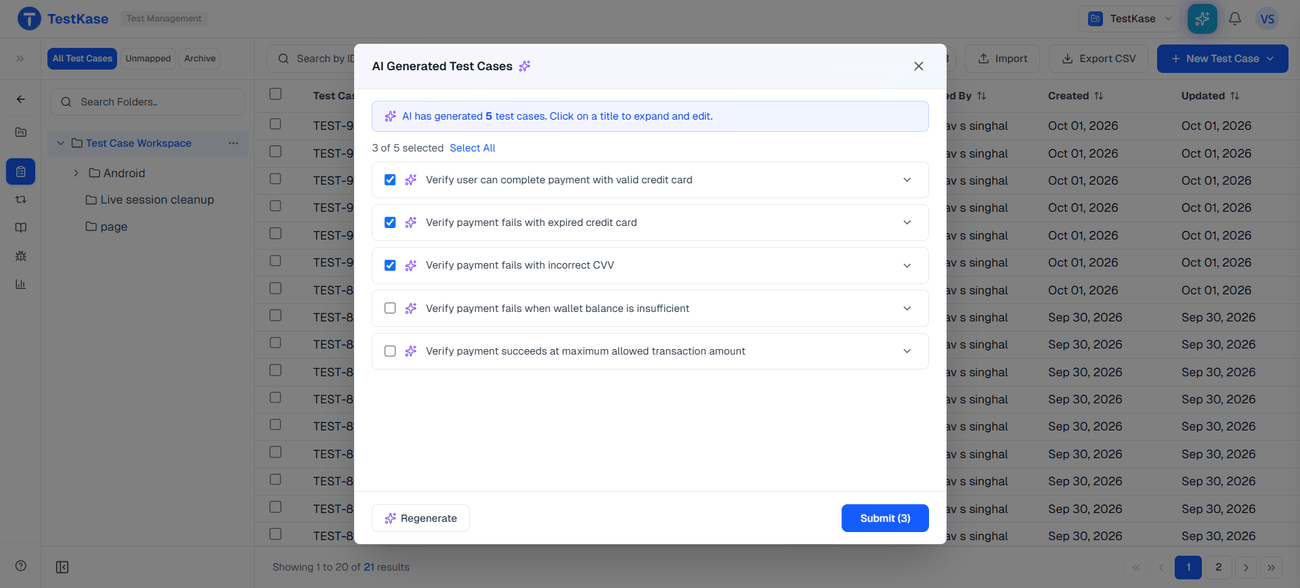
You accept the ones worth keeping
Nothing is written to your project until you pick it. Keep the strong cases, drop the rest, and the set that lands in your library is the one you approved.
- Review as a set. See the whole suite side by side, so a gap is obvious before you save.
- Edit in place. Fix a step or an expected result while you review — no round trip.
- Priorities from your scheme. Generated priorities use the values your project already defines.
Frequently asked questions
You choose the count. Generate a suite against a single requirement — a dozen is common — then keep the ones that earn their place. One requirement at a time keeps the cases specific and the review short.
Yes. Link the issue and generation works from its title, description and acceptance criteria — the text the team actually agreed. Cases generated from an issue also keep it as a parent, so traceability is there without anyone maintaining it by hand.
Summary, preconditions, test data, expected result and priority — each an individual switch you can turn on or off. Priority uses the values your own project defines, so generated cases land inside your scheme rather than inventing a parallel one.
Only what you accept. The output is a draft you review; nothing is written to your test library until you select it and save. Keep the strong cases, drop the rest.
No. It writes from the requirement text you supply and nothing else, so it cannot know a step nobody documented. Treat the result as a first draft over a filled page — you still decide which cases matter.
Read the guide: AI test case generation, in practice →It draws on AI credits, which are finite and shared across your organisation. When they run out, generation stops rather than quietly degrading. Quality is a spend dial — cheap, medium or best, medium by default — set by the organisation owner, and monthly usage is visible to owners and admins.
Yes. AI is an organisation-level switch the owner controls, and it can be checked per project — useful when some work sits under a contract that says nothing leaves your systems. Generating sends your requirement text to a model provider, which is exactly why that switch exists.
No. Generation produces test cases in your library. Running them on a real device is Live and Automate, and recording the result is a separate step.
Fill the page, then decide
Start from a requirement and get a full suite you can edit and keep — in the same workspace as your executions on real devices.