Your whole suite, running at once on real browsers
Point Selenium, Playwright or Appium at one endpoint, or upload your Espresso or XCUITest suite, and watch your runs go in parallel on real browsers and phones — with the video and logs waiting when a test goes red.
Selenium · Playwright · Appium · Espresso · XCUITest · no SDK to add

checkout.spec
Chrome · Win 11

checkout.spec
Safari · macOS

login.spec
Firefox · Win 11

login.spec
Edge · Win 10
cart.spec
Chrome · macOS
cart.spec
Firefox · macOS
search.spec
Edge · Win 11
search.spec
Safari · macOS
app.e2e
Appium · iPhone
app.e2e
Appium · Pixel
“Green on my machine” is not a release gate
Your CI runs headless Chromium. Your customers are on Safari, Firefox and Edge, on machines you don't have. Run the same suite on the real thing, and a green build means green for them too — with the video and logs waiting the moment one goes red.
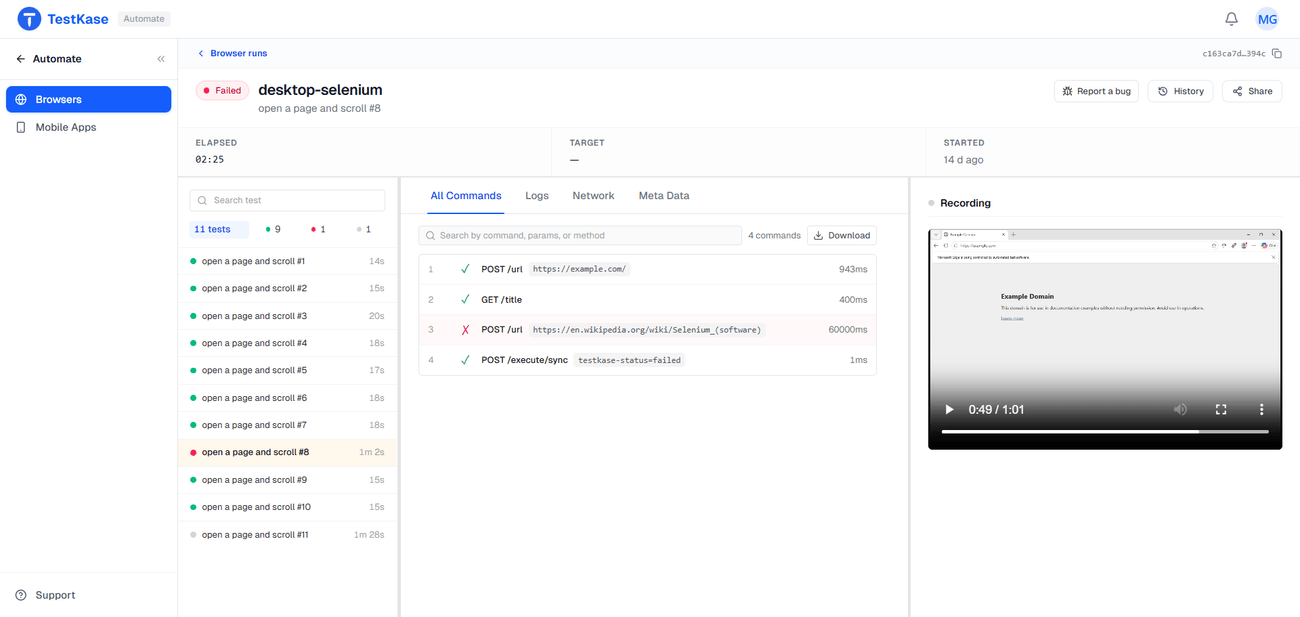
Every run hands back the evidence
Captured on our side of the connection, in any language, with any runner.
Video of the run
Recorded on the machine running the browser — scrub straight to the moment it broke.
A clip per test
Mark your test boundaries and the video splits into one clip for each test.
Console and network
The browser's own console and every request, pulled from its debugging protocol.
Driver logs and commands
Every command your suite sent, and what the browser answered, in order.
Live View
Watch a run as it happens — the one thing that helps when a test just hangs.
No SDK, ever
It's all captured on our side, so nothing is added to your code or your CI runners.
Run the matrix at full width
The same suite is an hour on one thread and minutes on twelve. When the fleet is full your session waits in line instead of failing — for a budget you set.
Chrome, Edge, Firefox and Safari on real macOS and Windows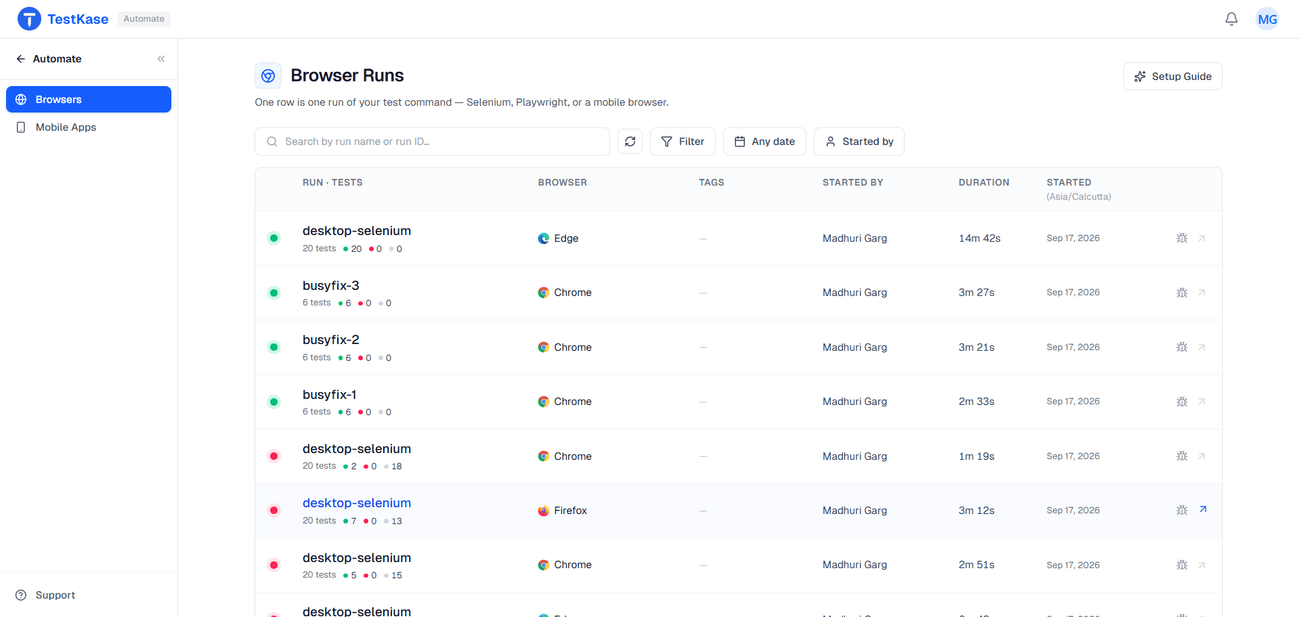
Five ways in, no SDK to add

Selenium
W3C WebDriver, in any language. Repoint your grid config and go.

Playwright
One connect() over a WebSocket — no grid to run yourself.
Appium
Upload an .apk or .ipa and drive real iPhones and Android phones.
Espresso
Upload your app and androidTest APKs and run the suite on real Android phones or emulators.
XCUITest
Upload your .ipa and UI-test Runner and run the suite on real iPhones and iPads.
# Selenium — W3C WebDriver
https://hub.testkase.com/wd/hub

# Playwright — connect() over WebSocket
wss://hub.testkase.com/playwright

# Espresso and XCUITest — upload, then start a build
https://hub.testkase.com/espresso/v1
https://hub.testkase.com/xcuitest/v1Runs from the pipeline you have
 GitHub Actions
 Jenkins
 GitLab CI
 CircleCIAzure Pipelines…or your own runner
Frequently asked questions
No. Automate speaks standard W3C WebDriver for Selenium and the Playwright connect protocol, so you keep your tests, assertions, framework and CI. You change the endpoint your suite connects to and nothing else — which is also what makes it cheap to leave, since there is no SDK baked into your code.
Chrome, Edge and Firefox on real macOS and Windows machines, plus Safari on macOS. These are real browsers on real operating systems, not headless containers.
No. Safari exposes neither console output nor network data, on macOS or iOS, and no browser vendor offers the protocol for it — so no tool captures them for Safari. You still get the run and its video; when you need the console or network for a bug, run the same suite on Chrome or Edge.
Yes, with Appium. Upload an .apk or .ipa and drive real Android phones and real iPhones using the standard Appium client in any language, with the same video and logs as a browser run. Android Espresso suites run too: upload the app and its androidTest APK through the Espresso API and start a build on real Android phones or emulators. iOS XCUITest suites run the same way on real iPhones and iPads, through the XCUITest API.
Read the guide: Espresso suites on real Android devices →Paid plans buy 1 to 20 threads self-serve, and a negotiated contract can go higher; your thread count is also your parallel-session limit. On the free tier you can run as many threads at once as your free minutes cover.
Your session waits in line rather than failing, for a budget you control that defaults to three minutes. The line is ranked per device, so a suite asking for any free Android is never stuck behind someone queued for a different model, and a suite pinned to one phone keeps claiming it between tests instead of paying for a fresh clean each time.
One or the other, never both. Mark your test boundaries and the recording splits into a clip per test; leave them off and you get one video of the whole run.
Usually not, and we would rather say so. Most flakiness lives in the tests — timing assumptions, shared fixtures, locators matching more than one element — and better hardware relocates that rather than curing it. What real infrastructure plus per-test artifacts does is make flakiness diagnosable: a clip and the console for the failing test usually answer "is this us or you" in under a minute.
Yes — every account gets free device-minutes to try Automate, no credit card required.
Run your suite on real browsers — free
Free device-minutes, no card. Point Selenium, Playwright or Appium at one endpoint, or upload your Espresso or XCUITest suite, and watch it go.