A clip and logs for the test that failed
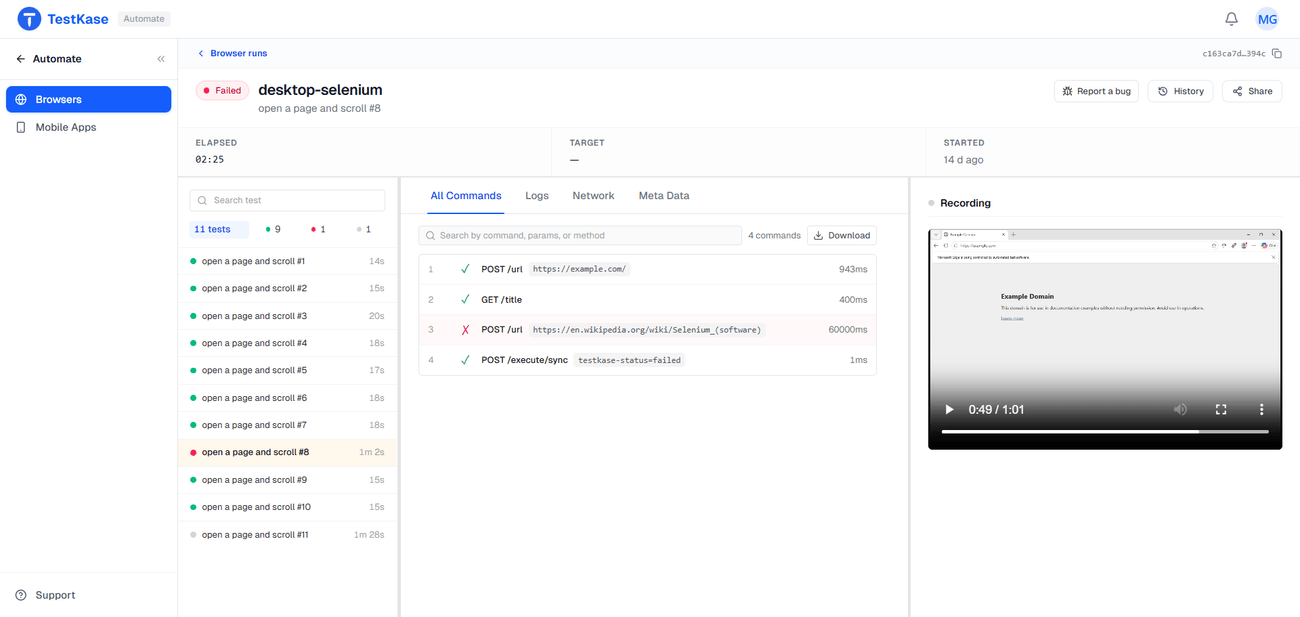
Mark your test boundaries and every test gets its own recording and its own logs, so a red build opens on eleven seconds of video rather than a two-hour file you have to scrub.
One test, its evidence — video, logs and commands attached
Its artifacts
clip.webm
video of this test
failure.png
the frame it broke on
driver.log
2.3 KB
commands
47 steps, in order
Your suite failed at test 147. Now go find test 147.
A whole run is one long video and one endless log, and the failure is somewhere in the middle. Per-test artifacts fix the addressing: the failing test opens straight onto its own clip and its own logs. Eleven seconds of video, not a two-hour file.
What every test keeps
Its own clip
The failing test, not the run it happened to be in.
A screenshot
The screen at the frame it broke on.
Driver logs
What the driver did, scoped to this test.
The command trace
Every command the test sent, in order.
Console and network
Errors and failed requests, straight from the browser.
Live View
Watch it run — for the test that hangs instead of fails.
Commands · 6
- 1newContext81ms
- 2newPage258ms
- 3goto/cart539ms
- 4click#pay-now212ms
- 5waitFor#thank-you60000ms
- 6screenshot—
Driver log · 8 lines
- 0.00s[driver] NewSession started · sessionId 21a6a4af
- 0.08s[driver] POST /session/el ok
- 0.34s[page] navigated to /cart
- 0.55s[page] click #pay-now
- 0.76s[driver] POST /execute/sync ok
- 0.95s[page] waiting for #thank-you
- 60.95s[driver] TimeoutError: #thank-you not visible after 60000ms
- 60.96s[driver] testkase-status=failed
Scoped to this test · the run log has 18,274 more lines
Most of it costs you nothing in test code
Video, driver logs, the command trace and Live View are captured on our side — any language, any runner, nothing installed. To split them per test, your suite marks where each test begins. On Playwright our reporter does that for you.
In any other language it is a short, documented signal at the start and end of a test — usually a few lines in a base class, and it works on every entrypoint.
Frequently asked questions
Nothing, for video, driver logs, the command list and live view — those are captured on our side. To get a clip and logs per test, your suite has to mark where each test starts and ends. With our Playwright reporter that happens automatically; in any other language it is a short documented signal you emit at the start and end of a test, usually a few lines in a base class.
No, and this surprises people, so plan for it. Recording starts in session mode because we cannot know whether your suite marks tests; the first boundary we receive discards the session recording and switches to one recording per test. A marked run produces clips and no session file. There is no cutting step that could produce one from the other afterwards.
There is nothing to detect. A session is a stream of browser commands, and nothing in that stream distinguishes the end of one test from the start of the next. Test boundaries exist only in your code, so they have to be sent in band.
No. Both come from the browser's own debugging protocol — CDP on Chrome and Edge, WebDriver BiDi on current Firefox — so no code is added to your suite. Safari exposes neither protocol and therefore has no console or network capture on any entrypoint, with any vendor.
No — a per-test clip is the test itself, so failures that happen between tests, in setup or teardown, fall outside it. On a short suite where the interesting failures live there, an unmarked run and its single session recording tells you more than slices do.
That is the case a recording handles worst, because the video ends at the timeout showing a screen that is not moving. Live View is the better tool there: you can watch the run as it happens and see what it is waiting for, rather than reconstructing it afterwards.
Thirty days, on every plan, after which they are removed automatically. That is long enough to investigate a failure and close the ticket; anything you need for longer should be downloaded.
Stop scrubbing a two-hour video to find test 147
Mark your boundaries once and every failure arrives with its own clip and its own logs attached.