Android emulators and iOS simulators, one click from a real phone
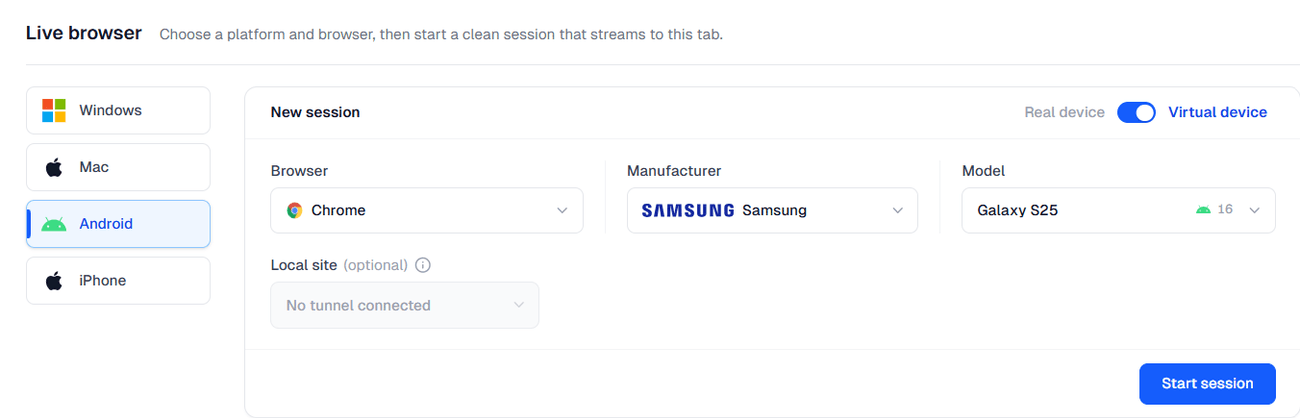
Open a virtual device from the same picker as real hardware, with the same session toolbar and the same evidence. Iterate in seconds. Confirm on a phone. Export nothing to get from one to the other.
Same account, same workspace, same session rail as real devices
Pixel 8
Android 14
iPhone 15
iOS 17
Galaxy S23
Android 13
iPad Air
iOS 16
Pixel Tablet
Android 14
iPhone SE
iOS 15
Add another version and it boots on demand — no handset to wait for.
The emulator on your laptop is yours alone
It ties up your machine, nobody else can see what you saw, and the moment you need real hardware you are in a different tool with different evidence. Run the virtual device on our side and all three problems go away — the phone is one click away, and your screenshots come with you.
The same toolbar as a real phone
A virtual session is not a preview mode. The control rail is the one a real device gets.
Switch device mid-session
Move from an emulator to a real phone from the same picker, in the same tab.
Screenshot, record, compare
The three capture actions sit on the rail of every session, virtual or physical.
Location, language, timezone
Set coordinates on an emulator like a phone; language is per-app on Android.
Device logs, restart app, inspect
Android emulator sessions expose logs, a restart-the-app control and a native inspector.
File a bug with the evidence attached
Report into your tracker from the session, screenshot already on the ticket.
Push files and media in
Send a file into the virtual device for an upload flow, the same control as on a phone.
Pick the one that fits the question
Android Emulators
Genuine Android with a real Chrome build. Your APK installs and runs, and the session carries the full phone toolbar.
Android emulator sessions →iOS Simulators
Real WebKit — the fastest honest way to see Safari on iOS. Mobile web, so native app work stays on real iPhones.
iOS simulator sessions →Cover many versions, then confirm on hardware
Check a change across several Android versions and screen sizes in the time a handset takes to wake — nobody is queued behind a physical phone while you fix a selector. When the answer turns physical, switch the same session to a real device. Split the plan without paying twice.
Frequently asked questions
No. Virtual device sessions are Live sessions — they open from the same picker, under the same account, and sit inside the same workspace as real phones and desktop browsers. If your plan lets you open a Live session, it lets you open a virtual one.
On an Android emulator, yes: it runs genuine Android, so an APK installs and runs normally. On an iOS simulator, no: an .ipa is compiled for an iPhone's processor and a simulator executes native macOS code, so simulator sessions are Safari and mobile web only. Native iOS work stays on real iPhones and iPads.
Anything physical. Camera, microphone, sensors, cellular radio, battery and thermal behaviour are synthetic or absent, so a virtual session cannot answer hardware questions. Performance also reflects the machine running the emulator rather than a phone, which is why frame rates and load times are signed off on real hardware.
Usually it starts faster, because there is no handset to wake and clean. Inside the session, responsiveness reflects the machine running the emulator rather than any phone, which is why performance measurements taken on a virtual device should not be treated as user-facing numbers.
Android emulators have audio; iOS simulators do not. Neither routes a VPN exit IP today — that stays a desktop-browser and real-iPhone control. Timezone can be set on both, while language is per-app on Android and not available on a simulator.
Switch device from the rail. The picker shows real phones alongside emulators and simulators, the session continues in the same tab, and everything you captured stays in the same gallery. There is no export, no re-upload and no second tool.
On Android emulators, yes — coordinates are set the way they are on a real Android phone, and location-aware pages and apps see them. On iOS simulators, location is also available. Neither is a substitute for GPS hardware behaviour, which only a real device has.
An iOS simulator is the cheapest honest way to see mobile Safari: the WebKit build is real and layout and engine behaviour are genuine. A real iPhone is the right choice the moment the question involves touch feel, the on-screen keyboard reshaping the page, cellular behaviour, or anything physical.
Open an emulator, then open the phone next to it
The fastest way to learn which questions a virtual device can answer is to ask one twice.