Safari on iPhone, without a Mac or an iPhone
Apple's own simulator on our Macs, streamed to your tab. Real WebKit, real iOS layout, fast to open — and mobile web only, which we say here rather than after you sign up.
Mobile web and Safari only · switch to a real iPhone in one click
Your iPhone users find the bug before you do
Safari never shipped for Windows, and the simulator is locked inside Xcode on a Mac. So mobile Safari goes unchecked until someone picks up a personal phone — usually a customer's.
Mobile Safari in seconds, from any machine
Apple's own simulator runs on our Mac and streams to your tab. Real WebKit, real iOS layout, fast to open — from Windows or Linux, with no Mac and no iPhone of your own.
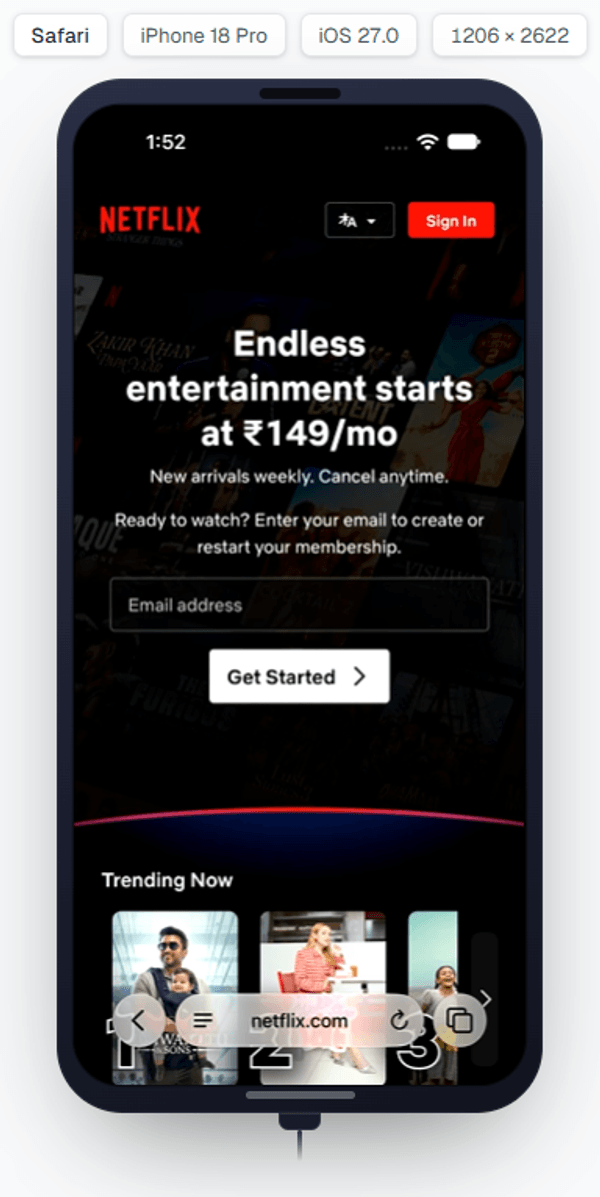
What you get in a simulator session
The phone-side rail, on genuine mobile Safari.
Real mobile Safari
Genuine WebKit for that iOS release, rendering your page the way an iPhone's Safari draws it.
No Mac, no iPhone needed
The simulator runs on our Mac. Drive it from Windows, Linux or whatever you already have.
One engine, every iOS browser
Every browser on iOS is WebKit, so one Safari session covers Chrome, Firefox and Edge on iPhone too.
Set a location
Give the session coordinates, and location-aware pages behave as they would for a user elsewhere.
Change the timezone
Move the clock to another region and check how your dates and times render there.
Capture and file it
Screenshot, record, compare against your approved baseline, and file a bug with the evidence attached.
Files into the session
Push a file into the simulator to exercise an upload flow.
One click to a real iPhone
Switch device from the rail when the question turns physical. Same tab, same gallery.
A real iPhone, one click away
Start on a simulator for anything that lives in the engine — layout, CSS, JavaScript, forms. When the answer turns to touch, the keyboard or your app, switch to a real iPhone from the same rail. Your captures come with you.
Frequently asked questions
No. An .ipa is compiled for an iPhone's processor and a simulator executes native macOS code, so it cannot run the artifact you ship. Simulator sessions are Safari and mobile web only. Native iOS testing — install, launch, permissions, push, background behaviour — happens on real iPhones and iPads, which sit in the same picker.
Yes. It is the WebKit build that belongs to that iOS version, so layout, CSS, JavaScript and engine behaviour are genuine. What is not genuine is the hardware around it — touch, the on-screen keyboard's effect on the viewport, cellular networking and the GPU — so a simulator is a strong answer for 'does my page render correctly in mobile Safari' and a weak one for 'does it feel right on a phone'.
No. The simulator runs on our Mac and streams to your browser. You can open it from Windows, Linux or anything else with a browser.
Timezone, yes — it is served by changing the host Mac's zone before the session starts, so date and time handling can be checked for another region. Device-wide language cannot be changed on a simulator session.
No to all three. The simulator reports no audio, so there is nothing to hear; there is no VPN or exit-IP routing, because it runs on our Mac's connection; and iOS sessions carry no network item, on simulators or real devices alike. Each of these is a real-iPhone or desktop-browser question elsewhere in the product.
Those are what a real iPhone is for. A mouse pointer is not a finger, and a hardware keyboard does not reshape the viewport the way the on-screen keyboard does. Reproduce anything in the engine on a simulator, then switch to a real iPhone from the same rail for the physical feel.
Current iOS releases, chosen from the same picker as real iPhones. The list reflects what is actually running rather than a version typed into this page, so open the picker for the current set.
Start on a simulator, because it opens in seconds and reproduces anything that lives in the engine — layout, CSS, JavaScript, forms, storage. If it reproduces there, you have your bug without ever touching hardware. If it does not, that absence is information: it points at touch, the on-screen keyboard, the network, an installed app, or something else physical, and you move to a real iPhone knowing roughly what you are looking for.
Sessions are individual, but the evidence is not. Screenshots, recordings and visual comparisons from a simulator session land in the shared gallery for your organisation, and a bug filed from the session carries them into your tracker. That is the practical difference from Xcode's simulator on one person's Mac, where what they saw stays with them.
Start on the simulator if the bug is about rendering, layout or JavaScript — it is faster to open and the engine is real. Move to a real iPhone if the report mentions the keyboard, scrolling, gestures, a slow connection, or anything that only makes sense in a hand. Switching is one click from the rail and keeps your captures.
See your site in mobile Safari in the next minute
Open a simulator from any machine, and a real iPhone next to it when the question turns physical.