Test the site on your laptop, on our real devices
Your work in progress has no public URL, and it should not need one. Run a small client on your machine and our real browsers and real phones can open your localhost, your staging box, or anything else inside your network — while it stays inside your network.
Free device-minutes to start · no credit card required
Your machine
localhost:3000
behind your firewall
Our cloud
real browser · real phone
A branch on your laptop has no URL a phone can reach
So it gets pushed to a preview deploy just to open it on a real device — a detour before you even know it works. Point a real browser or a real phone at the branch already running on your laptop instead.
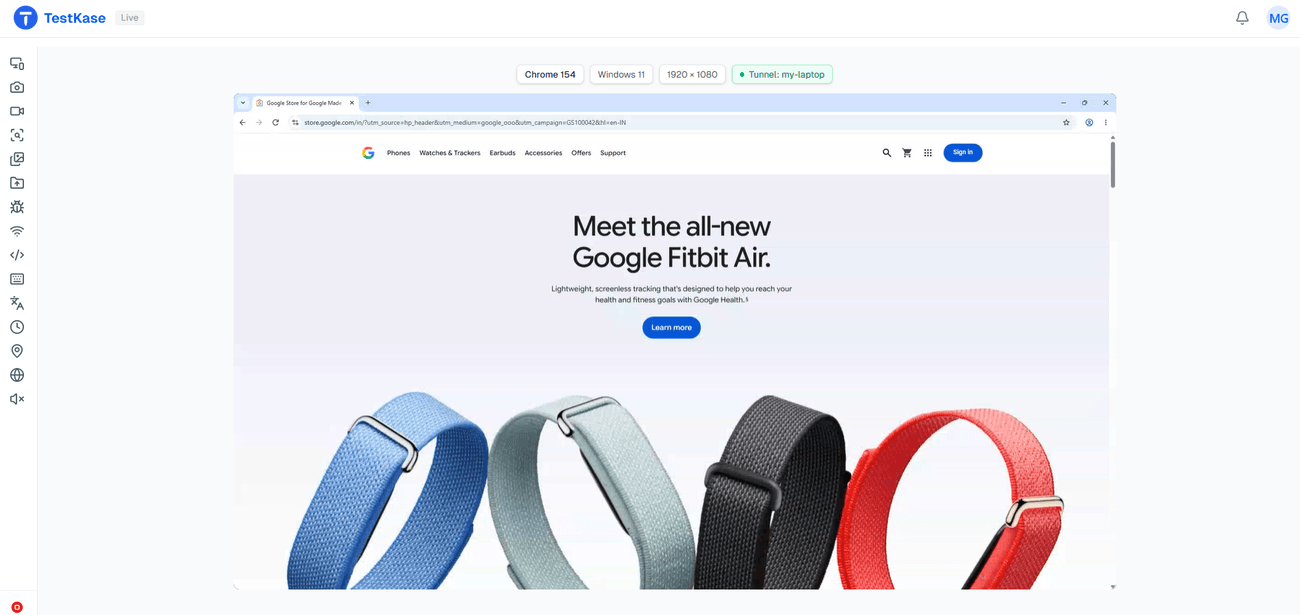
Nothing of yours is put on the internet
The client dials out to us; we never dial in, and your site never gets a public address.
Outbound only
The client opens an encrypted connection out to us — no port opened, no firewall rule changed.
No public URL, ever
No address anyone else could visit — only a session you started reaches your machine, and only while it runs.
Private traffic only
Only localhost, private IP ranges and non-public hostnames route back; everything else goes straight out.
Your existing access key
The key you already use for the API authenticates the tunnel too — no second credential to manage.
One tunnel, across everything you test on
Live browsers
Chrome, Edge and Firefox on Windows and macOS, plus Safari on macOS.
Real phones and tablets
Android Chrome and iOS Safari, on the physical device.
Your native app
Your uploaded app reaches the API running on your own machine.
Automate on Windows
Name a tunnel in your Selenium or Playwright capabilities and the run reaches it.
Run one command, then pick it and start
A small client on your machine, started with the access key you already have. Give it a name and it shows up on the start screen — choose yours and the session reaches your machine.
- Named tunnels, so a team can each run their own
- The same name works for browsers and real devices
- Your existing API key — no second credential to manage
Frequently asked questions
No. Testing your localhost or staging site this way never puts it on the internet — there is no public URL and nothing of yours is exposed. The client opens an encrypted connection outward to us over port 443, the same way your browser does, so it works from behind a corporate firewall without opening a port or changing a firewall rule. Only a session you started reaches your machine, and only while it runs.
You can open your local site in Live browsers on Windows and macOS — Chrome, Edge, and Firefox on both, plus Safari on macOS — and in Live mobile web on Android Chrome and iOS Safari, including your uploaded native app. Automate reaches the tunnel on Windows with Selenium and Playwright.
Not yet. Tunnelled Automate runs are wired up on Windows only, so run Selenium or Playwright against your localhost from a Windows machine for now. macOS support is on the roadmap.
Not yet. Automated Appium runs have no tunnel support today, so an Appium test cannot reach your localhost. It is on the roadmap; in the meantime a Live mobile session can open your local site on a real phone.
On a phone, localhost always means the phone itself, not your machine, so it can never reach your dev server. Point mobile sessions at a hostname such as localtest.me, or at an internal address, instead. On iPhones and iPads the tunnel carries HTTP(S) to a hostname, not a bare IP; Android carries any TCP connection to a LAN IP or a hostname. Remember to add that hostname to your dev server's allowed hosts, or the request still gets rejected.
Read the guide: Testing localhost on a real iPhone →Your uploaded app reaches the API running on your own machine on the phones we run, with one exception: on ColorOS and OnePlus handsets, app tunnelling is not available.
It is built for correctness, not throughput — loading pages, clicking through flows and checking API calls. It is not a fast pipe for large file transfers, so do not lean on it for heavy downloads.
Yes. By default only localhost, private IP ranges (10.x, 172.16–31.x, 192.168.x) and non-public hostnames route back through your machine, and everything public goes straight out from the device, which keeps public sites fast and off your bandwidth. Narrow it further with an allowlist of hosts to tunnel, or a list to always send direct.
A deploy on our side ends tunnels held in memory. The client tells you when it drops, so you restart it and carry on. In CI, run the client as a background step and give each job its own tunnel name.
On any Live start screen, open the info next to “Reach my local site”, download the client for your operating system, and create an access key. Run the client with that key and a name you will recognise, then pick that name on the start screen and the session routes to your machine. The full setup guide covers the flags and CI.
Stop deploying just to test
Point a real browser or a real phone at the branch running on your laptop, before it goes anywhere.