Your Appium suite, on hardware you do not have to own
Upload a build, change the endpoint, and run the tests you already have on real Android phones and real iPhones. No device lab to maintain, no rewrite, and no SDK in your app.
Free device-minutes to start · no credit card required
{
"platformName": "Android",
"appium:deviceName": "Galaxy S26",
"appium:app": "farm://app-4b90",
"appium:automationName": "UiAutomator2"
}
The bug is on a phone you don't own
Green on the emulator, red on a Galaxy a user actually holds. Point the same Appium suite at the real handset and the failure happens where you can see it — with the video, device logs and network capture waiting when the run finishes.
Everything a red build needs, already captured — on a phone you don't own.
Your suite, unchanged — just a different endpoint
No client to install, no SDK in your app. Keep the Appium you already run.
Any language
Java, Python, JavaScript, C# or Ruby — whatever your Appium client speaks.
Any runner
TestNG, pytest, JUnit or Mocha. How your tests are organised is up to you.
Same from CI or your laptop
One endpoint either way, so a pipeline failure reproduces locally.
No SDK, no rewrite
Standard Appium over the standard drivers: UiAutomator2 and XCUITest.
Native apps or mobile web
Drive your app, or Safari on iPhone and Chrome on Android.
Video, logs and network back
Every run, with decrypted HTTPS on request and history across builds.
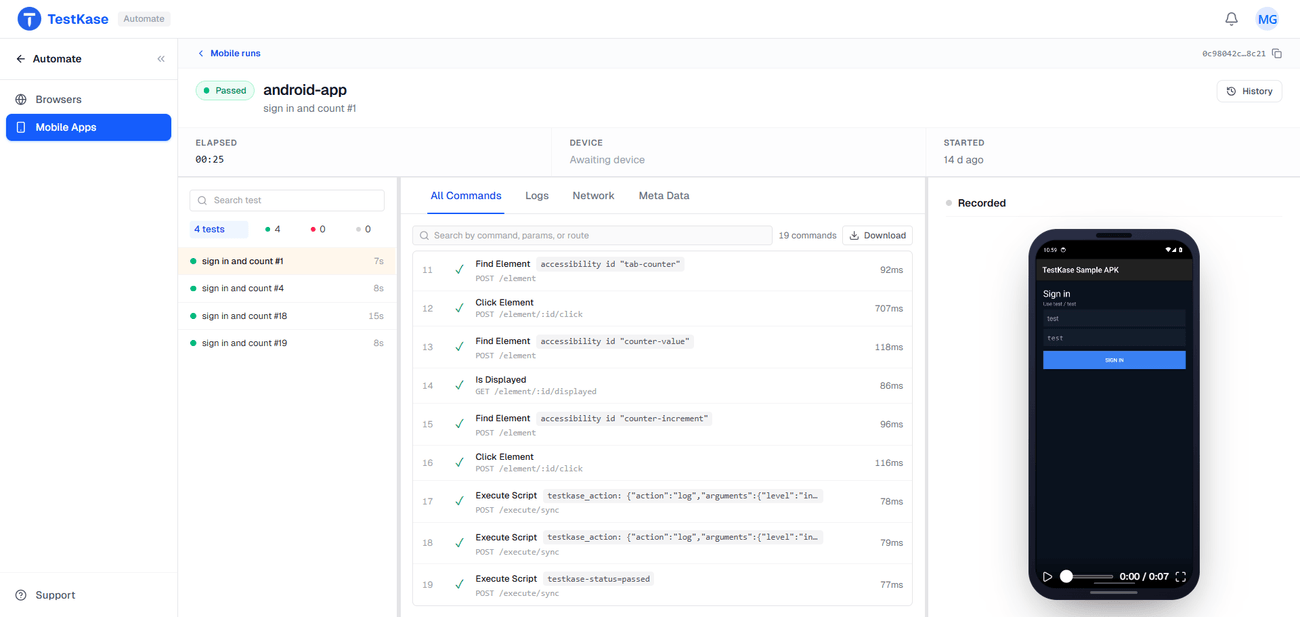
A real handset, yours for the run
Each run takes a physical phone or tablet out of the pool, wakes it and hands it over. Nobody else is on it while your tests run, and it is cleaned and verified before the next run touches it.
- One device per run. A physical handset, not a slice of a shared emulator.
- Cleaned and verified between runs. A phone goes back into the pool only after our clean-up check passes — apps, data and settings from the previous run are removed.
- Parallel across your plan. Run several devices at once, up to the threads your plan includes.
- Released when your suite finishes. The device goes back the moment your run ends.
Tests written in Espresso or XCUITest?
Run them as they are. Native suites have their own upload-and-run API, with the same video and logs as an Appium run.
Frequently asked questions
No. This is standard Appium — the client you already use, in the language your suite is written in. You change the endpoint your tests connect to and name the build you uploaded. Underneath, the usual drivers do the work: UiAutomator2 on Android and XCUITest on iOS.
Upload the .apk or .ipa, then reference it in your capabilities as appium:app with the id we give you. The reference uses a hyphen — farm://app-<id>. Worth checking it is actually set: without it the session opens on the device with your app not installed, and a suite can still report success. A passing run that never touched your build is worse than a failing one.
.apk for Android and .ipa for iOS, up to 500 MB. Android App Bundles (.aab) are not accepted, nor are split bundles — upload a built APK. We keep 10 builds per platform, each addressable on its own so you can pin an older version, and builds are removed after 90 days.
Yes — your iOS build is re-signed so we can install it on our hardware without you enrolling every device. iOS will not run an app unless the device trusts who signed it, which is why we re-sign it for you. For most testing you will notice nothing — but anything tied to your own signing identity, such as push notifications, Apple Pay, App Groups or iCloud, may not work on a re-signed build. Android installs exactly as you produced it, with one exception: if you turn network capture on, we repackage and re-sign the APK so it trusts the capture certificate, because Android apps ignore user-installed certificates unless their build says otherwise.
Espresso, yes — on Android. Upload your app APK and your androidTest APK through the Espresso API and start a build on real Android phones or emulators; each test comes back with its own video, device log and output. XCUITest, yes — on real iPhones and iPads. Upload your .ipa and your zipped UI-test Runner through the XCUITest API and start a build; your app is re-signed with our certificate but keeps its own bundle id (an Appium upload gets a new one), and each test comes back with its own result and video, with the device log and xcodebuild output for each device.
Read the guide: XCUITest suites on real iPhones and iPads →Not on an automated run. Those are controls in a hands-on Live session, where you can change them while you watch. An Appium run cannot change them.
Not today. Local testing works for hands-on Live sessions, including on phones, but Appium runs need an address we can resolve. It is on the roadmap.
Video of the run, or a clip per test; the device's own logs; a full network capture including decrypted HTTPS if you ask for it; and the run's history, so you can see the same test across previous builds.
Each run starts on a cleaned device: we remove the previous user's apps and data and reset settings between sessions.
Run it on the phone your user has
Upload a build and point your existing suite at real hardware.