Stop failing on the clock in the corner
Some of the page is supposed to change. Draw a rectangle over it and both images are masked there before they are compared, so the diff you get is only the part you care about.
Regions apply from the next capture onwards
One clock in the header fails every screen
A ticking clock, a rotating banner, an ad that reloads — any one of them turns every snapshot red. By the third day of approving the same non-change, nobody reads the diffs, and the real regression sails through with them.
Cover the moving parts, keep watching the rest
Drag a rectangle over the noise
Cover the clock, the carousel or the ad slot on the baseline.
Both images are masked
The rectangle is filled in the baseline and the new shot before they are compared.
Lands in place at any size
Regions are stored in the image's own pixels, so the mask sits where you drew it.
Live from the next capture
A new region takes effect on the very next comparison.
The rest stays watched
Everything outside the rectangle is still compared, pixel for pixel.
One region, one screen
Each mask belongs to the baseline you drew it on, where the problem actually is.
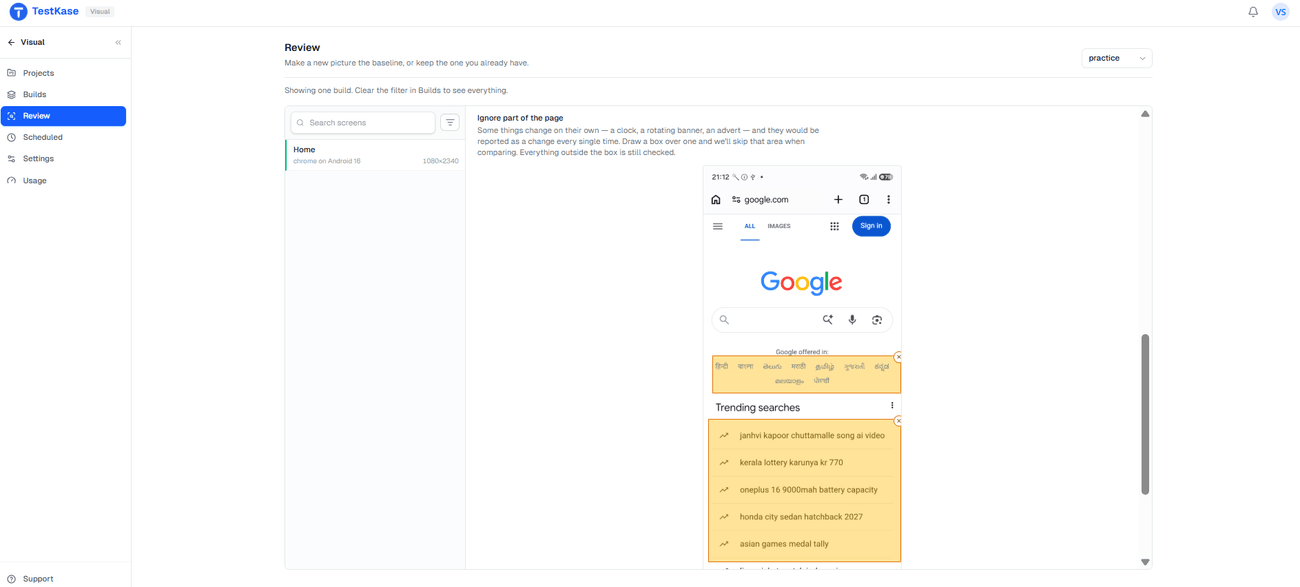
Draw it once, on the picture itself
Open the baseline, drag a box over the part that moves, and you are done. From the next run on, that rectangle is skipped and the diff you get is only the part you meant to check.
Frequently asked questions
No. Masking is applied when a comparison runs, so a region you draw today applies from the next capture onwards. The snapshot already waiting in your queue keeps the verdict it was given — you review that one on its merits and the region prevents the next one.
A threshold is about degree: how much difference across the whole image is tolerable, which is the right control for anti-aliasing and sub-pixel rendering noise. A region is about place: one rectangle is excluded entirely, however much it changes. Raising a threshold to silence a rotating banner makes the whole screen blinder, which is the common and expensive mistake.
Things that legitimately change and that you never want to be told about: a clock or relative timestamp, a rotating carousel, a third-party ad slot, a randomised avatar, a live counter. The test is simple — if that rectangle changed in a way that mattered, would you want to know? If yes, it is not an ignore region.
Often, yes. A mask is permanent blindness in one spot, so before drawing one it is worth trying to remove the cause: seed the test account with fixed data, freeze the clock in the test environment, let the page settle before capture, or turn off third-party ads and widgets. Those keep the whole screen checked. Reach for a region when the change is genuinely out of your control.
Not here. A region is a rectangle in image coordinates, applied to both pictures before they are compared. Percy and Chromatic both support selector-based ignores, which survive a layout change that moves the element — if your dynamic content moves around between builds, that is a genuine advantage for them.
No — a region belongs to a specific baseline, and a baseline is specific to a browser, platform and image size. So a region drawn on the Chrome desktop version of a screen does not carry over to the Safari one, which is correct, because the ad slot is not in the same place.
The screenshot is the whole screen; masking affects the comparison, not the picture. You can still see what was there when you look at the images — the masked area simply takes no part in deciding whether the screen changed.
Make the diff worth reading again
Mask the parts of the page that were always going to move, and every snapshot that reaches you means something.