See every pixel that changed
Capture a page from a live browser session and compare it with the image your team approved. Real Chrome, Edge, Firefox and Safari on real Windows and macOS — the same browsers your users have.
1,000 free snapshots · lifetime allowance · no credit card required
The moved button and the changed price, caught to the pixel.
A passing test never looked at the screen
Every assertion goes green while the button sits invisible behind a cookie banner, or a token change quietly reflows half the product. Nobody writes an assertion for how a page looks — so appearance gets checked by eye, on the one screen someone is working on, and almost never on the other forty.
Same markup, same text, same box. An assertion cannot see this.
One click turns a screenshot into a check
Capture
Press Visual in a live session, or hand us a list of public pages — we photograph each one on our own machines.
Compare
Every shot is measured against the baseline your team approved, on the same machine that took it.
Decide
A changed picture waits for a person: approve it, make it the new baseline, or file it as a bug.
Three ways in, one set of baselines
From a Live session
Sign in, reach any screen, press Visual. The only way to pages behind a login.
Live testing →On a schedule
Give us public pages and a cadence. We check them and email only when something moved.
Scheduled runs →From your own tests
Upload the screenshots your suite already takes with @testkase/visual. The exit code fails the build.
CLI and uploads →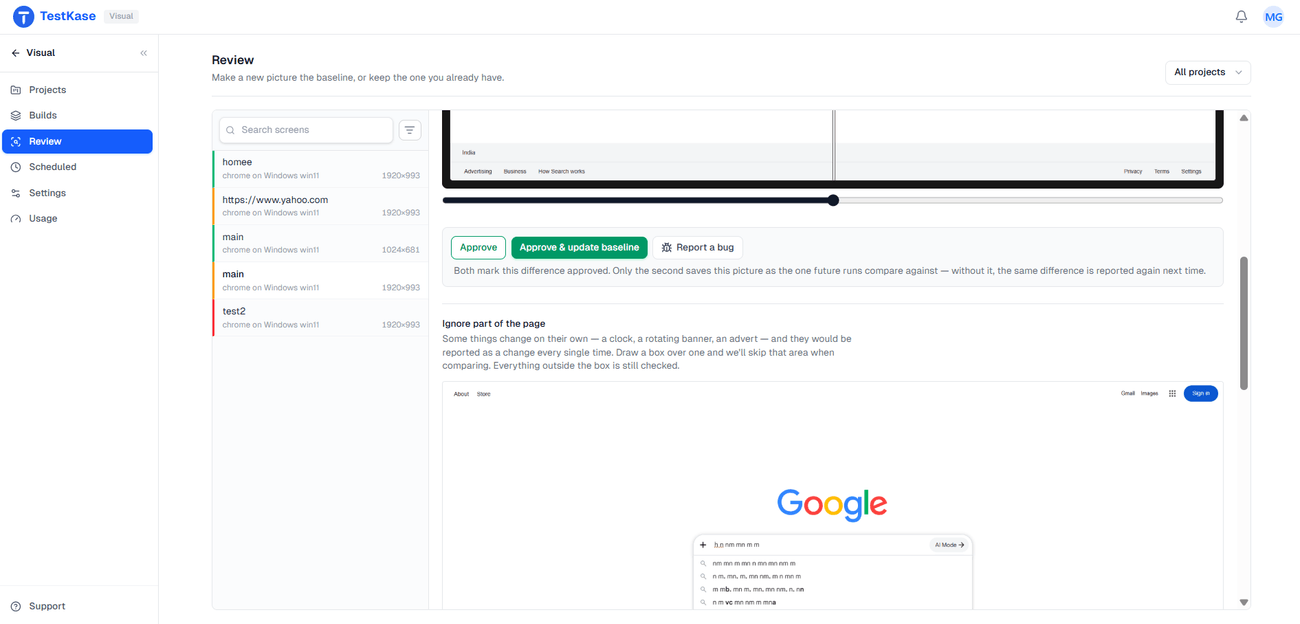
You decide what a change means
A changed picture stays Unreviewed until a person looks. Approve it and it passes, approve it and make it the new baseline, or report it as a bug — which files a ticket in the tracker you already use and marks the picture red.
Only the diffs that changed for a reason
Ignore regions
Mask a clock, a carousel or an ad. Both images skip it, so the parts that always move stop failing.
A threshold you set
Each project decides how much movement counts, so anti-aliasing never reads as a regression.
Projects and builds
Baselines live in a project; every run becomes a build you review as one batch.
One flat price, however many people use it
Free
1,000
snapshots, as a lifetime allowance. Not a trial that expires, and no card to enter.
Premium
5,000
snapshots every month for the whole organisation, at one flat monthly price. No per-user charge and no parallel-session charge. See pricing.
Frequently asked questions
No, and that is the main difference from Percy, Chromatic and Applitools. You can capture from a Live browser session by pressing a button, or schedule a list of public pages and have us check them on a cadence. If you do have a suite, the CLI uploads the screenshots it already takes.
One screen captured once — one page, in one browser, at one size. A run over ten pages is ten snapshots. Free gives you 1,000 as a lifetime allowance rather than a trial that expires, and the paid plan is a flat monthly price for the whole organisation with no per-user charge.
The free plan gives you 1,000 snapshots as a lifetime allowance with no card, and Premium is one flat monthly price for 5,000 snapshots every month across the whole organisation — see the pricing page for the current price. Neither plan is charged per user or per parallel session.
Desktop browser sessions in Live — Chrome, Edge, Firefox and Safari on real Windows and macOS. Capture from real phones works from a Live session too; scheduled runs are desktop browsers only for now, and capture from automated Selenium and Playwright runs is not part of this release. We would rather say that here than let you find out after you have bought it.
Yes, but not with a scheduled run. Runs do not sign in — they open a public address only, so they cover pages a visitor can reach without a password. For anything behind a login you have two ways past it: open a Live session and sign in yourself, then capture from there, or let an Automate test do it as part of its run.
Two controls, for two kinds of noise. A per-project threshold handles the diffuse rendering variation that appears everywhere — anti-aliasing, sub-pixel shifts. Ignore regions mask a specific rectangle that legitimately changes, like a clock or a carousel, in both images before they are compared and from the next capture onwards. Using the wrong one for the wrong problem is what makes visual tools get switched off.
Yes, every time, until you approve them. That is the point of a baseline: it does not know which changes were deliberate, so a redesign produces a queue of diffs on the day you ship it. Approve them in one pass and the queue goes quiet again — the noise is front-loaded onto the day you changed something, which is the day you can explain it.
Capture does: you can take a visual snapshot from a Live session on a real phone or tablet. Scheduled runs are desktop browsers only today — the mobile leg of scheduling is a known gap rather than a setting you are missing.
Whoever can tell whether a change was intended — usually a designer or product owner rather than whoever ran the tests. That is a cost question everywhere else in this category, because reviewing means holding a paid seat. Here user accounts are not the billing unit, so the person best placed to judge a diff can open it without anyone buying them a licence first.
Capture stops until the allowance resets or you upgrade; nothing is deleted and no baseline is lost. The free allowance is 1,000 snapshots as a lifetime total rather than a monthly one, which is enough to run a real trial on a real set of screens rather than a demo.
Those are evidence of what happened; nobody compares them to anything. Visual testing adds the missing half — an approved version of the screen, a comparison against it, and a person who decides whether the difference is intended. The CLI turns the folder you already produce into exactly that.
Take your first snapshot in a browser session
Open Live, press Visual, and the page you are looking at becomes the baseline everything after it is measured against.