Approve it, or reject it
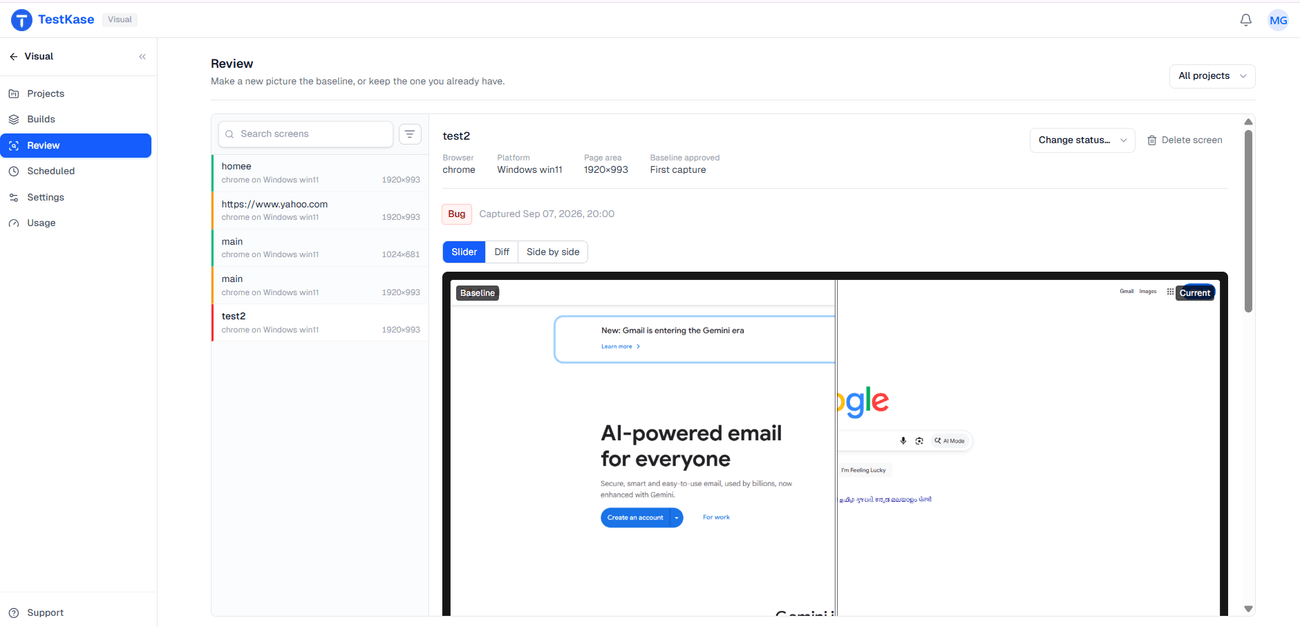
A changed snapshot never guesses — it waits for a person. Approve it and it becomes the new baseline. Reject it and the baseline stays, so the next capture flags the page again.
Unlimited users — reviewing is not charged per person
A pixel moved. Nothing knows if you meant it.
A diff tells you a screen changed. It cannot tell you whether that was the redesign you shipped or a bug you didn't. Only a person can. So every change stops here for a yes or a no.
What each decision does
Approve makes it the baseline
The change was meant. That snapshot becomes the standard every later capture is measured against.
Reject leaves the baseline alone
The change was not meant. Your decision is recorded and the baseline stays, so the next capture flags it again until the page is fixed.
Review a whole build at once
Every live session is one build. Judge a batch of related changes together, not twelve diffs arriving one at a time.
Anyone can be the reviewer
The person who knows if a change was intended is often a designer, not whoever ran the tests. They can open it — seats are not the billing unit.
Three ways to look
Side by side, a slider you drag across the join, or an overlay that marks the moved pixels. A four-pixel shift hides in one view and jumps out in another.
One click, one record
Saying which is which takes a single click and leaves the decision on the snapshot for anyone to see later.
Clear the queue by cause, not by count
Changes from one deploy share one cause, so they are easier to judge together than apart. Approve the batch that was intended, and send anything that is a bug to your tracker with the pictures attached — the baseline is what the fix should restore.
Frequently asked questions
A changed screen is unreviewed until someone acts on it. Approving promotes that snapshot to be the new baseline, so everything captured afterwards is measured against it. Rejecting records the decision and leaves the baseline exactly as it was, so the next capture flags the page again until it is fixed.
No. Nothing auto-approves, nothing times out into approval, and no service can approve on your behalf. The one exception is the very first capture of a screen, which becomes the baseline because there is nothing to compare it against.
Whoever can tell whether the change was intended, which is often a designer or a product owner rather than whoever ran the tests. Everything captured lands in one shared place and anyone in the workspace can open it — and since user accounts are not the billing unit here, asking a designer to look at two pictures does not mean buying them a seat.
Because a build is one session or one run, which means one cause. Twelve diffs arriving from a single deploy are much easier to judge together than separately — and the cause is usually the thing that tells you whether to approve or file a bug.
Not in the review itself — there is no comment thread on a diff. File it into your tracker with the pictures attached and the discussion happens where the work is already tracked. If threaded design review is central to your process, Chromatic is built specifically for that.
No. Approval does not gate a merge. The closest equivalent is the CLI's exit code, which can fail a pipeline when a screen is still unreviewed or rejected.
No. Every changed screen reaches you — there is no AI triage suppressing differences before you look. That is more work than a tool that filters for you, and it means nothing decides on your behalf which changes you never see.
No. Rejecting records the decision and leaves the baseline untouched. The fix happens in your product, not here — the baseline is the description of what that fix should restore.
Put a decision behind every pixel that moved
Capture from a live browser session, look at the change, and say whether it was meant to happen.