Test on real macOS browsers, live in your tab
Chrome, Edge, Firefox and Safari on real Macs, driven in real time from whatever machine you happen to own. Real hardware, so the fonts, the scrollbars and the WebKit build are the ones your users have.
No Mac required · no VM to maintain · free device-minutes to try it



It looks right on Windows. On a Mac it's broken.
Different fonts, different scrollbars, a whole different engine in Safari. The one teammate with a MacBook is in a meeting, and your customer on a Mac found the bug first. You need to see it on the machine where it breaks.
A real Mac, in the tab you already have open
Chrome, Edge, Firefox and Safari on genuine Apple hardware, streamed to your screen and driven by your own keyboard and mouse.
Genuine WebKit
The exact Safari your users run, not an approximation of it.
The real macOS render
The fonts, the overlay scrollbars and the platform-drawn controls a Mac actually paints.
Nothing to maintain
No VM to provision, no Mac to keep in a cupboard, nothing to install on your side.
We run every major browser on real macOS machines — Safari, Chrome, Edge and Firefox.
The Mac-only bugs you'll catch here
Type and font smoothing
macOS measures type differently, so a nav that fit on Windows wraps to two lines.
Overlay scrollbars
Mac scrollbars take no space, so a layout tuned to a Windows gutter overflows.
Native form controls
Selects, checkboxes and date pickers are Apple-drawn, and validate differently.
Media and codecs
Which video plays and how autoplay is gated changes by engine — a player can fail on Safari alone.
Storage and logins
Safari clears cookies and storage hard, so a login flow that assumes persistence drops out.
Scroll and sticky
Momentum scrolling and sticky positioning differ, so pinned headers jump or come loose.
What you can do inside a macOS session
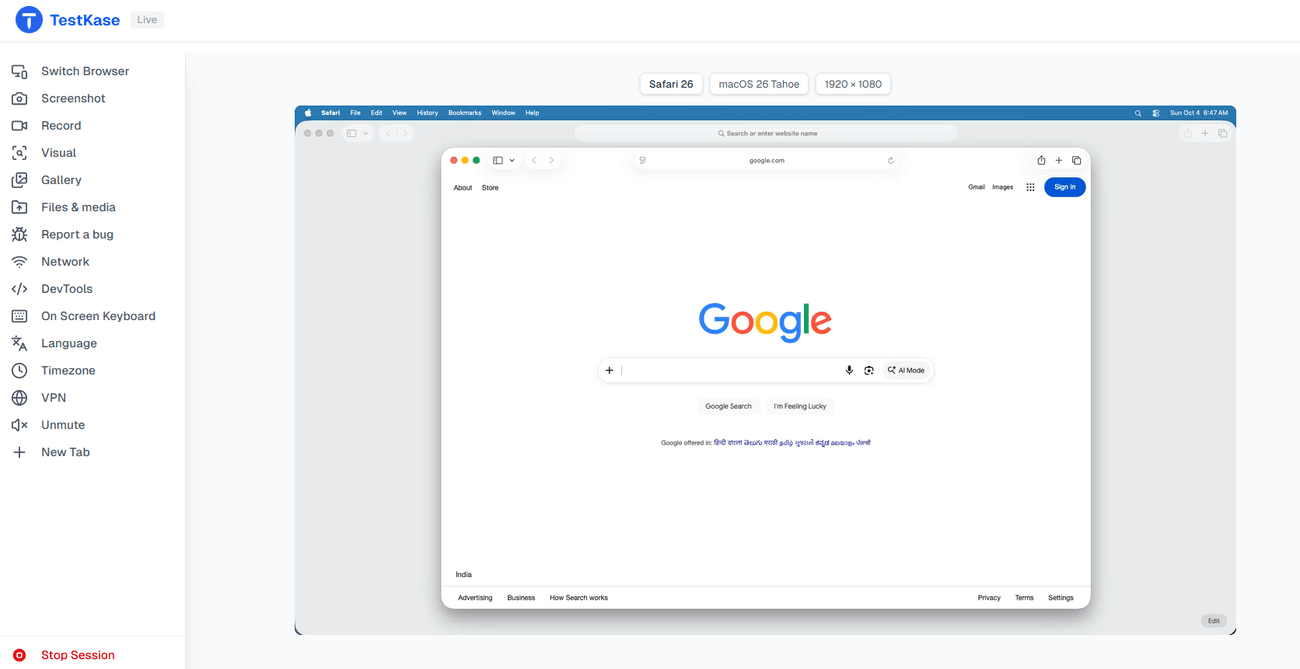
Every control on the Live session rail, on a real Mac.
Switch browser, keep the session
Relaunch the same session as a different browser, macOS version or resolution — one click, no rebooking.
Reach your own machine
Local Testing opens a site on your laptop or behind your firewall inside the session, with no public URL.
Set language and timezone
Applied before the browser launches, Safari included, so the page loads as a user in that locale sees it.
Set a location
Override the browser's coordinates on Chrome, Edge and current Firefox for location-gated content.
Capture what you found
Screenshot, record, or compare against a baseline, then file it into your tracker with the evidence attached.
Open DevTools on Chrome and Edge
An embedded panel — elements, console, network, sources; on Firefox, DevTools opens inside the session.
Walk one bug across every Mac browser
Reach the broken step once — sign in, click through, reproduce it. Then reopen the same session as another browser, macOS version or screen size. You don't redo the slow part four times.
Frequently asked questions
Yes. A macOS session runs real Safari on a real Mac and streams it to your browser, so you can drive it from Windows or Linux. You get the genuine WebKit build that ships with that macOS version, not an approximation of it.
A real machine. macOS renders type, scrollbars and native form controls differently from other platforms, and Safari exists nowhere else, so a session that was not running on Apple hardware would answer a different question from the one you asked.
Current macOS releases, with the browsers that run on them listed by version on the browsers page, generated from the fleet itself. We deliberately do not carry a decade of legacy macOS releases — if your support matrix requires one, another vendor is a better fit and we would rather say so.
On Chrome and Edge, yes — an embedded panel attached to the remote browser, with elements, console, network and sources. On Firefox, DevTools opens inside the session itself. Safari's automation protocol exposes no console or network data, so those are not available there.
Language and timezone, yes — set at the operating-system level before the browser launches, on Safari as well as the others. Location works on Chrome, Edge and current Firefox; desktop Safari has no coordinate override, so that control is hidden rather than shown broken.
Yes. Local Testing opens a tunnel from your machine to the session, so a site on localhost or behind your firewall loads in the macOS browser with no public URL and nothing deployed. It works on Safari as well as the other browsers.
Yes. You choose the desktop resolution when the session starts, and switching browser relaunches the same browser and macOS at a different size, so you can walk your breakpoints without setting up a machine for each one. This matters more on macOS than elsewhere, because overlay scrollbars and platform font metrics change how much fits on a line at each width.
Not on macOS today. Audio is available on Windows browser sessions and on phones. This is a real gap rather than a configuration step, and it is listed here so you find it before you need it.
No. They share an engine family but ship on different schedules and hardware, and differ where sites break most: how the page resizes as the address bar hides, touch versus hover, media autoplay rules, and how the on-screen keyboard moves the page. A macOS session covers the desktop half; a real iPhone or an iOS simulator covers the other.
Yes. All four run on real Macs, and you can relaunch the same session as a different browser, macOS version or resolution in one click — so you reach a broken step once and walk it across every Mac browser without redoing the slow part each time.
Open a Mac in the next minute
Pick a browser, pick a version, and drive a real Mac from the tab you are reading this in.