Connect TestKase to the tools your team already runs
Link test cases to the requirement they verify, file a defect where your developers already work, and report automated results back — using the trackers, channels and pipelines you already have.
Set up once by an admin · nothing here is a paid add-on
- 9 trackers
- a defect can be filed into any of them
- 5 chat channels
- test, scan and session events pushed live
- Free built-in option
- requirements and defects, no third party
- One token to connect
- set up once for the organisation
What an integration actually does
Three specific things, worth separating because most tools sell them as one word. Each removes a manual step that gets skipped under pressure.
Link tests to the requirement
Connect a test case to the requirement it exists to verify, so coverage becomes a question you can actually answer instead of a count of tests.
File a defect where devs already work
A tester's finding becomes a developer's ticket in the tracker they live in — no copy-paste, with the evidence attached.
Report automated results back
Results from automated runs report back into TestKase, so what CI executed shows up beside what people executed.
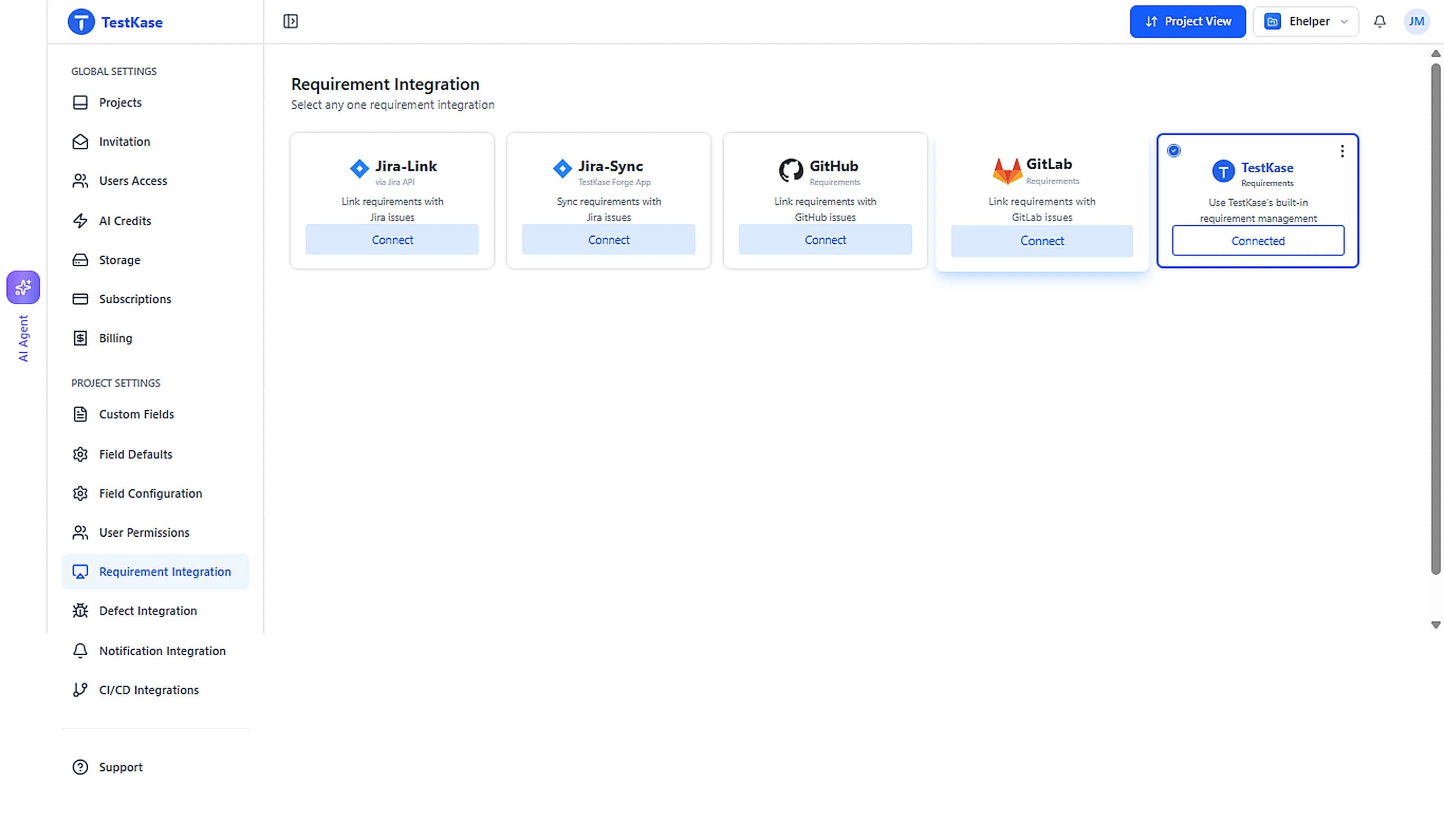
Where your requirements live
This is the decision the rest of your setup follows from, and the honest answer depends on where your team already argues about scope.
Jira
If epics and stories are written and refined in Jira, that is where requirements are. Link test cases to the issues rather than retyping them.
GitHub or GitLab
For engineering-led teams that run everything from issues next to the code, linking tests to those issues keeps requirement, test, defect and commit in one place.
Built in
Requirements and defects live inside TestKase, free, with no third party to buy or administer. A small team should not have to adopt Jira to record what it tests.
Mixed, which is normal
Requirements in Jira and defects in GitHub is a common shape. Each object lives in exactly one place and is linked from the others.
Every integration
Connecting a tracker or a channel takes a token and a destination. Nothing here is a paid add-on.
Issue and defect trackers
File a defect straight from a failed test, with the evidence attached.
Jira
Link test cases to issues, two-way.
GitHub
Map issues to test cases in the repo you already use.
GitLab
Issues and merge requests, mapped to coverage.
Asana
A task in the project you choose, with the failure in the notes.
Trello
A card on the list you pick, created from a failed run.
ClickUp
A task in the list you nominate, with status mapping.
Monday.com
An item on a board, created from the run that failed.
Azure Boards
A work item in the project and team you select.
Built-in tracker
No external tracker needed — defects live in TestKase.
Notifications
Test, scan and session events pushed to where your team already talks.
In your editor and your pipeline
Reach TestKase without opening TestKase.
MCP servers
Let Claude, Cursor or another MCP client manage your tests and drive real devices.
Chrome extension
Create and execute test cases from a side panel.
Jira plugin
Test management inside every Jira issue.
CI/CD
Push automation results from any pipeline.
Automation frameworks
Framework-agnostic result ingestion via the CLI.
Project management
Where requirements live, and how they link to coverage.
Frequently asked questions
Nine destinations: Jira, GitHub, GitLab, Asana, Trello, ClickUp, Monday, Azure Boards and the built-in TestKase tracker. Nothing here is a paid add-on.
Requirement linking covers four places: Jira, GitHub, GitLab and the built-in tracker. Defects can be filed into more destinations than that, but requirement integration is this narrower set.
Four chat apps — Slack, Microsoft Teams, Discord and Google Chat — plus a custom webhook to any endpoint you control. Test, scan and session events are pushed live to the channel you choose, set up once for the organisation.
No. Nothing here is a paid add-on, and the built-in requirements and defects are free. Connecting a tracker or a channel takes a token and a destination, set up once for the organisation.
No. Integrations connect, they do not migrate. An integration links to issues where they already are — there is no bulk import that turns a Jira backlog into TestKase requirements.
An administrator sets up a connection once for the organisation, not each person individually. That means someone has to make the connection before the links appear.
No — the link has to be made. Nothing infers which requirement a test case belongs to, so if nobody links them, coverage reporting has nothing to report on. A requirement linked to its tests, and tests linked to their defects, is what turns "we ran 400 tests" into "this feature is covered and these two things are broken".
Connect your first tracker in minutes
Requirements and defects are built in and free. The integrations are there to connect to what you already run — a token and a destination, set up once.