TestKase AI Agent
A conversational AI sidebar built into your dashboard. Create test cases, query data, summarize coverage, and filter results — all through natural language. Press Ctrl+K to start.
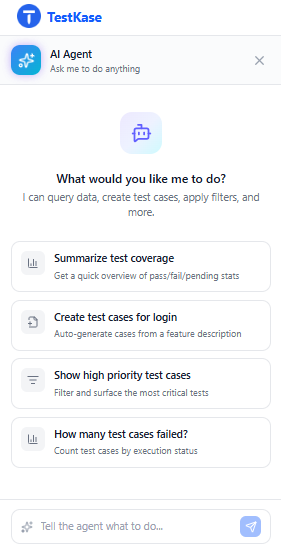
What is the AI Agent?
The AI Agent is a conversational sidebar panel built directly into your TestKase dashboard. It understands your project context — test cases, cycles, folders, and execution data — and lets you interact with everything through natural language.
Open
Press Ctrl+K or click the AI icon in the sidebar to open the agent panel.
Ask
Type your request in plain English — create tests, query data, or filter results.
Done
The agent streams results in real-time and executes actions directly in your project.
What the AI Agent Can Do
A powerful assistant that understands your project and executes actions in real-time.
Create Test Cases
Generate new test cases with steps, priorities, and labels through a simple prompt.
Summarize Coverage
Get instant summaries of test coverage, pass rates, and execution trends.
Filter & Search
Apply filters and search across test cases using natural language queries.
Query Test Data
Ask questions about your test data — counts, statuses, trends, and more.
Real-Time Streaming
See responses stream in real-time as the agent processes your request.
Tool Execution Tracking
Watch as the agent selects and executes tools, with full transparency.
How to Use It
Three ways to interact with the AI Agent in your dashboard.
Press Ctrl+K (or Cmd+K on Mac) from anywhere in the dashboard to open the AI Agent sidebar panel.
You can also click the AI icon in the left sidebar. The agent opens with full awareness of your current project context.
Example Prompts
Just type what you need — the AI Agent handles the rest.
"Summarize test coverage for this project"
Returns a coverage breakdown with pass rates, execution counts, and untested areas.
"Create 3 test cases for the login feature"
Generates three structured test cases with steps, priorities, and expected results.
"Show all high priority test cases"
Filters and displays all test cases marked as high priority in the current project.
"How many test cases failed in the last cycle?"
Queries the most recent test cycle and returns the failure count with details.
"Apply filters for status: blocked and priority: critical"
Sets the dashboard filters to show only blocked, critical test cases.
"What is the overall pass rate?"
Calculates and returns the pass rate percentage across all executed test cases.
Try the AI Agent Today
Sign up free and start using the built-in AI Agent in your TestKase dashboard.